




LaserJet M4555F
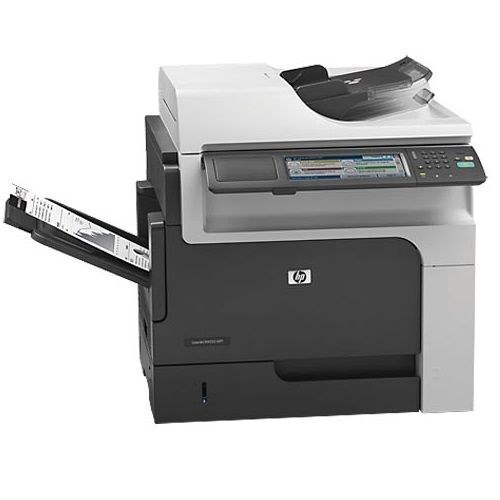
An early-2010s mono printer from the years when machines were bought for durability first and features second, the LaserJet M4555F runs on the same cartridge shelf as its whole family: the standard CE390A, sold singly as the 90A, and the high-yield CE390X, the 90X. Above them sit the maximum-yield CE390XX and the jumbo CE390AJ, stocked as a three-pack among the extended fills below.
What sets this page apart is depth: few printers in the store carry a shelf this wide, from single cartridges to ten-packs, jumbo fills, and MICR builds. That breadth suits a machine bought to last — whatever your stocking habit, the matching listing is already here.
Toner Cartridges for LaserJet M4555F
Standard CE390A (90A) listings
- CE390A Toner Cartridge Black 10 Pack/ HP 90A Toner
- CE390A Toner Cartridge Black 2 Pack/ HP 90A Toner
- CE390A Toner Cartridge Black 3 Pack/ HP 90A Toner
- CE390A Toner Cartridge Black 4 Pack/ HP 90A Toner
- 90A Toner Cartridges Black (CE390A)
- 90A Toner Cartridges Black 2 Pack (CE390A)
- 90A Toner Cartridges Black 3 Pack (CE390A)
- 90A Toner Cartridges Black 5 Pack (CE390A)
- 90A Toner Cartridges Black 10 Pack (CE390A)
High-yield CE390X (90X) listings
- CE390X Toner Cartridge High Yield Black 2 Pack/ HP 90X Toner
- CE390X Toner Cartridge High Yield Black 3 Pack/ HP 90X Toner
- CE390X Toner Cartridge High Yield Black 5 Pack/ HP 90X Toner
- CE390X Toner Cartridge High Yield Black 10 Pack/ HP 90X Toner
- 90X Toner Cartridges Black (CE390X)
- 90X Toner Cartridges Black 2 Pack (CE390X)
- 90X Toner Cartridges Black 3 Pack (CE390X)
- 90X Toner Cartridges Black 5 Pack (CE390X)
- 90X Toner Cartridges Black 10 Pack (CE390X)
- HP 90X (CE390X) Toner Cartridge Black
- HP 90X (CE390X) Toner Cartridge 4 Black
Jumbo and maximum-yield fills
- 90A-Jumbo Toner Cartridges Black 2 Pack (CE390A)
- 90A-Jumbo Toner Cartridges Black 3 Pack (CE390A)
- 90A-Jumbo Toner Cartridges Black 5 Pack (CE390A)
- 90A-Jumbo Toner Cartridges Black 10 Pack (CE390A)
- CE390AJ Toner Cartridge Jumbo Yield Black 3 Pack/ HP 90AJ Toner
- CE390XX Toner Cartridge Maximum Yield Black 3 Pack/ HP 90XX Toner
- CE390XX Toner Cartridge Maximum Yield Black/ HP 90XX Toner
MICR listings for check printing
- CE390A Toner Cartridge Black MICR/ HP 90A Toner
- 90A-MICR Toner Cartridges Black (CE390A)
- 90A-MICR Toner Cartridges Black 2 Pack (CE390A)
- 90A-MICR Toner Cartridges Black 3 Pack (CE390A)
- 90A-MICR Toner Cartridges Black 5 Pack (CE390A)
- 90A-MICR Toner Cartridges Black 10 Pack (CE390A)
- CE390X Toner Cartridge High Yield Black MICR/ HP 90X Toner
- 90X-MICR Toner Cartridges Black (CE390X)
- 90X-MICR Toner Cartridges Black 2 Pack (CE390X)
- 90X-MICR Toner Cartridges Black 3 Pack (CE390X)
- 90X-MICR Toner Cartridges Black 5 Pack (CE390X)
- 90X-MICR Toner Cartridges Black 10 Pack (CE390X)
Listings named for specific models in the family
- 600 M601DN-Jumbo Toner Cartridges Black (CE390A)
- M601N-Jumbo Toner Cartridges Black (CE390A)
- M602DN-Jumbo Toner Cartridges Black (CE390A)
- M602N-Jumbo Toner Cartridges Black (CE390A)
- M602X-Jumbo Toner Cartridges Black (CE390A)
- M603DN-Jumbo Toner Cartridges Black (CE390A)
- M603N-Jumbo Toner Cartridges Black (CE390A)
- M603XH-Jumbo Toner Cartridges Black (CE390A)
- M4555-Jumbo Toner Cartridges Black (CE390A)
- M4555 MFP-Jumbo Toner Cartridges Black (CE390A)
- M4555F-Jumbo Toner Cartridges Black (CE390A)
- M4555FSKM-Jumbo Toner Cartridges Black (CE390A)
- M4555H-Jumbo Toner Cartridges Black (CE390A)
- M601DN Toner Cartridges Black (CE390X)
- M601N Toner Cartridges Black (CE390X)
- M602DN Toner Cartridges Black (CE390X)
- M602N Toner Cartridges Black (CE390X)
- M602X Toner Cartridges Black (CE390X)
- M603DN Toner Cartridges Black (CE390X)
- M603N Toner Cartridges Black (CE390X)
- M603XH Toner Cartridges Black (CE390X)
- M4555 Toner Cartridges Black (CE390X)
- M4555 MFP Toner Cartridges Black (CE390X)
- M4555F Toner Cartridges Black (CE390X)
- M4555FSKM Toner Cartridges Black (CE390X)
- M4555H Toner Cartridges Black (CE390X)
- M601DN-MICR Toner Cartridges Black (CE390X)
- M601N-MICR Toner Cartridges Black (CE390X)
- M602DN-MICR Toner Cartridges Black (CE390X)
- M602N-MICR Toner Cartridges Black (CE390X)
- M602X-MICR Toner Cartridges Black (CE390X)
- M603DN-MICR Toner Cartridges Black (CE390X)
- M603N-MICR Toner Cartridges Black (CE390X)
- M603XH-MICR Toner Cartridges Black (CE390X)
- M4555-MICR Toner Cartridges Black (CE390X)
- M4555 MFP-MICR Toner Cartridges Black (CE390X)
- M4555F-MICR Toner Cartridges Black (CE390X)
- M4555FSKM-MICR Toner Cartridges Black (CE390X)
- M4555H-MICR Toner Cartridges Black (CE390X)
- LaserJet M4555F Toner Cartridge Black
All listings are black; each product page states its yield.
Which cartridge should you buy?
Match the fill to the workload first and the pack size to your storage second. Standard cartridges in singles and small packs serve a steady office; the high-yield line cuts how often anyone opens the printer. Jumbo and maximum-yield fills push intervals furthest for the busiest machines, while the model-named listings are simply the same cartridges badged for specific siblings — buy whichever listing you prefer. MICR is for checks, full stop. Compatible cartridges carry a one-year warranty and one-year returns.
Chip, toner and everyday use
The M4555F flags cartridges it did not manufacture with a notice on the display; acknowledge it and printing proceeds. If a toner-low warning appears, treat it as the reorder signal rather than the deadline — output usually continues for a while, but a shared machine should never be run to empty. Smudged pages after a change typically mean loose toner inside the bay; a few blank sheets flush it through.
Frequently Asked Questions
The printer says my cartridge is non-HP. Is that a problem for the M4555F?
Not in itself. The machine labels any cartridge it did not make, and quality compatibles print normally once the notice is acknowledged. Reseat the cartridge only if the printer actually refuses a job.
How do I clear a Toner Low message?
By fitting a fresh cartridge — the warning clears on its own once the new chip is read. Until then you can keep printing, but order promptly; the message arrives near the end of the fill.
What causes smudged toner on this printer's pages?
Usually stray toner dust inside the machine. Print several blank pages to carry it out, and confirm the cartridge sits level and is not leaking. Persistent smudging after that points to a cartridge ready for replacement.
Should a busy M4555F use the jumbo fill instead of the standard?
If cartridge changes feel frequent, yes. The jumbo fill is the extended version of the same cartridge family, and it fits the same slot with no adjustments — the gain is purely a longer interval between swaps.
More printers that use the same cartridges
The M4555F shares its cartridge with the rest of this mono fleet:
HP CE390A, LaserJet 600, LaserJet Enterprise 600, LaserJet Enterprise 600 M601, LaserJet Enterprise 600 M601DN, LaserJet Enterprise 600 M601N, LaserJet Enterprise 600 M602, LaserJet Enterprise 600 M602DN, LaserJet Enterprise 600 M602N, LaserJet Enterprise 600 M602X, LaserJet Enterprise 600 M603, LaserJet Enterprise 600 M603DN, LaserJet Enterprise 600 M603N, LaserJet Enterprise 600 M603XH, LaserJet Enterprise M4555, LaserJet Enterprise M4555 MFP, LaserJet Enterprise M4555F, LaserJet Enterprise M4555F MFP, LaserJet Enterprise M4555FSKM, LaserJet Enterprise M4555FSKM MFP, LaserJet Enterprise M4555H, LaserJet Enterprise M4555H MFP, LaserJet M4555, LaserJet M4555 MFP, LaserJet M4555FSKM, LaserJet M4555FSKM MFP, LaserJet M4555H, LaserJet M4555H MFP, LaserJet M4555f MFP, LaserJet M601, LaserJet M601DN, LaserJet M601N, LaserJet M602, LaserJet M602DN, LaserJet M602N, LaserJet M602X, LaserJet M603, LaserJet M603DN, LaserJet M603HX, LaserJet M603N, LaserJet M603XH, Laserjet M602dn.