




LaserJet Enterprise M4555F MFP
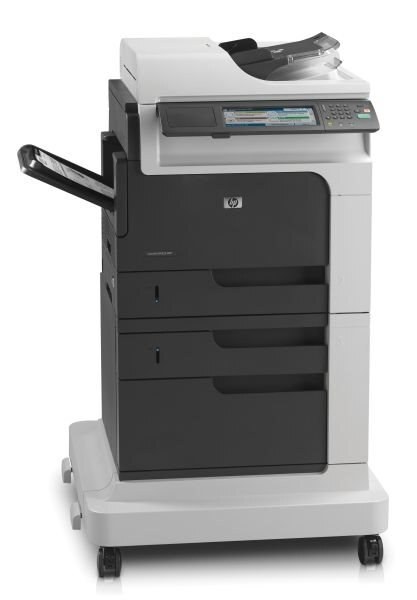
The LaserJet Enterprise M4555F MFP is the M4555 configuration HP aimed at departments that still live on paper: an early-2010s mono multifunction machine for everyday office document printing, with scanning and copying folded into the same box. It runs on one black cartridge family — the standard CE390A or the high-yield CE390X, the pair HP sells as the 90A and 90X. Everything stocked for this model below is a compatible build of one of those two codes, so the code printed on the cartridge you pull out is the only reference you need.
A shared MFP like this one earns its keep in the middle of a department, where one machine takes the walk-up copies, the scans bound for email and the day's letters and reports. Putting print, scan and copy in a single chassis means one device to queue at and one toner code to keep on the shelf beside it. The F MFP asks little in return: keep its cartridge supply stocked and it will absorb the mixed workload that would otherwise be split across two or three single-purpose machines.
Toner Cartridges for LaserJet Enterprise M4555F MFP
| Cartridge | Color | Page Yield |
|---|---|---|
| LaserJet Enterprise M4555F MFP Toner Cartridge Black | Black | See product page |
| CE390A Toner Cartridge Black — 2 Pack | Black | See product page |
| CE390A Toner Cartridge Black — 3 Pack | Black | See product page |
| CE390A Toner Cartridge Black — 4 Pack | Black | See product page |
| CE390A Toner Cartridge Black — 10 Pack | Black | See product page |
| CE390A Toner Cartridge Black — MICR | Black (MICR) | See product page |
| CE390X Toner Cartridge High Yield Black — 2 Pack | Black | See product page |
| CE390X Toner Cartridge High Yield Black — 3 Pack | Black | See product page |
| CE390X Toner Cartridge High Yield Black — 5 Pack | Black | See product page |
| CE390X Toner Cartridge High Yield Black — 10 Pack | Black | See product page |
| CE390X Toner Cartridge High Yield Black — MICR | Black (MICR) | See product page |
| Jumbo Yield Black — 3 Pack (HP 90AJ) | Black | See product page |
| CE390XX Toner Cartridge Maximum Yield Black | Black | See product page |
| CE390XX Toner Cartridge Maximum Yield Black — 3 Pack | Black | See product page |
Which cartridge should you buy?
Start with how much of the department's volume lands on this one machine. The CE390A standard cartridge suits an F MFP that prints in short bursts between scans and copies. Busier units belong on the CE390X: the extra toner stretches the gap between swaps, which matters when the whole floor shares the machine. Two extended grades sit above the pair — a jumbo-yield CE390AJ stocked as a three-pack, and the maximum-yield CE390XX — for offices that would rather change cartridges rarely and buy in multiples. If this machine prints checks, choose one of the MICR builds instead; the magnetic toner is what bank scanners read. Every compatible cartridge on this page carries a 1-year warranty and 1-year returns.
Chip, toner and everyday use
Swapping toner in a shared MFP goes best between jobs: open the front door once the machine is idle, pull the spent cartridge straight out, and slide the replacement in until it seats. Remove the sealing tape first — a cartridge installed with its tape still in place is the most common cause of blank pages after a change. The printer may flag that the new cartridge is not an HP original; acknowledge the notice and printing continues. Because a departmental machine never runs dry at a convenient moment, keep the next cartridge in the cabinet with the machine rather than in a central store room.
Frequently Asked Questions
Is there a high-yield option for the LaserJet Enterprise M4555F MFP?
Yes. Alongside the standard CE390A, the high-yield CE390X fits the same slot and simply holds more toner, so a busy M4555F MFP goes longer between changes. The label on the cartridge you remove tells you which of the two you have been running.
Can I scan documents with the LaserJet Enterprise M4555F MFP?
Yes — scanning is built in, so documents can go to a computer, to email or to a USB drive. Use the flatbed glass for single pages and delicate originals, and the feeder for stacks of ordinary pages.
Can the LaserJet Enterprise M4555F MFP make copies without a computer?
Yes. Place the original on the glass or in the feeder and press copy on the control panel; the machine works as a standalone copier with no computer involved.
What is the MICR version of the cartridge for?
MICR toner is magnetic, which lets bank equipment read the account line on printed checks. If this MFP prints checks, pick the MICR build of the CE390A or CE390X; for ordinary documents the regular versions are the right choice.
More printers that use the same cartridges
The same two cartridges feed every model in this family — the M4555 configurations and the 600 series alike:
HP CE390A, LaserJet 600, LaserJet Enterprise 600, LaserJet Enterprise 600 M601, LaserJet Enterprise 600 M601DN, LaserJet Enterprise 600 M601N, LaserJet Enterprise 600 M602, LaserJet Enterprise 600 M602DN, LaserJet Enterprise 600 M602N, LaserJet Enterprise 600 M602X, LaserJet Enterprise 600 M603, LaserJet Enterprise 600 M603DN, LaserJet Enterprise 600 M603N, LaserJet Enterprise 600 M603XH, LaserJet Enterprise M4555, LaserJet Enterprise M4555 MFP, LaserJet Enterprise M4555F, LaserJet Enterprise M4555FSKM, LaserJet Enterprise M4555FSKM MFP, LaserJet Enterprise M4555H, LaserJet Enterprise M4555H MFP, LaserJet M4555, LaserJet M4555 MFP, LaserJet M4555F, LaserJet M4555FSKM, LaserJet M4555FSKM MFP, LaserJet M4555H, LaserJet M4555H MFP, LaserJet M4555f MFP, LaserJet M601, LaserJet M601DN, LaserJet M601N, LaserJet M602, LaserJet M602DN, LaserJet M602N, LaserJet M602X, LaserJet M603, LaserJet M603DN, LaserJet M603HX, LaserJet M603N, LaserJet M603XH, Laserjet M602dn