




LaserJet Enterprise 600 M601
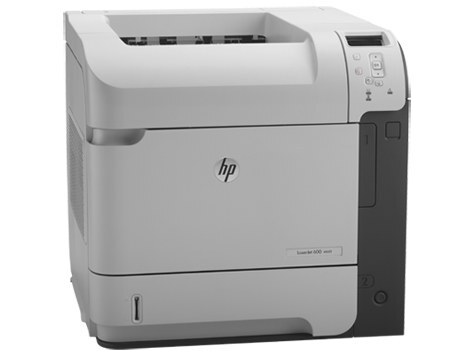
For anyone running a LaserJet Enterprise 600 M601, the appeal is clear: a early-2010s mono single-function printer with none of the fragility of newer machines. The LaserJet Enterprise 600 M601 was purpose-built for everyday office document printing, and it handles that workload with unhurried confidence.
The LaserJet Enterprise 600 M601 shares its HP 90A/90X cartridges — including the CE390A — with 40 other HP models, keeping replacement options plentiful. Whether you want the OEM CE390A or a compatible HP 90A/90X cartridge for the LaserJet Enterprise 600 M601, both are made to deliver the crisp output this printer is known for. The range tops out with the high-yield CE390X — order the 90X when the Enterprise 600 M601 chews through standard cartridges too quickly.
Toner Cartridges for LaserJet Enterprise 600 M601
This printer works with the following toner cartridges:
- HP CE390A
- HP CE390X
More HP Printers
- LaserJet 600
- LaserJet Enterprise 600
- LaserJet Enterprise 600 M601DN
- LaserJet Enterprise 600 M601N
- LaserJet Enterprise 600 M602
- LaserJet Enterprise 600 M602DN
- LaserJet Enterprise 600 M602N
- LaserJet Enterprise 600 M602X
- LaserJet Enterprise 600 M603
- LaserJet Enterprise 600 M603DN
- LaserJet Enterprise 600 M603N
- LaserJet Enterprise 600 M603XH
- LaserJet Enterprise M4555
- LaserJet Enterprise M4555 MFP
- LaserJet Enterprise M4555F
- LaserJet Enterprise M4555F MFP
- LaserJet Enterprise M4555FSKM
- LaserJet Enterprise M4555FSKM MFP
- LaserJet Enterprise M4555H
- LaserJet Enterprise M4555H MFP
- LaserJet M4555
- LaserJet M4555 MFP
- LaserJet M4555F
- LaserJet M4555f MFP
- LaserJet M4555FSKM
- LaserJet M4555FSKM MFP
- LaserJet M4555H
- LaserJet M4555H MFP
- LaserJet M601
- LaserJet M601DN
- LaserJet M601N
- LaserJet M602
- LaserJet M602DN
- LaserJet M602N
- LaserJet M602X
- LaserJet M603
- LaserJet M603DN
- LaserJet M603HX
- LaserJet M603N
- LaserJet M603XH
Frequently Asked Questions
Which toner cartridge does the LaserJet Enterprise 600 M601 use?
The LaserJet Enterprise 600 M601 uses the CE390A (standard yield) or the CE390X (high-yield) toner cartridge. Confirm the code printed on your current cartridge matches before ordering a replacement.
How do I fix smudged toner on prints from the LaserJet Enterprise 600 M601?
Smudges usually mean loose toner dust inside the LaserJet Enterprise 600 M601 — printing a few blank pages flushes it through. If smudging continues, check that the cartridge is seated properly in the LaserJet Enterprise 600 M601 and not leaking.
How do I wake the LaserJet Enterprise 600 M601 from sleep mode?
Press any button on the LaserJet Enterprise 600 M601's control panel or send a print job — the LaserJet Enterprise 600 M601 wakes automatically. If the LaserJet Enterprise 600 M601 stays unresponsive, check that it is plugged in and the power switch is on.