




FS Series
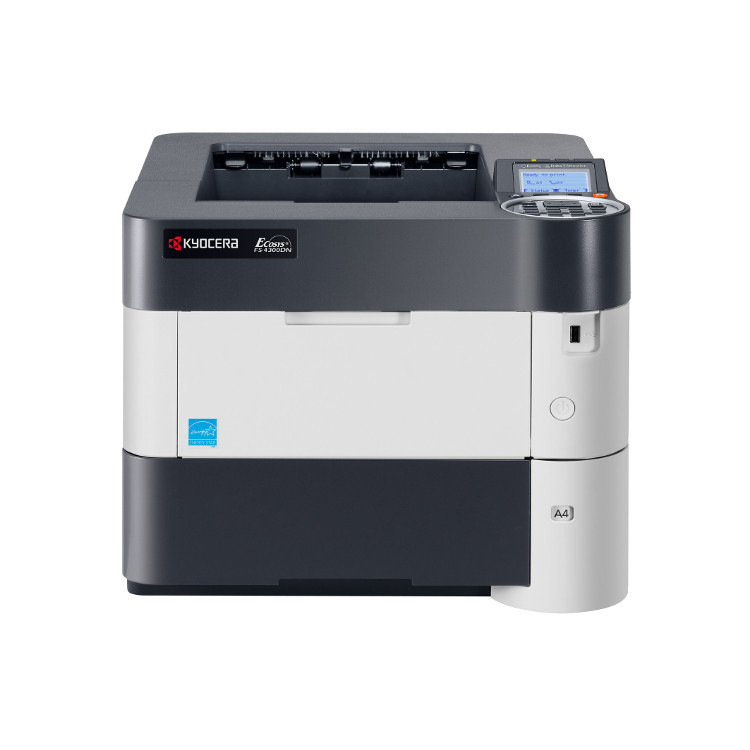
The FS Series is the broadest branch of the Kyocera-Mita tree: 81 model pages of mono printers and multifunction machines, plus the FS-C color branch. Cartridges here follow the same double naming as the rest of the catalog — the workhorse TK-112 also answers to 1T02FV0US0 — and the families repeat across models, so one cartridge often feeds a whole row of machines. At the top of the range, the FS-9530DN flagship runs on the TK-712 (1T02G10US0); at the color end, the FS-C machines take four separate cartridges, black plus cyan, magenta and yellow, as in the TK-582 family.
What makes the FS shelf feel crowded is how long these machines stay in service. A department can hold an FS-1370DN at one desk and an FS-C5150DN at another, bought years apart, and both are still ordinary sights in offices, because the engines were built to be repaired rather than replaced. That longevity is why the table below runs from early codes such as the TK-18 to the later TK-3xxx generations: the series never turned over all at once, and every generation with machines still in the field stays listed.
Popular cartridges for the FS Series
One representative cartridge per family and color, taken from the 273 products on this series shelf. The model pages carry the full shelf for each printer, including multi-packs and sets.
| Cartridge | Color/Type | Page Yield |
|---|---|---|
| TK-112 (1T02FV0US0) | Black | See product page |
| TK-1122 (1T02M70UX0) | Black | See product page |
| TK-1142 (1T02ML0US0) | Black | See product page |
| TK-132 (1T02HS0US0) | Black | See product page |
| TK-162 (1T02LY0US0) | Black | See product page |
| TK-172 (1T02LZ0US0) | Black | See product page |
| TK-18 (370QB0KM) | Black | See product page |
| TK-3102 (1T02MS0US0) | Black | See product page |
| TK-3112 (1T02MT0US0) | Black | See product page |
| TK-312 (1T02F80US0) | Black | See product page |
| TK-3122 (1T02L10US0) | Black | See product page |
| TK-3132 (1T02LV0US0) | Black | See product page |
| TK-322 (1T02F90US0) | Black | See product page |
| TK-332 (1T02GA0US0) | Black | See product page |
| TK-342 (1T02J00US0) | Black | See product page |
| TK-352 (1T02J10US0) | Black | See product page |
| TK-362 (1T02J20US0) | Black | See product page |
| TK-477 (1T02K30US0) | Black | See product page |
| TK-542K (1T02HL0US0) | Black | See product page |
| TK-542C (1T02HLCUS0) | Cyan | See product page |
| TK-542M (1T02HLBUS0) | Magenta | See product page |
| TK-542Y (1T02HLAUS0) | Yellow | See product page |
| TK-552K (1T02HM0US0) | Black | See product page |
| TK-552C (1T02HMCUS0) | Cyan | See product page |
| TK-552M (1T02HMBUS0) | Magenta | See product page |
| TK-552Y (1T02HMAUS0) | Yellow | See product page |
| TK-562K (1T02HN0US0) | Black | See product page |
| TK-562C (1T02HNCUS0) | Cyan | See product page |
| TK-562M (1T02HNBUS0) | Magenta | See product page |
| TK-562Y (1T02HNAUS0) | Yellow | See product page |
| TK-572K (1T02HG0US0) | Black | See product page |
| TK-572M (1T02HGBUS0) | Magenta | See product page |
| TK-582K (1T02KT0US0) | Black | See product page |
| TK-582C (1T02KTCUS0) | Cyan | See product page |
| TK-582M (1T02KTBUS0) | Magenta | See product page |
| TK-582Y (1T02KTAUS0) | Yellow | See product page |
| TK-592K (1T02KV0US0) | Black | See product page |
| TK-592C (1T02KVCUS0) | Cyan | See product page |
| TK-592M (1T02KVBUS0) | Magenta | See product page |
| TK-592Y (1T02KVAUS0) | Yellow | See product page |
| TK-712 (1T02G10US0) | Black | See product page |
| TK-8602M (1T02MNBUS0) | Magenta | See product page |
| TK897K | Black | See product page |
| TK897C | Cyan | See product page |
| TK897M | Magenta | See product page |
| TK897Y | Yellow | See product page |
| TK67 | Black | See product page |
| 1T02BR0US0 | Black | See product page |
| TK5197K | Black | See product page |
| TK5197C | Cyan | See product page |
| TK5197M | Magenta | See product page |
| TK5197Y | Yellow | See product page |
| 370QC0KM | Black | See product page |
Which cartridge should you buy?
Narrow by model first. The FS directory below holds every model page in the series; open yours — the FS-1370DN page for a compact mono printer, the FS-C5150DN page for a color machine — and the cartridges at the top of that shelf are the ones your printer takes. Where a family offers more than one capacity, the model page shows the choice; where the table above lists a black cartridge for a color family, the matching cyan, magenta and yellow singles sit in the same table and on the model page. Buying the wrong generation is the common mistake here: neighboring codes such as TK-312 and TK-3122 are different cartridges, not revisions of one part.
Chip, toner and everyday use
An FS machine reads the cartridge chip as it starts, and a cartridge from the wrong family is refused before it prints a page, so the full code matters more than a close match. When a fresh cartridge goes in, rock it gently side to side first to loosen the toner, seat it until it clicks, and let the machine run its calibration before judging density. Toner keeps best sealed, flat and out of direct sunlight; a cartridge stored upright in a hot supply room is the usual suspect behind streaky first pages. Every compatible cartridge on this page is covered by a 1-year warranty and 1-year returns.
Frequently Asked Questions
Do all FS Series printers use the same cartridge?
No. Families repeat across the series — the TK-352, for example, feeds several of the MFP models, including the FS-3140MFP — but no single cartridge covers the whole line. The model page is the authority: it lists only the cartridges that fit that printer.
What is the difference between the FS and FS-C pages?
The C marks the color branch. A plain FS model prints in black only and takes one cartridge; an FS-C model takes four — black, cyan, magenta and yellow — each replaced on its own cycle. The cartridge families are different between the two branches even when the model numbers look close.
My cartridge has no TK code, only a 370 number. Is it still sold?
Yes. The earliest FS machines predate the TK short form, and their cartridges are listed under the long number — the 370QB0KM, sold as the TK-18, is the common one. Search whichever name is printed on your old cartridge; both land on the same listings.
Can I replace just one color in an FS-C printer?
Yes, and that is the normal way to run one. Each color is a separate cartridge with its own cycle, so you replace the one that is empty and leave the rest. The model pages also list 4-color sets, which make sense when several colors run low together.
FS Series models
- 1370DN
- FS- 1320D
- FS- 4200DN
- FS- 9130
- FS-1016MFP
- FS-1018MFP
- FS-1020D
- FS-1028MFP
- FS-1035 MFP
- FS-1035MFP
- FS-1116MFP
- FS-1118MFP
- FS-1120D
- FS-1128MFP
- FS-1135 MFP
- FS-1300D
- FS-1300DN
- FS-1320D
- FS-1350DN
- FS-1370DN
- FS-1800
- FS-1800N
- FS-1900
- FS-1900N
- FS-1920
- FS-2000D
- FS-2000DN
- FS-2020D
- FS-2100DN
- FS-3040MFP
- FS-3040MFP Plus
- FS-3140MFP
- FS-3140MFP Plus
- FS-3540MFP
- FS-3640MFP
- FS-3800
- FS-3800N
- FS-3820
- FS-3820N
- FS-3830
- FS-3830N
- FS-3900D
- FS-3900DN
- FS-3900DTN
- FS-3920DN
- FS-4000DN
- FS-4000DTN
- FS-4020DN
- FS-4100DN
- FS-4300DN
- FS-5100DN
- FS-6025
- FS-6030
- FS-6525MFP
- FS-6530MFP
- FS-720
- FS-820
- FS-9130DN
- FS-920
- FS-9530
- FS-9530DN
- FS-C2026MFP
- FS-C2026MFP Plus
- FS-C2126MFP
- FS-C2126MFP Plus
- FS-C2526MFP
- FS-C2626MFP
- FS-C5100
- FS-C5100DN
- FS-C5150DN
- FS-C5200
- FS-C5200DN
- FS-C5250DN
- FS-C5300DN
- FS-C5350DN
- FS-C5400
- FS-C5400DN
- FS-C8520MFP
- FS-C8525MFP
- FS-C8600DN
- FS-C8650DN