





 See Compatible Printers
 Read more about our ink!
Kyocera-mita
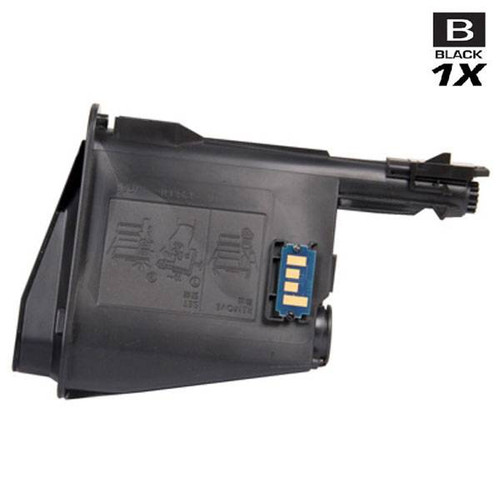
Compatible Kyocera Mita 1T02M70UX0 (TK-1122) Laser Toner Cartridge Black

Amazon Price:

- Page Yield:
- 3,000 Pages
- Availability:
- N
- Shipping:
- Calculated at Checkout
- Compatible Printers
- FS-1025MFP
- FS-1060DN
- FS-1125MFPi>
- Specifications
- SKU:
- TK-1122-BK
- Printer Brand:
- Kyocera-mita
- OEM Number:
- 1T02M70UX0
- Ink Color:
- Black
- Page Yield:
- 3,000 Pages
- Printer Type:
- Laser Cartridge
- Condition:
- New Compatible
- Description
- Yields up to 3000 pages
- Trust compatible Kyocera Mita 1T02M70UX0 Toner Cartridge to provide outstanding print quality for all your important photos and documents
- Unlike bargain replacement inks Kyocera Mita toner cartridge are designed specifically to work with Kyocera Mita printers for exceptional reliability and performance
- Compatible with: Kyocera Mita FS: 1025 1060 1125 Series Printers
- Supply Type: Toner
- Cartridge Yield Type: Standard
- Ink/Toner Cartridge Type: Compatible
- Ink/Toner Color: Black
- Ink/Toner Pack Size: 1/Pack
- Reviews

/> 

Compatible Kyocera Mita 1T02M70UX0 (TK-1122) Laser Toner Cartridge in black color with yielding capacity of up to 3000 pages renders consistent convenience and better value.
Kyocera Mita TK-1122 Toner Cartridge in black color offer magnificent performance with Kyocera Mita printers. Cartridge is designed to provide great print quality for photos and documents.
Features:
Frequently Asked Questions
How many pages will this TK-1122 actually print in my office?
The TK-1122 is rated at 3,000 pages, measured at standard 5% page coverage. Real output depends on what you print: text memos and invoices land close to the rating, while dense forms, logos, and shaded tables use toner faster. If your FS-1060DN mostly handles everyday correspondence, expect the cartridge to last through several busy weeks before print starts to fade.
My prints are coming out light on one side. Is the cartridge finished?
Not necessarily. Uneven fading often means the toner inside has settled rather than run out. Remove the cartridge, rock it gently side to side to redistribute the toner, and reinstall it. If pages stay pale across the full width after that, the TK-1122 is near the end of its life and a replacement is the fix.
How do I confirm this is the cartridge my printer takes?
Pull the current cartridge and read its label: you are looking for TK-1122 or the original part number 1T02M70UX0. This compatible cartridge is built to that same specification, in black, as a single unit. If your old cartridge carries a different TK number, this is not the match for your machine.
Which Kyocera printers does the TK-1122 fit?
It fits three models in the FS Series: the FS-1025MFP, the FS-1060DN, and the FS-1125MFP. These are compact monochrome machines, so one black cartridge is all they use — there are no color cartridges to match or replace alongside it.
What if the cartridge arrives damaged or prints badly?
Every cartridge we sell is covered by a 1-year warranty, and 1-year free returns mean a defective unit costs you nothing beyond the swap itself. Read the full terms on our shipping and returns page, and contact us before sending anything back so we can log the issue.
How quickly will my order ship, and from where?
Orders ship from our warehouses in Illinois, Pennsylvania, Georgia, and California, which keeps most deliveries to a few business days. Questions about an order are answered Monday through Friday, 9 AM to 5 PM CST.
Our FS-1125MFP copies and scans as well as prints — what draws on this cartridge?
Printing and copying do; scanning does not. Every page the MFP puts on paper — whether it started as a computer file or a document on the glass — comes out of the same TK-1122 black cartridge, since these compact monochrome machines carry no other supply. An office that scans heavily and prints lightly will stretch the 3,000-page rating further than the page counter alone suggests.
What does a page from this cartridge cost?
The cartridge is $29.93 rated at 3,000 pages at standard 5% coverage, so the planning figure is about 1.0 cent per page. Memos and invoices at normal text density land right around it. If your FS-1060DN spends its days on dense forms or shaded tables, expect the effective figure to climb — coverage, not the cartridge, is what moves it. Either way it is a simple number for a small office budget.
Should I keep the empty cartridge after fitting the new one?
For a few days, yes. Print with the replacement first and confirm the output is clean across several real jobs; only then let the old TK-1122 go. If the new unit misbehaves, having the spent one on hand helps support pinpoint whether the printer or the cartridge is at fault, and the warranty and free-returns process asks you to contact us before sending anything back. After that, route the empty to a cartridge recycling collection.
What is the best way to dispose of the spent TK-1122?
Place it in the carton and bag the new cartridge came in, so any loose toner stays sealed inside. Toner cartridges belong with a recycling collection rather than household or office trash — many office suppliers and municipal programs accept them free. Because this is a single-cartridge purchase, the simplest routine is to drop the boxed empty off at the same time you next pass a collection point, rather than storing empties indefinitely.
About This TK-1122 Toner Cartridge
This is a single compatible TK-1122 black toner cartridge (OEM part 1T02M70UX0) for the Kyocera FS-1025MFP, FS-1060DN, and FS-1125MFP, priced at $29.93. It is the straightforward one-at-a-time replacement for a single machine: order it when the low-toner warning appears, swap it in, and get back to printing. Browse the rest of our Kyocera Mita range if your office runs other models alongside this one.
Related Items
Kyocera-mita
Compatible Kyocera Mita 1T02M70UX0 (TK-1122) Laser Toner Cartridges Black 5 Pack
/>


Kyocera-mita
Compatible Kyocera Mita 1T02M70UX0 (TK-1122) Premium Quality Laser Toner Cartridges Black 5 Pack
/>
Kyocera-mita
Compatible Kyocera Mita 1T02HG0US0 (TK-572K) Laser Toner Cartridge Black
/>

Kyocera-mita
Compatible Kyocera Mita 1T02H00US0 (TK-677) Laser Toner Cartridge Black
/>