





 See Compatible Printers
 Read more about our ink!
Kyocera-mita
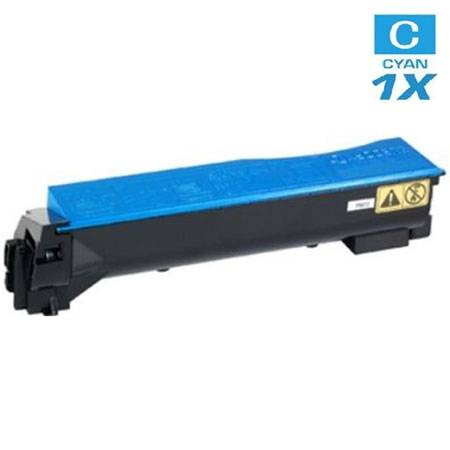
Compatible Kyocera Mita 1T02HLCUS0 (TK-542C) Laser Toner Cartridge Cyan

Amazon Price:

- Page Yield:
- 4,000 Pages
- Availability:
- In Stock
- Shipping:
- Calculated at Checkout
- Compatible Printers
- Specifications
- SKU:
- TK-542C
- Printer Brand:
- Kyocera-mita
- OEM Number:
- 1T02HLCUS0
- Ink Color:
- Cyan
- Page Yield:
- 4,000 Pages
- Printer Type:
- Laser Cartridge
- Condition:
- New Compatible
- Description
- Yields up to 4000 pages
- Trust compatible Kyocera Mita 1T02HLCUS0 Toner Cartridge to provide outstanding print quality for all your important photos and documents
- Unlike bargain replacement inks Kyocera Mita Toner Cartridge are designed specifically to work with Kyocera Mita printers for exceptional reliability and performance
- Packaging: Each
- Compatible with: Kyocera Mita FS: C5100 C5100N 5100DN C5100DN and C5100DNF printers
- Supply Type: Toner
- Cartridge Yield Type: Standard
- Ink/Toner Cartridge Type: Compatible
- Ink/Toner Color: Cyan
- Ink/Toner Pack Size: 1/Pack
- Reviews

/> 

Compatible Kyocera Mita 1T02HLCUS0 (TK-542C) Laser Toner Cartridge Cyan offers vibrant print quality exceptional reliability and performance for your photos and documents.
Kyocera Mita TK-542C Cyan toner cartridge is designed to deliver the best image quality and reliable printing. Toner cartridge is compatible with Kyocera Mita printers and yields up to 4000 pages.
Features:
Frequently Asked Questions
How do I confirm this is the cyan cartridge and not one of the other colors?
Go by the part number on the label: the cyan in the TK-542 family is 1T02HLCUS0, short code TK-542C — the C at the end is the color marker. Compare it with the label on the cartridge you are pulling out. Each color in this family carries its own code, so a thirty-second label check rules out ordering the wrong slot's cartridge.
My blues and greens have gone washed out — is that the cyan running dry?
Very likely, yes. Cyan does the heavy lifting in blues, greens and skies, so when it fades, those colors wash out first while text still prints perfectly black. Check the supply levels on the printer's screen: if cyan is the low one, a fresh TK-542C is the fix, and the other cartridges can stay right where they are.
Can I change just the cyan and leave the other cartridges in place?
Yes. Each color lives in its own slot and is replaced independently — nothing about a cyan swap requires touching black, magenta or yellow. Pull the spent cyan, slide this one in until it seats, and the printer is back in service.
The old cartridge still shows a little toner left. Can I stretch it a bit further?
You can buy a little time: take the cartridge out and rock it gently from side to side a few times to redistribute the toner inside, then reinstall it. That usually revives faded output for a while, but it is a stopgap — once a cartridge needs the shake treatment, its replacement should already be on order.
How many pages will this cyan cartridge print?
It is rated at 4,000 pages at the standard 5% coverage. Real life varies with what you print: full-color brochures and photo-heavy pages drink cyan far faster than memos with a blue letterhead, so treat 4,000 as the benchmark the rating is measured against, not a promise for every job.
What cover comes with this cartridge?
The same cover as every compatible cartridge on our store: a 1-year warranty and 1-year free returns, detailed on our shipping & returns page. If the cartridge misbehaves, you are not stuck with it — and a single faulty unit is handled on its own, without any fuss about the rest of your supplies.
How should I store a spare TK-542C until the cyan slot needs it?
Sealed in its packaging, flat, in a cool dry spot away from sunlight and heaters. Cyan is often bought ahead precisely because its fading creeps up gradually, and a spare 1T02HLCUS0 stored that way is ready months later with no loss of quality. Before fitting, rock it gently side to side a few times — toner settles during a long wait, and the rock levels it so the first pages print evenly.
How many months is 4,000 pages in a typical office?
Work it from your color volume. At roughly 150 color pages a month — memos with a letterhead, the occasional chart — a TK-542C lasts well over two years. A desk printing color documents daily, at 600 or more color pages a month, turns one over in about half a year. Only pages carrying cyan count against it; black-only text spends nothing from this cartridge, which is why color units so often outlast the black beside them.
What does the cyan cost per printed page?
At $44.44 against its 4,000-page rating, the TK-542C works out to roughly 1.11 cents per page at the standard 5% coverage. Full-color brochures draw cyan far harder and push the real cost up; light office documents with small color elements bring it down. As a planning figure it sits honestly between those poles — the rating's own basis is the assumption to keep in mind when comparing it with your actual output.
What do I do with the cyan cartridge I take out?
Put it in the box and bag the new TK-542C arrived in, so residual toner stays sealed in, and hold it with your other spent cartridges for a local recycling collection rather than general waste. If the old cyan's fading seemed to arrive suspiciously early in its life, keep it a few days after the swap — if the replacement's output raises questions with support, the removed unit is the evidence of what the slot was doing.
About This TK-542C Cyan Cartridge
This is the single cyan cartridge — 1T02HLCUS0 (TK-542C), $44.44 — for the Kyocera FS-C5100, sold on its own so you replace the color that actually ran out instead of buying a whole set. It is part of our Kyocera Mita compatible range, rated at 4,000 pages, and it ships from our warehouses in IL, PA, GA and CA. Questions about the codes or the swap? Our support team is on hand Monday to Friday, 9 AM to 5 PM CST.
Related Items

Kyocera-mita
Compatible Kyocera Mita 1T02HMCUS0 (TK-552C) Laser Toner Cartridge Cyan
/>

Kyocera-mita
Compatible Kyocera Mita 1T02NRCUS0 (TK-5142C) Laser Toner Cartridge Cyan
/>
Kyocera-mita
Compatible Kyocera Mita 1T02KTCUS0 (TK-582C) Laser Toner Cartridge Cyan
/>

Kyocera-mita
Compatible Kyocera Mita 1T02LCAUS0 (TK-8507C) Laser Toner Cartridge Cyan
/>