




FS-C5200DN
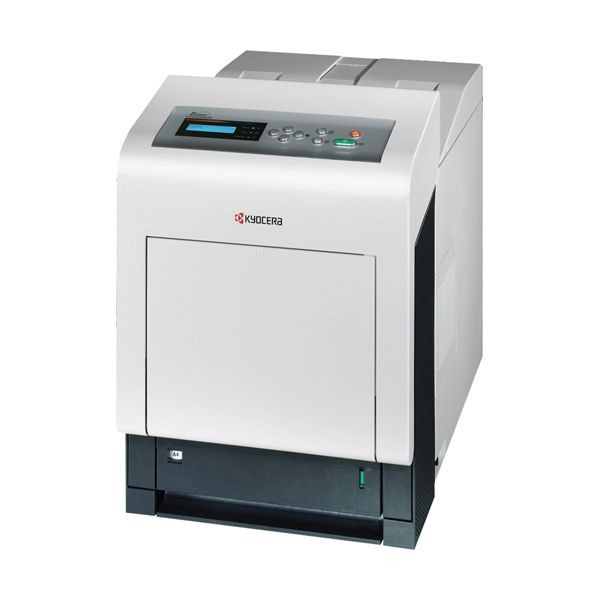
The Kyocera FS-C5200DN is a shared-workgroup color laser printer with networking and automatic two-sided printing built in from the start. Its supplies are the four-piece TK-552 set: TK-552K black (1T02HM0US0), good for roughly 7,000 pages — the Clever Supplies listings write that same cartridge TK552K — and the three colors TK-552C cyan (1T02HMCUS0), TK-552M magenta (1T02HMBUS0) and TK-552Y yellow (1T02HMAUS0), each good for roughly 6,000 pages. Every cartridge swaps individually, so the team replaces only the color that has actually run dry.
Where a personal color printer serves one desk, the FS-C5200DN is placed on the network and serves the whole team, which makes consistency its real job: the same report should look identical from any workstation. Standard duplexing trims paper use on long documents, and because all four cartridges follow the same replacement rhythm, an office manager can stock one shelf of supplies and cover everyone. European references call this family the TK-550 series; North American stock uses the TK-552 names printed on the boxes here. The shelf stocked for this page also includes TK542 multipack options, built around the TK542K black cartridge and its color companions, listed in the table below.
Toner Cartridges for FS-C5200DN
| Cartridge | Color | Page Yield |
|---|---|---|
| TK-552K / TK-552C / TK-552M / TK-552Y — 4 Color Set | Black, Cyan, Magenta, Yellow | 7,000 black; 6,000 each color |
| TK-552 — Premium Quality 4 Color Set | Black, Cyan, Magenta, Yellow | 7,000 black; 6,000 each color |
| TK-552K (1T02HM0US0) | Black | ~7,000 pages |
| TK-552C (1T02HMCUS0) | Cyan | ~6,000 pages |
| TK-552M (1T02HMBUS0) | Magenta | ~6,000 pages |
| TK-552Y (1T02HMAUS0) | Yellow | ~6,000 pages |
| TK542K / TK542C / TK542M / TK542Y — 5 Color Set | Black, Cyan, Magenta, Yellow | See product page |
| TK542K / TK542C / TK542M / TK542Y — 8 Color Set | Black, Cyan, Magenta, Yellow | See product page |
| TK542C / TK542M / TK542Y — 6 Color Set (colors only) | Cyan, Magenta, Yellow | See product page |
| TK542C / TK542M / TK542Y — 3 Color Set (colors only) | Cyan, Magenta, Yellow | See product page |
| TK552 — 4 Color Set | Black, Cyan, Magenta, Yellow | 7,000 black; 6,000 each color |
| TK552K — 2 Black | Black | ~7,000 pages each |
| TK552K — 3 Black | Black | ~7,000 pages each |
| TK552K — 5 Black | Black | ~7,000 pages each |
| TK552K — Black | Black | ~7,000 pages |
| TK552C — Cyan | Cyan | ~6,000 pages |
| TK552M — Magenta | Magenta | ~6,000 pages |
| TK552Y — Yellow | Yellow | ~6,000 pages |
Which cartridge should you buy?
For a shared printer, plan around the black cartridge first: reports, invoices and correspondence drain TK-552K long before the colors move, and the 2-, 3- and 5-black multipacks exist precisely for that pattern. Buy colors as singles when the panel reports one running low — there is no discount in retiring a half-full cyan early. A full 4 color set earns its place when the printer is first installed, after a quarter of heavy color work, or when several cartridges report low in the same month. All yields here follow ISO/IEC 19798, so a multipack comparison against singles is apples to apples.
Chip, toner and everyday use
The chip on each TK-552 cartridge lets the FS-C5200DN confirm the cartridge and track its level, which is what drives the low-toner warnings your team sees. Push a new cartridge straight in until it seats; a half-seated cartridge is the usual cause of a recognition message. Page yields assume about 5% coverage, so full-color handouts will finish a cartridge well ahead of the rating while plain text can run past it. Keep one complete spare set in the supply cabinet if the printer supports a whole department — a shared machine sitting idle on a Friday afternoon costs more than the shelf space does.
Frequently Asked Questions
Which toner does the FS-C5200DN use?
The TK-552 family: black TK-552K at roughly 7,000 pages and cyan, magenta and yellow at roughly 6,000 pages each, measured per ISO/IEC 19798. European listings call the same cartridges the TK-550 series.
Will compatible toner void the FS-C5200DN warranty?
No — using compatible cartridges does not void the printer manufacturer's warranty. The one exception to check is a leased machine, where the lease contract rather than the warranty may set its own supply terms.
Why does the black cartridge run out so much faster than the colors?
On a workgroup printer most pages are black text, and duplexed reports still count against black toner. The colors are only laid down where a page actually contains them, so they last through several black cartridges in typical office use.
What backing do these compatible cartridges carry?
Every compatible cartridge listed here is covered by a 1-year warranty with 1-year returns, so a dud cartridge is a replacement or a refund, not a write-off for the department.
More printers that use the same cartridges
These Kyocera models share the same black toner family: ECOSYS P6030CDN, ECOSYS P7035CDN, FS-5100DN, FS-C5100, FS-C5100DN, FS-C5200, FS-C5300DN, FS-C5350DN, FS-C5400 and FS-C5400DN.