






 See Compatible Printers
 Read more about our ink!
Kyocera-mita
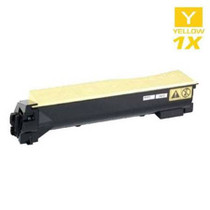
Compatible Kyocera Mita 1T02KTAUS0 (TK-582Y) Laser Toner Cartridge Yellow

Amazon Price:

- Page Yield:
- 2,800 Pages
- Availability:
- In Stock
- Shipping:
- Calculated at Checkout
- Compatible Printers
- FS-C5150DN
- P6021cdni>
- ECOSYS P6021CDN
- P6021CDN
- Specifications
- SKU:
- TK-582Y
- Printer Brand:
- Kyocera-mita
- OEM Number:
- 1T02KTAUS0
- Ink Color:
- Yellow
- Page Yield:
- 2,800 Pages
- Printer Type:
- Laser Cartridge
- Condition:
- New Compatible
- Description
- Yields up to 2800 pages
- Trust compatible Kyocera Mita 1T02KT0US0 Toner Cartridge to provide outstanding print quality for all your important photos and documents.
- Unlike bargain replacement inks compatible Kyocera Mita Toner Cartridge is designed specifically to work with Kyocera Mita printers for exceptional reliability and performance.
- Packaging: Each
- Compatible with: Kyocera Mita: FS-C5150DN C5150 ECOSYS: P6021CDN and P6021 printers
- Supply Type: Toner
- Cartridge Yield Type: Standard
- Ink/Toner Color: Yellow
- Ink/Toner Pack Size: 1/Pack
- Ink/Toner Cartridge Type: Compatible
- Reviews

/> 

Compatible Kyocera Mita 1T02KTAUS0 (TK-582Y) Laser Toner Cartridge Yellow color with yielding capacity of up to 2800 pages renders consistent convenience and better value.
Kyocera Mita TK-582Y Toner cartridge in yellow color with yielding capacity of up to 2800 pages offers an exceptional performance with Kyocera Mita printers. Cartridge is designed to provide great print quality for photos and documents.
Features:
Frequently Asked Questions
How do I tell the yellow has run out if yellow barely shows on paper?
Watch the colors that are built from it. Yellow on its own is almost invisible in text, but green is printed from cyan and yellow — so when greens slide toward blue and highlight colors lose their warmth, the yellow cartridge is the one that has emptied. The machine's toner message confirms it: the yellow unit is 1T02KTAUS0, also marked TK-582Y.
What does this listing contain?
A single yellow cartridge for the FS-C5150DN, rated at 2,800 pages at the standard 5% coverage and priced at $30.56. One cartridge, one slot — nothing else in the printer needs to change at the same time.
Can the swap be done in the middle of a print run?
Yes. Pause the job, open the printer, exchange the yellow unit, and carry on — the other three cartridges stay in place and the run resumes with its color balance restored. The whole change takes a couple of minutes and needs no tools.
Should I shake the old yellow cartridge before replacing it?
It is worth one try: remove it, rock it gently from side to side, and refit it. Redistributing the last of the toner often buys a short run of acceptable pages. If greens still print blue after that, the cartridge is genuinely empty and this replacement is the answer.
Is this the full-capacity yellow or a reduced starter size?
Full capacity — the complete 2,800-page rating. It is not the smaller starter cartridge supplied with a new machine, so fitting it restores the yellow slot's full run length.
What warranty and returns cover does it carry?
The same as the rest of our compatible range: a 1-year warranty and 1-year free returns, with the full terms on our shipping & returns page. The cartridge is covered on its own, whenever it is fitted and whatever the other slots are doing.
What does this yellow cartridge cost per page?
At $30.56 for the complete 2,800-page rating, the TK-582Y works out at roughly 1.09 cents per page for yellow at the standard 5% coverage. In practice most documents use a fraction of that — yellow hides inside greens, warm tones and highlights rather than covering pages on its own — so the real cost per document in mixed office printing is typically far lower. Only sustained photo and graphics work pushes consumption toward the benchmark rate.
Which documents consume yellow without anyone noticing?
Anything green, warm or golden. Spreadsheets with green highlighting, charts with green and orange series, photographs of landscapes and food, and documents with cream or warm-gray backgrounds all draw steadily on the 1T02KTAUS0 while showing almost no visible yellow. That invisibility is exactly why this cartridge surprises people: the level falls page by page through ordinary work, and the first obvious sign is not yellow fading — it is greens turning blue and highlights going cold.
How should a spare yellow be kept until its turn comes?
Sealed in its packaging, lying flat, in a cool dry cupboard away from sunlight and heat. Yellow is the cartridge offices forget about, so a spare stored properly may wait a long time — and it keeps well in those conditions. Before fitting, rock it gently from side to side a few times to level the toner that settled during storage, then judge the result on a page with known greens rather than on plain text.
What do I do with the old yellow cartridge once it is out?
Keep it beside the printer until the new TK-582Y has restored the greens and warm tones on your real documents for a few days; if the replacement ever disappointed early, the old unit is the evidence that makes the conversation easy. After that, it goes to a toner recycling point or office-supply take-back bin instead of household trash. The cartridge is covered and handled entirely on its own — 1-year warranty, 1-year free returns — independent of the other three slots.
About This TK-582Y Yellow Cartridge
Yellow is the quiet cartridge of the four — invisible alone, unmistakable when it is gone and every green turns blue. This TK-582Y, part number 1T02KTAUS0, brings the Kyocera FS-C5150DN back into balance with a 2,800-page rating. It is sold under our Kyocera Mita compatible range, orders leave from our warehouses in IL, PA, GA and CA, and support runs Monday to Friday, 9 AM to 5 PM CST.
Related Items

Kyocera-mita
Compatible Kyocera Mita 1T02LCCUS0 (TK-8507Y) Laser Toner Cartridge Yellow
/>


Kyocera-mita
Compatible Kyocera Mita 1T02KVAUS0 (TK-592Y) Laser Toner Cartridge Yellow
/>

Kyocera-mita
Compatible Kyocera Mita 1T02NRAUS0 (TK-5142Y) Laser Toner Cartridge Yellow
/>
Kyocera-mita
Compatible Kyocera Mita 1T02HMAUS0 (TK-552Y) Laser Toner Cartridge Yellow
/>