





 See Compatible Printers
 Read more about our ink!
Kyocera-mita
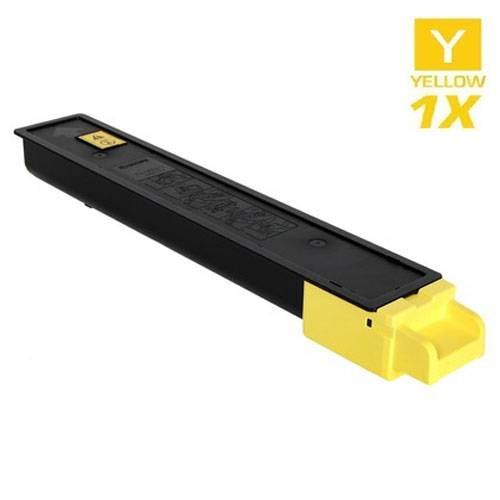
Compatible Kyocera Mita 1T02NPAUS0 (TK-8327Y) Laser Toner Cartridge Yellow

Amazon Price:

- Page Yield:
- 18,000 Pages
- Availability:
- In Stock
- Shipping:
- Free Shipping
- Compatible Printers
- TASKalfa 2551cii>
- CS-2551CI
- ECOSYS M5526cdw
- ECOSYS P5026cdw
- TASKalfa 2551ci
- Specifications
- SKU:
- TK-8327Y
- Printer Brand:
- Kyocera-mita
- OEM Number:
- 1T02NPAUS0
- Ink Color:
- Yellow
- Page Yield:
- 18,000 Pages
- Printer Type:
- Laser Cartridge
- Condition:
- New Compatible
- Description
- Yields up to 18000 pages
- Trust compatible Kyocera Mita 1T02NPAUS0 Toner Cartridge to provide outstanding print quality for all your important photos and documents
- Unlike bargain replacement inks Kyocera Mita Toner Cartridge is designed specifically to work with Kyocera Mita printers for exceptional reliability and performance
- Packaging: Each
- Compatible with: Kyocera Mita TASKalfa 2551 2551CI and CS-2551CI printers
- Supply Type: Toner
- Cartridge Yield Type: Standard
- Ink/Toner Cartridge Type: Compatible
- Ink/Toner Color: Yellow
- Ink/Toner Pack Size: 1/Pack
- Reviews

/> 

Compatible Kyocera Mita 1T02NPAUS0 (TK-8327Y) Laser Toner Cartridge Yellow offers vibrant print quality exceptional reliability and performance for your photos and documents.
Kyocera Mita TK-8327Y toner cartridge is designed to deliver the best image quality and reliable printing. Toner cartridge is compatible with Kyocera Mita printers and yields up to 18000 pages.
Features:
Frequently Asked Questions
Yellow barely shows on the page — how would I even know this cartridge is empty?
Watch the greens. Yellow and cyan mix to make green, so a fading yellow turns greens blue-ish and makes highlight colors look cold, and the printer's own level display will name yellow before the page gives it away completely. When greens drift and the display agrees, it is this cartridge: 1T02NPAUS0, the TK-8327Y.
Which codes should I match for the yellow cartridge?
1T02NPAUS0 is the full part number and TK-8327Y is the short family name — the Y marks it as yellow. A match on either code against the unit you remove means this $91.20 cartridge is the correct replacement.
What is this cartridge rated at?
18,000 pages at standard coverage. Yellow is usually the slowest-draining color in document printing, so a rating like that generally translates into a long time between swaps on a TASKalfa 2551ci.
Does an empty yellow affect black-and-white printing?
No. Plain text documents print from the black cartridge alone and will look exactly as they should. It is color output that suffers: without yellow, greens, warm tones and highlight shades cannot be mixed properly.
Is it worth keeping a spare yellow on the shelf?
More than any other color, arguably — precisely because it is so easy to miss. A spare in the cupboard means the day the greens go strange, the fix is a two-minute swap instead of a wait for delivery while color jobs queue up.
What cover backs this cartridge?
A 1-year warranty with 1-year free returns, set out in our shipping & returns policy. The cover belongs to this single yellow cartridge just as it would to one bought inside a set.
How can I keep an eye on the yellow level before it surprises me?
Make the printer's supply display part of a monthly routine. Yellow is the easiest color to miss because its absence hides inside greens and warm tones, so do not rely on the printed page to warn you. A ten-second look at the level screen on the TASKalfa 2551ci once a month tells you where the 1T02NPAUS0 stands, and when the bar gets low you can order in calm time rather than mid-job.
Which pages quietly use the most yellow?
Charts and anything green or warm. Yellow is half of every green, so spreadsheets printed with green shading, landscape photographs and highlighted documents all draw on the TK-8327Y even when no yellow object is visible on the page. The 18,000-page rating is set at standard coverage, so a reporting season full of color charts will consume the cartridge noticeably faster than the same page count of plain correspondence would.
I fitted the new yellow and the greens still look wrong. What else could it be?
Check the cyan as well. Green is mixed from yellow and cyan together, so if the greens remain blue-leaning after the yellow swap, the cyan cartridge may be running low at the same time — colors fitted on the same day often fade in the same season. Look at the level display for all four slots before ordering anything else, and test with a page containing a known green, such as a logo or a chart you print regularly.
How do I make sure I order yellow and not magenta by mistake?
Read the letter inside the part number. Yellow is 1T02NPAUS0, with an A before US0; magenta is 1T02NPBUS0, with a B. The short names carry the same distinction — TK-8327Y for yellow, TK-8327M for magenta. The four codes in this family differ by a single character, so compare the code on the cartridge you removed against the listing character by character, especially if you are ordering in a hurry.
About This TK-8327 Yellow Cartridge
This is the single yellow unit of the TK-8327 family for the Kyocera TASKalfa 2551ci — part number 1T02NPAUS0, short name TK-8327Y — rated at 18,000 pages and priced at $91.20. Stocked in the Kyocera-Mita compatible range, it ships from our warehouses in IL, PA, GA and CA, and our support team is available Monday to Friday, 9 AM to 5 PM CST if you would like the code checked against your machine first.
Related Items

Kyocera-mita
Compatible Kyocera Mita 1T02NRAUS0 (TK-5142Y) Laser Toner Cartridge Yellow
/>


Kyocera-mita
Compatible Kyocera Mita 1T02KTAUS0 (TK-582Y) Laser Toner Cartridge Yellow
/>

Kyocera-mita
Compatible Kyocera Mita 1T02KVAUS0 (TK-592Y) Laser Toner Cartridge Yellow
/>

Kyocera-mita
Compatible Kyocera Mita 1T02NSAUS0 (TK-5152Y) Laser Toner Cartridge Yellow
/>