





 See Compatible Printers
 Read more about our ink!
Kyocera-mita
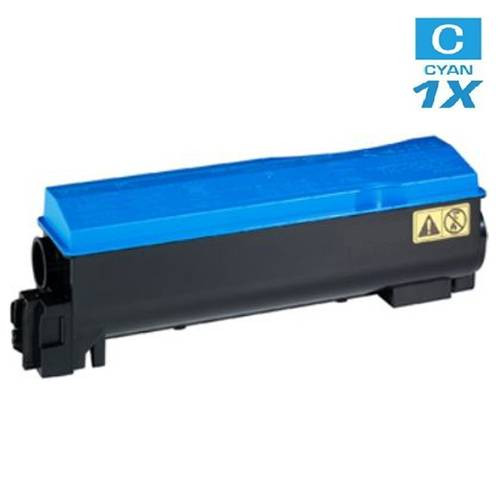
Compatible Kyocera Mita 1T02KTCUS0 (TK-582C) Laser Toner Cartridge Cyan

Amazon Price:

- Page Yield:
- 2,800 Pages
- Availability:
- In Stock
- Shipping:
- Calculated at Checkout
- Compatible Printers
- FS-C5150DN
- P6021cdni>
- ECOSYS P6021CDN
- P6021CDN
- Specifications
- SKU:
- TK-582C
- Printer Brand:
- Kyocera-mita
- OEM Number:
- 1T02KTCUS0
- Ink Color:
- Cyan
- Page Yield:
- 2,800 Pages
- Printer Type:
- Laser Cartridge
- Condition:
- New Compatible
- Description
- Yields up to 2800 pages
- Trust compatible Kyocera Mita 1T02KTCUS0 Toner Cartridge to provide outstanding print quality for all your important photos and documents.
- Unlike bargain replacement inks compatible Kyocera Mita Toner Cartridge is designed specifically to work with Kyocera Mita printers for exceptional reliability and performance.
- Packaging: Each
- Compatible with: Kyocera Mita FS: C5150DN C5150 ECOSYS: P6021CDN and P6021 printers
- Supply Type: Toner
- Cartridge Yield Type: Standard
- Ink/Toner Color: Cyan
- Ink/Toner Pack Size: 1/Pack
- Ink/Toner Cartridge Type: Compatible
- Reviews

/> 

Compatible Kyocera Mita 1T02KTCUS0 (TK-582C) Laser Toner Cartridge Cyan color with yielding capacity of up to 2800 pages renders consistent convenience and better value.
Kyocera Mita TK-582C Toner cartridge in cyan color with yielding capacity of up to 2800 pages offers an exceptional performance with Kyocera Mita printers. Cartridge is designed to provide great print quality for photos and documents.
Features:
Frequently Asked Questions
Which code should I look for when only the cyan runs out?
The cyan cartridge for this printer family is 1T02KTCUS0, also marked TK-582C. Match that code on the cartridge you are replacing and you have the right unit — this listing is a single cyan cartridge for the FS-C5150DN, at $30.56, rated at 2,800 pages at 5% coverage.
What does a fading cyan actually look like on the page?
Blues wash out first, skies go pale, and greens lose their depth and drift toward yellow, because green is built from cyan and yellow together. Black text stays crisp — that is the giveaway that one color, not the whole machine, is running dry.
Can I get a bit more life out of the old cartridge first?
Often, yes. Take the cyan unit out, rock it gently side to side several times to redistribute the toner that is left, and refit it. That usually restores even color for a while — long enough for this replacement to arrive, though it is a short reprieve rather than a fix.
Do the other colors have to come out for a cyan change?
No. The cyan slot works independently, so the black, magenta and yellow cartridges stay exactly where they are. Open the printer, swap the one unit, and close up — the job takes a couple of minutes and needs no tools and no technician.
Is this a full-size cartridge or a small starter unit?
Full size. The TK-582C in this listing carries the complete 2,800-page rating, not the reduced fill of the starter cartridge that ships with a new printer. What you fit is what the rating promises.
What cover does a single cartridge like this come with?
The same cover as the rest of the range: a 1-year warranty and 1-year free returns, with the details set out on our shipping & returns page. If the unit ever misbehaves, it is dealt with on its own — nothing else in the printer has to be sent anywhere.
What does this cyan cartridge cost per page?
At $30.56 for the full 2,800-page rating, the TK-582C comes to roughly 1.09 cents per page for the cyan on a standard-coverage sheet. Most office pages use far less cyan than the 5% benchmark — a document with a blue header or a small logo barely sips it — so in everyday mixed printing the real cost per document usually lands well under that figure. Photo pages are the exception and consume cyan at many times the standard rate.
Which documents run the cyan down fastest?
Anything built from blue and green. Photographs of sky and water, presentations with blue backgrounds or themes, charts with blue and green data series, and company documents carrying a large blue logo all draw steadily on the 1T02KTCUS0. A week of plain text and spreadsheets can pass almost without touching it, while one print run of a blue-themed brochure can use more cyan than a month of letters. That is why two offices can see very different calendar life from the same cartridge.
How should a spare cyan be stored so it is ready when the blues fade?
Sealed in its bag, lying flat, in a cool dry cabinet out of direct sunlight and away from radiators. Cyan tends to be forgotten until a color job exposes it, and a spare stored that way keeps well for the wait. When you come to fit it, rock the cartridge gently from side to side a few times first, so toner that settled in storage spreads evenly and the first pages come out at full, even density.
What do I do with the old cyan cartridge after the change?
Keep it until the new unit has printed a few days of your normal work without issue — if anything looks off early in the replacement's life, the old cartridge is helpful evidence and it costs nothing to hold. After that, it goes to a toner recycling collection point or an office-supply take-back bin rather than household trash. The cartridge is handled entirely on its own, the same way its 1-year warranty and 1-year free returns cover it.
About This TK-582C Cyan Cartridge
This is the single cyan cartridge, 1T02KTCUS0 (TK-582C), for the Kyocera FS-C5150DN — the one to order when the blues fade and the other three slots still have life in them. It is rated at 2,800 pages and sold as part of our Kyocera Mita compatible range. Orders ship from our warehouses in IL, PA, GA and CA, and our support team is on hand Monday to Friday, 9 AM to 5 PM CST if you want the code confirmed before you buy.
Related Items

Kyocera-mita
Compatible Kyocera Mita 1T02HMCUS0 (TK-552C) Laser Toner Cartridge Cyan
/>


Kyocera-mita
Compatible Kyocera Mita 1T02LCAUS0 (TK-8507C) Laser Toner Cartridge Cyan
/>
Kyocera-mita
Compatible Kyocera Mita 1T02HNCUS0 (TK-562C) Laser Toner Cartridge Cyan
/>
Kyocera-mita
Compatible Kyocera Mita 1T02NSCUS0 (TK-5152C) Laser Toner Cartridge Cyan
/>