




FS-1016MFP
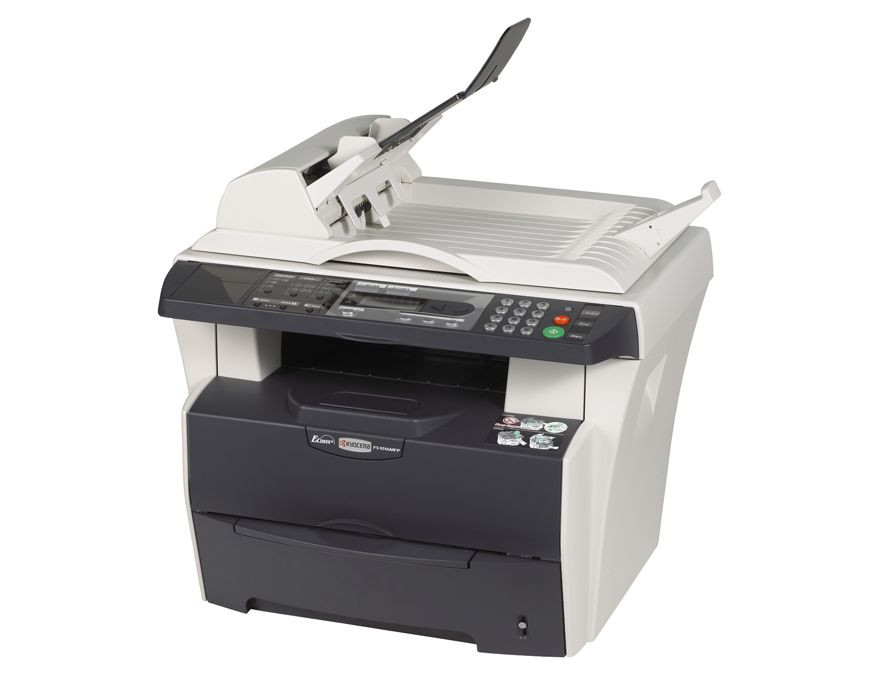
The FS-1016MFP is Kyocera's compact answer for a small office that needs printing, copying and scanning in one machine without giving up floor space to get it. It is a monochrome multifunction that keeps its supply list as short as its footprint: one black cartridge, the TK-112, which Kyocera sells under part number 1T02FV0US0 and rates at roughly 6,000 pages. There is no color set to track and no second consumable hiding in the machine, just a single toner that a small team can plan around without thinking hard.
That 6,000-page rating suits the way a corner office or home business actually prints: invoices, contracts, shipping labels and the odd scanned-and-copied form, spread across the month rather than dumped in one huge run. The machine's modest appetite also means a small team is not paying for capacity it will never use. One caution for new owners: the starter toner packed with the device yields only about 3,000 pages, so the first reorder arrives sooner than the headline figure suggests, and after that swap the full-size cartridge settles the machine into its normal, longer rhythm.
Toner Cartridges for FS-1016MFP
| Cartridge | Color | Page Yield |
|---|---|---|
| 1T02FV0US0 (TK-112) | Black | ~6,000 pages |
| TK-112 - 3 Pack | Black | ~6,000 pages each |
| TK-112 - 5 Pack | Black | ~6,000 pages each |
| TK-112 Premium - 5 Pack | Black | ~6,000 pages each |
Which cartridge should you buy?
For a single small machine, the honest answer is usually the single cartridge: it covers months of light-to-moderate work, and the multi-packs earn their place only when the same toner also feeds other printers in the family or when whoever orders supplies would rather think about toner twice a year instead of five times. Kyocera also makes a smaller economy fill, the TK-112E at about 2,000 pages, for very light users; this page stocks the full-size TK-112, which is the better fit once copying joins printing in the daily mix. If your FS-1016MFP shares an office with one of the other models listed below, a 3 pack or 5 pack splits neatly across machines and keeps every one of them one swap away from running.
Chip, toner and everyday use
With one cartridge doing everything, supply management is simple: a fading page or a low-toner message means the same single swap, and the chip in the cartridge reports its level to the machine so you are rarely surprised. If output turns light before the cartridge is truly empty, take it out and rock it gently side to side to redistribute the toner, which often restores even coverage for a while longer. Keep the spare in its sealed bag in a cool drawer, and remember that scanning uses no toner at all, so a scanning-heavy afternoon costs nothing in supplies. Every compatible cartridge on this page is covered by a 1-year warranty and 1-year returns.
Frequently Asked Questions
Which toner does the FS-1016MFP use?
It uses the TK-112 black cartridge, Kyocera part 1T02FV0US0, rated for approximately 6,000 pages per ISO/IEC 19752. That one cartridge covers all of its printing and copying.
What is the TK-112E, and should I buy it instead?
The TK-112E is an economy version of the same cartridge with a smaller fill, around 2,000 pages, aimed at very light printing. Most small offices are better served by the full-size TK-112 stocked here, which lasts roughly three times as long between swaps.
Why did my first cartridge run out faster than 6,000 pages?
Because the cartridge shipped with the machine is a starter fill of about 3,000 pages, not a full retail cartridge. Once you install a standard TK-112, the roughly 6,000-page rating applies.
Can I still scan when the toner is low?
Yes. Scanning sends no toner to paper, so it keeps working normally while toner runs low; only printing and copying fade as the cartridge empties, which is your cue to install the spare.
More printers that use the same cartridges
These models take the same TK-112 cartridge, so a spare bought for one fits them all: FS-1116MFP, FS-720, FS-820, FS-920.