




FS-C2026MFP
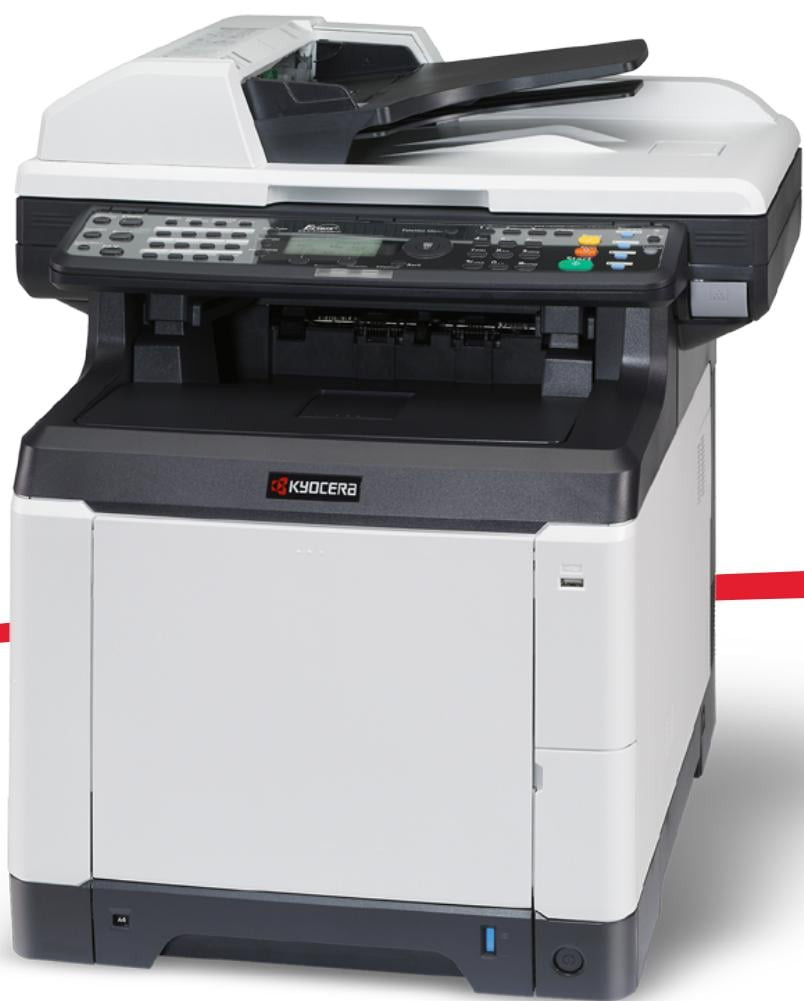
The Kyocera FS-C2026MFP puts printing, copying, scanning and faxing into one networked A4 color unit from the 20-page-per-minute class, aimed at small workgroups that want color without a departmental price tag. Everything it prints runs on a single four-cartridge family, the TK-592 series — the same shelf you will also see written without the dash as TK592. Black is the TK-592K, Kyocera part number 1T02KV0US0, and it is rated for roughly 7,000 pages; the no-dash listing of the same black cartridge is TK592K. Cyan is the TK-592C (1T02KVCUS0, no-dash TK592C), magenta the TK-592M (1T02KVBUS0, no-dash TK592M) and yellow the TK-592Y (1T02KVAUS0, no-dash TK592Y), each color rated for about 5,000 pages per ISO/IEC 19798.
This is the machine a five-to-fifteen-person office buys when color proposals, invoices and scanned paperwork all land on the same desk. Because it sits on the network, the whole group shares one set of four cartridges instead of feeding separate desktop printers, and Kyocera builds the drum and developer components for long service life, so the toner shelf is the only routine stop. Each color is its own cartridge, which means a run of blue-heavy presentations drains cyan long before it touches the black — and you replace only the one that is empty.
Toner Cartridges for FS-C2026MFP
| Cartridge | Color | Page Yield |
|---|---|---|
| TK-592 — 4 Color Set (1T02KV0US0/ 1T02KVCUS0/ 1T02KVBUS0/ 1T02KVAUS0) | Black, cyan, magenta, yellow | 7,000 black / 5,000 per color |
| TK-592 — Premium 4 Color Set (1T02KV0US0/ 1T02KVCUS0/ 1T02KVBUS0/ 1T02KVAUS0) | Black, cyan, magenta, yellow | 7,000 black / 5,000 per color |
| 1T02KV0US0 (TK-592K) | Black | 7,000 pages |
| 1T02KVCUS0 (TK-592C) | Cyan | 5,000 pages |
| 1T02KVBUS0 (TK-592M) | Magenta | 5,000 pages |
| 1T02KVAUS0 (TK-592Y) | Yellow | 5,000 pages |
| TK592 — 4 Color Set (TK592K, TK592C, TK592M, TK592Y) | Black, cyan, magenta, yellow | 7,000 black / 5,000 per color |
| TK592K | Black | 7,000 pages |
| TK592K — 2 Black | Black | 7,000 pages each |
| TK592K — 3 Black | Black | 7,000 pages each |
| TK592K — 5 Black | Black | 7,000 pages each |
| TK592C | Cyan | 5,000 pages |
| TK592M | Magenta | 5,000 pages |
| TK592Y | Yellow | 5,000 pages |
| TK592 (TK592K) | Black | 7,000 pages |
| TK592 (TK592K) | Black | 7,000 pages |
| TK592 (TK592Y) | Yellow | 5,000 pages |
Which cartridge should you buy?
Start with how your office actually prints. Most workgroups burn through black far faster than any single color, because everyday documents are text with a color logo, not full-bleed graphics — so the 7,000-page TK-592K empties first while the colors keep going. Buying the four-color set makes sense when several cartridges run low together or when you want a complete spare set on the shelf; buying singles makes sense the rest of the time, since an unopened color cartridge you do not need yet is money sitting in a drawer. If black is your bottleneck, the multi-packs of black listed above cut the cost per cartridge against one-off orders. Every cartridge on this page is a compatible unit backed by a 1-year warranty and 1-year returns.
Chip, toner and everyday use
Swapping a cartridge on the FS-C2026MFP takes a minute: open the top cover, rock the old cartridge gently side to side before it goes in the recycling pile, and slide the new one in until it seats — the printer reads the cartridge chip during its start-up routine, so let that cycle finish before sending a job. Page yields are rated at the ISO standard coverage, so a month of dense color charts will land below the headline figure while plain memos can beat it. Keep one spare black on hand, store cartridges flat and away from heat, and the machine will rarely be the reason work stops.
Frequently Asked Questions
Which toner does the Kyocera FS-C2026MFP use?
It uses the TK-592 family: black TK-592K at about 7,000 pages and cyan, magenta and yellow cartridges at about 5,000 pages each. Kyocera sells the same family in Europe under the TK-590 name, but the listings on this page are the US TK-592 versions.
Can I replace just one color at a time?
Yes. The four cartridges are independent, so when the panel reports a single color as empty you swap only that one and keep printing with the other three. There is no need to change a full set unless several colors happen to run out together.
Are the four colors interchangeable with each other?
No. Each cartridge is keyed and chipped for its own slot — black, cyan, magenta and yellow are separate parts with separate codes. Match the code on the box to the slot the printer names and it will seat on the first try.
How accurate is the 7,000-page rating on the black cartridge?
It is measured to ISO/IEC 19798, the standard test pattern for color laser cartridges. Real output depends on coverage: text pages with a small color logo often go further, while photo-heavy pages use toner faster. Treat the figure as a planning number, not a promise.
More printers that use the same cartridges
The TK-592 family also feeds these Kyocera machines:
FS-C2026MFP Plus, FS-C2126MFP, FS-C2126MFP Plus, FS-C2526MFP, FS-C2626MFP, FS-C5250DN, TASKalfa 400CI, TASKalfa 500CI, TASKalfa 552CI