






 See Compatible Printers
 Read more about our ink!
Kyocera-mita
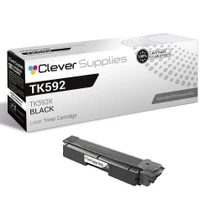
Compatible Kyocera-Mita TK592 (TK592K) Toner Cartridge Black

Amazon Price:

- Page Yield:
- Black: 7000
- Availability:
- In Stock
- Shipping:
- Calculated at Checkout
- Compatible Printers
- Specifications
- SKU:
- CS-Kyocera-Mita-TK592-Black-N1
- Printer Brand:
- Kyocera-Mita
- OEM Number:
- TK592K
- Ink Color:
- Black
- Page Yield:
- Black: 7000
- Printer Type:
- Laser Cartridge
- Condition:
- New Compatible
- Description
- Reviews



Kyocera Mita offers the TK592 series toner cartridges, including TK592K black, TK592C cyan, TK592M magenta, and TK592Y yellow, designed for FS-C2026MFP, FS-C2126MFP, FS-C2526MFP, FS-C2626MFP, and FS-C5250DN printers. These cartridges ensure consistent and high-quality printing performance for various printing tasks. With their high yield and efficiency, the TK592 series cartridges provide cost-effective printing solutions for offices with moderate to high-volume printing needs. In addition to toner cartridges, toner cartridges play a vital role in maintaining print quality. The Kyocera Mita TK592 toner cartridge complements the printer's performance, delivering vibrant colors and sharp images. Whether it's colorful graphics or high-resolution photos, the TK592 toner cartridge ensures impressive prints, enhancing overall output quality. Kyocera Mita printers, such as the FS-C2026MFP, FS-C2126MFP, FS-C2526MFP, FS-C2626MFP, and FS-C5250DN models, are known for their durability and efficiency in office environments. With features like duplex printing and network connectivity, these printers offer convenience and reliability, ensuring smooth printing operations. In conclusion, Kyocera Mita printers paired with TK592 toner and toner cartridges provide reliable and high-quality printing solutions for offices. Whether it's black and white documents or colorful prints, the FS-C series ensures consistent and professional results, making it a trusted choice for users seeking dependable printing solutions.
Frequently Asked Questions
The printer is stopped and people are waiting — how do I confirm the right cartridge in under a minute?
Open the cover, pull the spent cartridge, and read its label: TK592K is the code you need for black. Everything else on that label is secondary. Match those six characters to this listing and you can order with confidence instead of guessing from the printer's model number alone.
How fast can a replacement actually get to us?
Stock is held in four warehouses — IL, PA, GA and CA — so your cartridge ships from the end of the network nearest you rather than from a single depot. The shipping and returns page sets out the delivery options and what applies to your order.
Our pages were fading before the old cartridge died. Will a fresh one cure that?
If the fading was the toner running out — the usual story — then yes, the new TK592K restores full, even density from the first page. If clean output does not return after a proper fitting, that points elsewhere in the machine, and you are not stuck with the cartridge: it carries a 1-year warranty and returns are free for a year.
We print dense reports and statements. How does that change the 7,000-page rating?
The up-to-7,000 figure assumes light text coverage of around 5%. Bold headings, shaded tables and logo-heavy pages all lay down more toner, so a report-heavy office will see fewer pages per cartridge. The rating still holds as a comparison standard — just budget more conservatively if your documents are dark.
Do I need a technician to fit it, or can office staff do it?
Office staff, easily. Out with the old unit, a gentle side-to-side rock of the new one, packaging off, slide it home — a couple of minutes, no tools, no settings to change. The printer recognizes its cartridge and is ready to work as soon as the cover closes.
After this scare, should we keep a spare on hand?
Most offices that live through one toner stoppage decide yes: a single sealed cartridge in the cupboard costs little shelf space and turns the next low-toner warning into a non-event. Either way, this cartridge is covered by a 1-year warranty, and support is reachable Monday through Friday, 9 AM to 5 PM CST.
How long will one TK592K last in our office?
It depends on how much you print each month, and the math is simple: divide your monthly page count into the 7,000-page rating. An office printing around 1,000 pages a month gets roughly seven months from one TK592K, while a busier office printing 3,000 pages a month will see about two months. Dense reports and logo-heavy pages pull the real figure down, so check your own volume first and treat the rating as the yardstick, not a promise of a calendar date.
What should I do with the spent cartridge after the swap?
Hold on to it for a few days rather than throwing it away at once. Once the new TK592K has printed cleanly for several days, the old unit has served its purpose and can go out with your local recycling or waste collection, following whatever rules apply where you are. Keeping it briefly also helps if any question comes up about the replacement, since the label on the old cartridge is the surest record of what was in the machine.
The new cartridge is in, but prints still look uneven — what do I check first?
Take the cartridge back out, rock it gently from side to side to level the toner inside, and slide it home again until it seats firmly, then run a test page. Uneven density right after a change is usually a seating or settling issue, and that reseat clears it in most cases. If clean, even output still does not return after a proper fitting, the cause sits elsewhere in the machine rather than in the cartridge, and our support team can help you work through it Monday through Friday, 9 AM to 5 PM CST.
How do I make sure the next order is the black cartridge, not a color?
Order by the full code, not by the printer model alone: TK592K, where the K marks black. Before you place the order, read the code on the box or on the cartridge coming out of the machine and match those six characters to the listing. The color cartridges in this family carry different final letters, so a quick code check at ordering time is what keeps a cyan or magenta from arriving when the black slot is the one that is empty.
About This Cartridge
This is the single TK592K black cartridge at $45.62 — the get-printing-again replacement for the FS-C2026MFP, FS-C2126MFP, FS-C2526MFP, FS-C2626MFP and FS-C5250DN, rated at up to 7,000 pages per cartridge. A Kyocera-Mita compatible built to the TK592 specification, it is backed by a 1-year warranty and 1-year free returns.
Related Items

Kyocera-mita
Compatible Kyocera-Mita TK592 (TK592K) Toner Cartridge Black


Kyocera-mita
Compatible Kyocera-Mita TK592 Toner Cartridge Black (TK592K)
/>

Kyocera-mita
Compatible Kyocera-Mita TK592 Toner Cartridge 2 Black (TK592K)
/>

Kyocera-mita
Compatible Kyocera-Mita TK592 Toner Cartridge 3 Black (TK592K)
/>