




FS-C5250DN
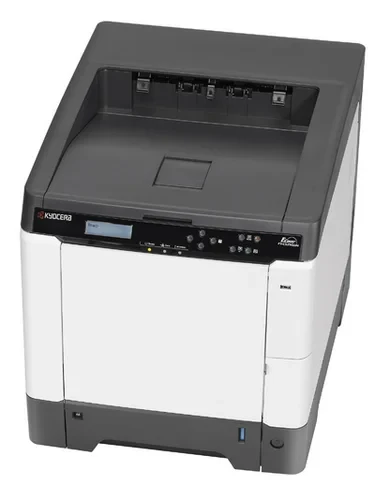
Not every office needs a scanner on top of its printer. The Kyocera FS-C5250DN is the print-only member of the family — an A4 color laser from the 25-page-per-minute class with duplex and Ethernet fitted as standard, built for shared color output and nothing else. It drinks from the same supply line as its multifunction siblings, the TK-592 cartridge family, which you will also find written as TK592 without the dash. Four separate cartridges do the work: black TK-592K (Kyocera part 1T02KV0US0, also listed as TK592K) at roughly 7,000 pages, and the three colors — cyan TK-592C (1T02KVCUS0, TK592C), magenta TK-592M (1T02KVBUS0, TK592M) and yellow TK-592Y (1T02KVAUS0, TK592Y) — at about 5,000 pages apiece per ISO/IEC 19798.
The buying logic here is refreshingly plain: if your team prints color all day but scans almost never, the multifunction premium buys you a document feeder that gathers dust. The FS-C5250DN spends the budget on the print engine instead and parks on the network where everyone can reach it. Supplies stay predictable because it shares its cartridges with a wide family of Kyocera color machines, so the shelf you stock for this printer is the same shelf its siblings draw from — no orphaned toner when hardware changes.
Toner Cartridges for FS-C5250DN
- TK-592 four-color set — one of each cartridge (full codes 1T02KV0US0/ 1T02KVCUS0/ 1T02KVBUS0/ 1T02KVAUS0); about 7,000 pages black and 5,000 per color
- TK-592 premium four-color set — the same four cartridges in the premium-quality line
- 1T02KV0US0 (TK-592K) — black single, about 7,000 pages
- 1T02KVCUS0 (TK-592C) — cyan single, about 5,000 pages
- 1T02KVBUS0 (TK-592M) — magenta single, about 5,000 pages
- 1T02KVAUS0 (TK-592Y) — yellow single, about 5,000 pages
- TK592 four-color set (TK592K, TK592C, TK592M, TK592Y) — the no-dash shelf line, one of each color
- TK592K — black single cartridge, about 7,000 pages
- TK592K — two black cartridges for offices that print mostly text
- TK592K — three black cartridges, a quarter of steady mono work in one box
- TK592K — five black cartridges, the deep-stock option
- TK592C — cyan single cartridge, about 5,000 pages
- TK592M — magenta single cartridge, about 5,000 pages
- TK592Y — yellow single cartridge, about 5,000 pages
- TK592 (TK592K) — black single under the combined code label
- TK592 (TK592K) — black single, second listing of the same cartridge
- TK592 (TK592Y) — yellow single under the combined code label
Which cartridge should you buy?
Watch which cartridge the printer asks for first — on a print-only color machine in a typical office it is black, because letters, reports and forms dominate the queue. The TK-592K carries a 7,000-page rating against 5,000 for each color, yet it still tends to empty first. A sensible pattern is to keep black in depth (the two, three and five black packs above exist for exactly that) and to reorder colors one at a time as the panel warns. Take the full four-color set when you are setting up a new shelf or when two or more cartridges are low together. All cartridges here are compatibles covered by a 1-year warranty with 1-year returns.
Chip, toner and everyday use
Two habits keep this printer out of trouble. First, when a color runs low, give the cartridge a gentle rock from side to side before you decide it is finished — toner settles, and redistributing it often buys dozens of extra pages while the replacement ships. Second, let the printer complete its calibration cycle after a swap; interrupting it is how streaks and off colors get blamed on a healthy cartridge. Yield figures assume the ISO test coverage, so graphics-heavy departments should budget below the headline numbers and text-heavy ones can expect to meet them.
Frequently Asked Questions
Is the FS-C5250DN a multifunction device?
No — it only prints. There is no scanner, copier or fax on this model. If you need those functions on the same toner family, look at the FS-C2026MFP, which uses the identical cartridges.
Which toner cartridges fit the FS-C5250DN?
The TK-592 family: a black cartridge rated near 7,000 pages and cyan, magenta and yellow cartridges rated near 5,000 pages each. In Kyocera's European catalog the same family is labeled TK-590; the US listings on this page are the ones to order.
What do the D and N in the name stand for?
Duplex and network. Two-sided printing is built in rather than optional, and the Ethernet port lets the whole office share the printer — which is the entire point of a print-only color machine.
Can I keep printing if one color is empty?
The printer will ask for the empty cartridge to be replaced; the four colors work as a set, so an empty slot stops color output even if the other three are full. Keeping one spare of the color you use most is cheap insurance against a stalled deadline.
More printers that use the same cartridges
These Kyocera models run on the same TK-592 shelf:
FS-C2026MFP, FS-C2026MFP Plus, FS-C2126MFP, FS-C2126MFP Plus, FS-C2526MFP, FS-C2626MFP, TASKalfa 400CI, TASKalfa 500CI, TASKalfa 552CI