





 See Compatible Printers
 Read more about our ink!
Kyocera-mita
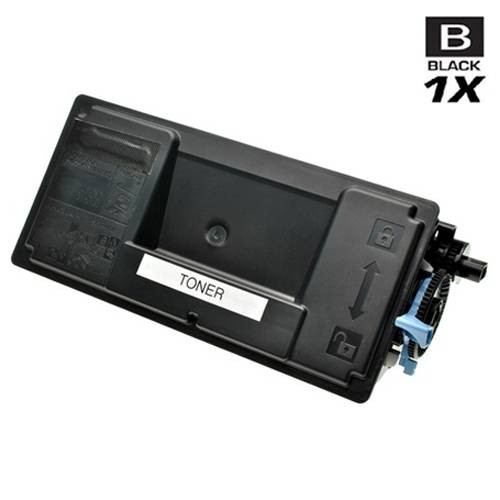
Compatible Kyocera Mita 1T02MS0US0 (TK-3102) Laser Toner Cartridge Black

Amazon Price:

- Page Yield:
- 12,500 Pages
- Availability:
- In Stock
- Shipping:
- Calculated at Checkout
- Compatible Printers
- Specifications
- SKU:
- TK-3102-BK
- Printer Brand:
- Kyocera-mita
- OEM Number:
- 1T02MS0US0
- Ink Color:
- Black
- Page Yield:
- 12,500 Pages
- Printer Type:
- Laser Cartridge
- Condition:
- New Compatible
- Description
- Yields up to 12500 pages
- Trust compatible Kyocera Mita 1T02MS0US0 Toner Cartridge to provide outstanding print quality for all your important photos and documents.
- Unlike bargain replacement inks compatible Kyocera Mita Toner Cartridge is designed specifically to work with Kyocera Mita printers for exceptional reliability and performance.
- Packaging: Each
- Compatible with: Kyocera Mita FS: 2100 2100D ECOSYS: M3040 M3040IDN M3540 series printers
- Supply Type: Toner
- Cartridge Yield Type: Standard
- Ink/Toner Color: Black
- Ink/Toner Pack Size: 1/Pack
- Ink/Toner Cartridge Type: Compatible
- Reviews

/> 

Compatible Kyocera Mita 1T02MS0US0 (TK-3102) Laser Toner Cartridge Black color with yielding capacity of up to 12500 pages renders consistent convenience and better value.
Kyocera Mita TK-3102 Toner cartridge in black color with yielding capacity of up to 12500 pages offers an exceptional performance with Kyocera Mita printers. Cartridge is designed to provide great print quality for photos and documents.
Features:
Frequently Asked Questions
How do I confirm from the empty cartridge that TK-3102 is what my printer takes?
Pull the spent unit out and read its top label before you order. Two identifiers should appear there: the long Kyocera part number 1T02MS0US0 and the shorter TK-3102 designation. When those match this listing, you have the correct black cartridge for an FS-2100DN or an ECOSYS M3040idn.
What arrives if I order this single cartridge?
A lone sealed black toner cartridge, packed ready for immediate fitting. Nothing else needs to be purchased alongside it, and there is no assembly work — you unwrap it, prepare it, and slide it into the machine.
How far does 12,500 pages stretch on one desktop printer?
The 12,500-page figure is the rated life of this one TK-3102 cartridge at standard coverage. A desk printing a few hundred sheets monthly — correspondence, forms, the odd report — will typically work through that rating over many months, which is why a single spare usually suits a one-printer setup.
Can I swap the cartridge myself between jobs?
Yes. Open the front cover, draw the old unit straight out, and unpack the replacement. Rock the new 1T02MS0US0 gently left and right several times so the powder inside levels out, remove its protective material, push it home until it seats, and close up. The whole exchange takes a couple of minutes without tools.
What should I do if early prints come out lighter than expected?
Remove the cartridge and rock it side to side once more; toner that settled in transit redistributes and density usually recovers. Also confirm that a toner-saving mode has not been left active in your driver settings. If output stays faint after both checks, reach out to us for help under the coverage described below.
What backing and delivery support does this purchase include?
Your cartridge carries a 1-year warranty together with 1-year free returns. Parcels dispatch from the nearest of our IL, PA, GA and CA warehouse locations, and you can reach the support team Monday to Friday, 9 AM to 5 PM CST, with fitting or order questions.
What should I do with the spent cartridge once the new one is in?
Put the empty TK-3102 (1T02MS0US0) back into the fresh cartridge's packaging to keep any residual powder contained, and route it through your office's electronics or toner recycling channel rather than household trash. Hold onto it for the first few days after the swap; if the new cartridge shows a fault early, having the old unit available makes the conversation with support simpler.
How do I judge whether one spare on the shelf is enough?
Work from your monthly volume. This cartridge is rated at 12,500 pages, and a desk printing a few hundred sheets a month takes many months to finish one — so a single sealed spare usually bridges the gap between a low-toner warning and a delivery comfortably. If your usage suddenly doubles, that is the moment to step up to a multi-pack instead.
Should I use the toner-saving mode in the driver?
It depends on the document. Toner-saving settings lighten output deliberately, which is fine for internal drafts and proof copies, and they do stretch a cartridge further. For anything a customer will see, switch it off so density stays full. Just remember the mode exists: if prints suddenly look faint, a toner-save setting left active is a likelier explanation than a failing TK-3102.
When should I start thinking about the next order?
Well before the current cartridge fades. The 12,500-page rating lets you estimate a replacement window from your monthly page count, and ordering when you judge the installed 1T02MS0US0 to be in its final stretch means the new cartridge is already on the shelf when the warning appears — no paused work, no rush shipping decisions.
About This Single Cartridge
Priced at $33.05, this individual 1T02MS0US0 (TK-3102) black cartridge is the no-fuss refill for a single FS-2100DN or M3040idn that has just run dry. It sits in the Kyocera-Mita compatible line at Clever Supplies, delivers a rated yield of 12,500 pages, and full return and warranty details are published on our shipping & returns page for review before you buy.
Related Items

Kyocera-mita
Compatible Kyocera Mita 1T02MS0US0 (TK-3102) Laser Toner Cartridges Black 3 Pack
/>


Kyocera-mita
Compatible Kyocera Mita 1T02MS0US0 (TK-3102) Laser Toner Cartridges Black 5 Pack
/>

Kyocera-mita
Compatible Kyocera Mita 1T02MS0US0 (TK-3102) Premium Quality Laser Toner Cartridges Black 5 Pack
/>
Kyocera-mita
Compatible Kyocera Mita 1T02LZ0US0 (TK-172) Laser Toner Cartridge Black
/>