





 See Compatible Printers
 Read more about our ink!
Kyocera-mita
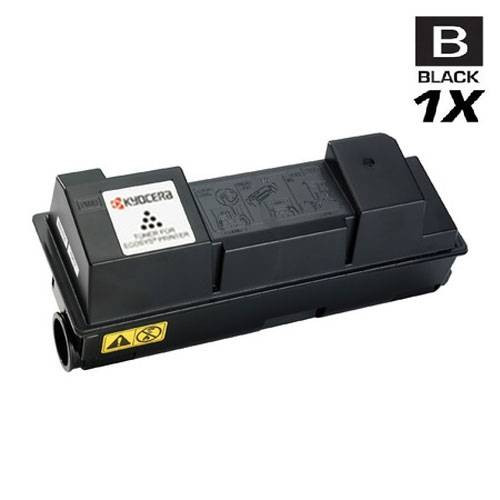
Compatible Kyocera Mita 1T02J10US0 (TK-352) Laser Toner Cartridge Black

Amazon Price:

- Page Yield:
- 15,000 Pages
- Availability:
- In Stock
- Shipping:
- Calculated at Checkout
- Compatible Printers
- Specifications
- SKU:
- TK-352-BK
- Printer Brand:
- Kyocera-mita
- OEM Number:
- 1T02J10US0, 1T02LX0US0
- Ink Color:
- Black
- Page Yield:
- 15,000 Pages
- Printer Type:
- Laser Cartridge
- Condition:
- New Compatible
- Description
- Yields up to 15000 pages
- Trust compatible Kyocera Mita TK-352 Toner Cartridge to provide outstanding print quality for all your important photos and documents
- Unlike bargain replacement inks Kyocera Mita 1T02J10US0 Toner Cartridge are designed specifically to work with Kyocera Mita printers for exceptional reliability and performance
- Compatible with: Kyocera Mita FS: 3040 3040MFP 3140 3540 3640 3920 series printers
- Ink/Toner Color: Black
- Ink/Toner Pack Size: 1/Pack
- Supply Type: Toner
- Cartridge Yield Type: Standard
- Ink/Toner Cartridge Type: Compatible
- Reviews

/> 

Compatible Kyocera Mita 1T02J10US0 (TK-352) Laser Toner Cartridge in black color with yielding capacity of up to 15000 pages provides consistent convenience and better value.
Kyocera Mita Toner cartridge in black color with yielding capacity of up to 15000 pages offer an exceptional reliability and performance with Kyocera Mita printers. Cartridge is patterned to provide great print quality for photos and documents.
Features:
Frequently Asked Questions
How do I confirm this is the cartridge my multifunction unit takes?
Pull the spent cartridge out and read its label: if it carries 1T02J10US0 — also shown as TK-352 — this is the matching black toner for your FS-3040MFP. The two codes are alternate identifiers for one and the same cartridge, so matching either one is enough to order with confidence.
What does a 15,000-page rating mean on a machine that copies and scans as well as prints?
The rating counts printed pages at standard coverage, and on a busy multifunction unit handling copy jobs, scanned-document printouts and everyday office paperwork, this TK-352 is a genuinely long-cycle supply. Most offices find one cartridge carries them through a substantial stretch of normal volume before the low-toner warning appears.
How does the swap go on this model?
Open the front of the machine, release and lift out the old unit, then slide the new cartridge in until it seats. Before fitting, rock the fresh 1T02J10US0 gently from side to side several times and pull the protective seal — that one step is what keeps the first pages from printing light. No tools, no settings to change, and the machine is back in service within a couple of minutes.
The first copies after fitting look gray instead of black. What is wrong?
Almost certainly settled toner from transit. Take the cartridge back out, rock it side to side again to redistribute the powder, and refit it — density normally returns on the very next page. Also glance at the density setting on the machine itself. If output is still washed out after that, tell us and we will put it right under the warranty.
I ordered by the TK-352 code but my invoice shows 1T02J10US0. Did I get the wrong item?
No — both codes name this same cartridge, and paperwork may show either. What matters is what is printed on the cartridge label itself when it arrives, and that will match the unit you removed.
What protection and delivery service does this single cartridge come with?
It is covered by a 1-year warranty with 1-year free returns, as detailed on our shipping & returns page. Orders ship from whichever of our IL, PA, GA or CA warehouses is nearest to you, and our support team is available Monday to Friday, 9 AM to 5 PM CST.
Which other machines does this cartridge fit besides the FS-3040MFP?
The same 1T02J10US0 (TK-352) also serves the FS-3140MFP, FS-3540MFP and FS-3640MFP. So if your office runs more than one model from this multifunction family, a single cartridge type covers them all — check the label on the unit you remove, and matching either the 1T02J10US0 or TK-352 code confirms you are ordering the right supply for any of them.
Do copies use up this cartridge the same way prints do?
Yes. On a multifunction unit, every copied page is printed with the same toner as a page sent from a computer, so copy volume draws down the TK-352's 15,000-page rating just as print volume does. Scanning, by contrast, uses no toner at all. Offices that copy heavily should count both streams when judging how long one cartridge will last.
When should I think about ordering the next one?
When the low-toner warning appears, rather than when copies start to fade. The warning leaves a working margin in the 1T02J10US0, and a machine that copies and prints all day can move through that margin quickly. Ordering at the warning keeps a replacement on its way from the nearest warehouse while the installed cartridge finishes its run.
What should I do with the spent cartridge?
Seal the empty TK-352 in the bag and box the new cartridge arrived in and send it out through a local toner recycling route. If the new unit has only just been fitted, keep the old one for a few days first — until fresh copies and prints have confirmed the replacement is behaving, the spent cartridge is your evidence of what came out of the machine.
About This Cartridge
Priced at $32.98, this single 1T02J10US0 (TK-352) is the no-fuss refill for an FS-3040MFP that earns its keep every day — printing, copying and turning scanned paperwork back into hard copy. It sits in the Kyocera-Mita compatible range at Clever Supplies and is rated at up to 15,000 black pages, so one fitting settles the toner question for a long stretch of office work.
Matching family members: the black three-pack and the black five-pack. Every one of these machines takes this cartridge: FS-3040MFP, FS-3140MFP, FS-3540MFP and FS-3640MFP.
Related Items

Kyocera-mita
Compatible Kyocera Mita 1T02J10US0 (TK-352) Laser Toner Cartridges Black 3 Pack
/>


Kyocera-mita
Compatible Kyocera Mita 1T02J10US0 (TK-352) Laser Toner Cartridges Black 5 Pack
/>

Kyocera-mita
Compatible Kyocera Mita 1T02J10US0 (TK-352) Premium Quality Laser Toner Cartridges Black 5 Pack
/>
Kyocera-mita
Compatible Kyocera Mita 1T02HL0US0 (TK-542K) Laser Toner Cartridge Black
/>