Frequently Asked Questions
How do I check that TK-132 is the cartridge my printer takes?
Look at the label on the cartridge currently inside your machine. It will show the supply code TK-132, and the full ordering number for this cartridge is 1T02HS0US0. If either of those matches what you see, this single black cartridge at $18.30 is the right refill — the two numbers describe the same cartridge, one short and one long.
What arrives in the package?
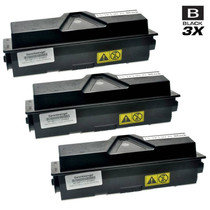
One sealed compatible black toner cartridge in protective packaging. Nothing else needs to be ordered, assembled or configured — it goes directly from the delivery box into the printer.
What does 7,500 pages mean for a small office?
That figure comes from standard test pages with ordinary text coverage. A desk-side machine printing letters, invoices and the occasional report will work through one cartridge over many months; heavy graphics and dense fills use toner faster. For light, everyday office printing it is a long, quiet interval between changes.
Can I change it without calling anyone out?
Yes — open the printer, lift the finished cartridge out, slide the fresh one in until it seats, and close up. Most people finish in a couple of minutes with no tools, and printing resumes right where it stopped.
The first few pages look pale. Is the cartridge faulty?
Almost certainly not. Toner powder shifts to one side while the cartridge is in transit. Remove it, tilt it gently left and right several times to level the powder, reinstall it, and run a few test pages. Density normally settles within the first short run.
What protection comes with it?
Every cartridge carries a 1-year warranty and free returns for a full year. Questions are answered by a real support team, Monday through Friday, 9 AM to 5 PM CST.
Do copies on the FS-1028mfp draw on this same cartridge, or is there a separate copier supply?
The same one. The FS-1028mfp prints and copies from the single TK-132 cartridge, so every copied page spends toner exactly as a printed page does. Scanning a document to a file uses no toner at all. When you estimate how long a cartridge will last, add your copying volume to your printing volume — the 7,500-page rating covers the two combined.
I would rather order before the old cartridge gives out — how should I keep the new TK-132 until then?
Leave it sealed in its packaging, lying flat in a cool, dry drawer or cupboard, away from radiators and direct sunlight. A sealed cartridge keeps well for a long stretch, so ordering ahead costs nothing in performance. When the installed unit starts to fade, rock the new one gently side to side, fit it, and carry on.
What should I do with the empty cartridge once the new one is in?
Put the empty straight into the box and bag the fresh cartridge came out of — that seals in any loose powder and keeps the desk clean. Then pass it to a local recycling point or an office-supply take-back service; toner cartridges are widely accepted. Avoid shaking the empty or opening it up, as the remaining powder is fine and messy.
Can the paper I use make prints from a healthy cartridge look weak?
It can. Thick, textured or damp paper takes toner less evenly than ordinary office stock, and the result can look gray or patchy even with a good TK-132 fitted. If output suddenly looks weak, run a few pages on plain paper first. If those come out dark and even, the cartridge is fine and the paper was the problem.
About This Cartridge
This is a single compatible Kyocera-Mita black toner cartridge, supply code TK-132 (part number 1T02HS0US0), made for the FS-1028mfp multifunction printer and its relatives the FS-1128mfp and the FS-1300D. Each cartridge is rated at 7,500 pages, swaps in by hand in about two minutes, and is backed for a year with both warranty cover and free returns. Orders leave from the nearest of our IL, PA, GA and CA warehouses; delivery timing and the returns process are spelled out on our shipping and returns page.







 See Compatible Printers
 Read more about our ink!