




Xpress M2835 DW
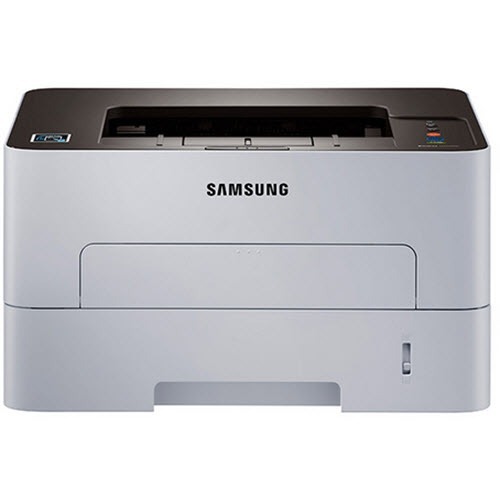
The Xpress M2835 DW is the wireless, duplexing configuration of Samsung's M2835 workgroup mono laser, sold with spacing in the model name under the Xpress badge. It takes the standard MLT-D116S cartridge or the high-yield MLT-D116L — the version this page lists. Images are formed on the MLT-R116 drum, a separate long-life unit replaced after around 9,000 pages.
The spaced name causes a moment's doubt for buyers comparing it with the SL-M2835DW — it is the same printer, badged and spaced differently for a different sales channel. The machine itself is a team printer: Wi-Fi sharing so anyone can print, two-sided output so long documents stop eating paper. Its natural home is a small office where one device quietly covers everybody, and its supplies are cheapest to manage when they are treated as the team's, not one person's.
Toner Cartridges for Xpress M2835 DW
- SL-M2625D nameplate — one MLT-D116L cartridge — black toner; yield on the product page
- SL-M2625D nameplate — MLT-D116L, pack of 2 — black toner; yield on the product page
- SL-M2625D nameplate — MLT-D116L, pack of 3 — black toner; yield on the product page
- SL-M2625D nameplate — MLT-D116L, pack of 5 — black toner; yield on the product page
- SL-M2625D nameplate — MLT-D116L, pack of 10 — black toner; yield on the product page
- SL-M2675F nameplate — one MLT-D116L cartridge — black toner; yield on the product page
- SL-M2825DW nameplate — one MLT-D116L cartridge — black toner; yield on the product page
- SL-M2835DW nameplate — one MLT-D116L cartridge — black toner; yield on the product page
- SL-M2875FD nameplate — one MLT-D116L cartridge — black toner; yield on the product page
- SL-M2875FW nameplate — one MLT-D116L cartridge — black toner; yield on the product page
- SL-M2885FW nameplate — one MLT-D116L cartridge — black toner; yield on the product page
- SL-M2625D nameplate — one MLT-D116L cartridge — black toner; yield on the product page
- M2826 nameplate — one MLT-D116L cartridge — black toner; yield on the product page
- M2875 DW nameplate — one MLT-D116L cartridge — black toner; yield on the product page
One part of this printer is not in the toner list at all: the separate imaging drum. Its listings follow, and it needs changing only after roughly 9,000 pages:
- SL-M2625D-DRUM nameplate — MLT-R116 drum, single unit
- SL-M2625D-DRUM nameplate — MLT-R116 drums, pack of 2
- SL-M2625D-DRUM nameplate — MLT-R116 drums, pack of 3
- SL-M2625D-DRUM nameplate — MLT-R116 drums, pack of 5
- SL-M2625D-DRUM nameplate — MLT-R116 drums, pack of 10
- SL-M2675F nameplate — MLT-R116 drum, single unit
- SL-M2825DW nameplate — MLT-R116 drum, single unit
- SL-M2835DW nameplate — MLT-R116 drum, single unit
- SL-M2875FD nameplate — MLT-R116 drum, single unit
- SL-M2875FW nameplate — MLT-R116 drum, single unit
- SL-M2885FW nameplate — MLT-R116 drum, single unit
- SL-M2625D nameplate — MLT-R116 drum, single unit
- SL-M2675F nameplate — MLT-R116 drum, single unit
Which cartridge should you buy?
The high-yield MLT-D116L and the standard MLT-D116S are handled identically by the printer — toner-level reporting works the same with either, and the only real decision is economic. To compare honestly, divide a cartridge's price by its rated yield and look at the cost per page; on a shared machine the L cartridge usually wins that arithmetic and also halves the number of changes. The listings here are all the L version. Our compatibles carry a 1-year warranty and 1-year returns.
Chip, toner and everyday use
When this printer first asks for toner, it is estimating, not measuring damage — dismissing the warning and printing on is safe, and many good pages usually remain. Watch the output instead: swap the cartridge when prints themselves tell you it is time. For the spare, position matters less than climate; flat or upright is fine in a dry, temperate spot, while damp basements and dusty workshops are both bad neighborhoods for a sealed cartridge. A gentle shake just before installing settles any toner that shifted in storage.
Frequently Asked Questions
Should I replace the cartridge as soon as the printer asks?
Not necessarily. The low-toner warning on the Xpress M2835 DW is a conservative estimate, and printing can continue without harming anything. Keep an eye on output quality, rock the cartridge when fading starts, and change it when the pages themselves say so — with a spare already in the building, there is no rush either way.
Is the Xpress M2835 DW different from the SL-M2835DW?
Only on the nameplate. The SL-M2835DW is the same workgroup printer sold under the SL badge, and both take the same MLT-D116S and MLT-D116L cartridges and the same drum. Listings under either name describe the same supplies.
Where should backup toner for this printer live?
In the same room climate you would choose for paper: dry, temperate and out of direct sun. A cupboard near the printer is perfect. What shortens a spare's life is heat and damp, not time spent sitting level on a shelf.
How long does the drum last compared with the toner?
The MLT-R116 drum is rated for around 9,000 pages — several toner cartridges' worth. Plan on toner as the regular purchase and the drum as an occasional one, triggered by repeating marks rather than by the calendar.
More printers that use the same cartridges
These Samsung models run on the same cartridges: Samsung-MLTD116L, Xpress M2626, Xpress M2676, Xpress M2826, Xpress M2875, Xpress M2875 DW, Xpress SL-M2625D, Xpress SL-M2675F, Xpress SL-M2825DW, Xpress SL-M2875FD, Xpress SL-M2875FW, SL-M2625, SL-M2625D, SL-M2625DW, SL-M2626, SL-M2675, SL-M2675F, SL-M2675FN, SL-M2676, SL-M2825, SL-M2825DW, SL-M2825ND, SL-M2826, SL-M2835, SL-M2835DW, SL-M2875, SL-M2875FD, SL-M2875FW, SL-M2876, SL-M2885, SL-M2885FW.