




Xpress M2676
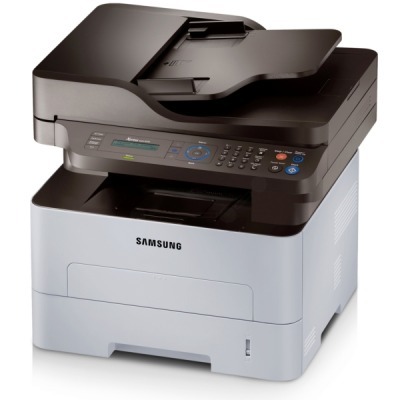
The Xpress M2676 carries Samsung's 2676 workgroup multifunction under the Xpress badge — print, scan and copy built for shared daily use. It runs on the MLT-D116S cartridge or the longer-lasting MLT-D116L, with the high-yield version listed here. Behind every cartridge sits the MLT-R116 drum unit, an independent imaging component swapped after roughly 9,000 pages.
A shared all-in-one develops habits around itself: people copy at the glass without thinking of toner, scan to email all day at no supply cost at all, and print in bursts when a deadline lands. The supply lesson is that this printer's toner use is driven by print and copy volume alone, and it arrives unevenly. Setting two-sided printing as the driver default is the simplest cost control available to its owner — users who truly need single-sided output can still override it per job.
Toner Cartridges for Xpress M2676
- One MLT-D116L cartridge under the SL-M2625D name — black; yield on product page
- One MLT-D116L cartridge under the SL-M2675F name — black; yield on product page
- One MLT-D116L cartridge under the SL-M2825DW name — black; yield on product page
- One MLT-D116L cartridge under the SL-M2835DW name — black; yield on product page
- One MLT-D116L cartridge under the SL-M2875FD name — black; yield on product page
- One MLT-D116L cartridge under the SL-M2875FW name — black; yield on product page
- One MLT-D116L cartridge under the SL-M2885FW name — black; yield on product page
- One MLT-D116L cartridge under the SL-M2625D name — black; yield on product page
- One MLT-D116L cartridge under the M2826 name — black; yield on product page
- One MLT-D116L cartridge under the M2875 DW name — black; yield on product page
- 2 x MLT-D116L cartridges under the SL-M2625D name — black; yield on product page
- 3 x MLT-D116L cartridges under the SL-M2625D name — black; yield on product page
- 5 x MLT-D116L cartridges under the SL-M2625D name — black; yield on product page
- 10 x MLT-D116L cartridges under the SL-M2625D name — black; yield on product page
The imaging drum is a separate line item in this printer's life — the listings below are its drum options, needed only after about 9,000 pages:
- MLT-R116 imaging drum under the SL-M2625D-DRUM name — one unit
- MLT-R116 imaging drum under the SL-M2625D-DRUM name — 2 units
- MLT-R116 imaging drum under the SL-M2625D-DRUM name — 3 units
- MLT-R116 imaging drum under the SL-M2625D-DRUM name — 5 units
- MLT-R116 imaging drum under the SL-M2625D-DRUM name — 10 units
- MLT-R116 imaging drum under the SL-M2675F name — one unit
- MLT-R116 imaging drum under the SL-M2825DW name — one unit
- MLT-R116 imaging drum under the SL-M2835DW name — one unit
- MLT-R116 imaging drum under the SL-M2875FD name — one unit
- MLT-R116 imaging drum under the SL-M2875FW name — one unit
- MLT-R116 imaging drum under the SL-M2885FW name — one unit
- MLT-R116 imaging drum under the SL-M2625D name — one unit
- MLT-R116 imaging drum under the SL-M2675F name — one unit
Which cartridge should you buy?
Shared machines justify the high-yield MLT-D116L almost by definition: more pages between changes, and changes that land on whoever happens to be nearby. The standard MLT-D116S is the same cartridge family in a smaller fill for lighter duty. This page lists the L cartridge singly and in multi-packs; for a shared M2676, a multi-pack simply formalizes the spare you would keep anyway. Compatible cartridges from Clever Supplies are covered by a 1-year warranty and 1-year returns.
Chip, toner and everyday use
Printer firmware updates can occasionally change how the machine validates cartridge chips, which is why offices that rely on compatible cartridges tend to glance at update notes before installing one. It does not happen with every update, and most compatibles keep working without interruption. Day to day, the habits that matter more are mundane: keep one spare in the building, rock a fading cartridge gently before condemning it, and let the machine's own toner gauge — read through the cartridge chip — tell you where you stand.
Frequently Asked Questions
How do we avoid running out of toner in the middle of a job?
For a shared Xpress M2676, one spare MLT-D116L is the minimum and two is comfortable during heavy periods. Track roughly how long each cartridge lasts and set your reorder point from that, instead of from the low-toner warning alone. Running out should be a rare event once the rhythm is known.
Should duplex be the default on a shared machine?
It is one of the easiest savings available: most office documents lose nothing by being two-sided, and the driver still lets anyone choose single-sided for a specific job. Pair the duplex default with toner-save for drafts and the two biggest consumable costs are both addressed.
Can a firmware update affect cartridge recognition?
Occasionally, yes — an update can change how the printer checks the chip on the cartridge. If a cartridge that worked yesterday is refused after an update, reseating it and restarting the printer is the first step; a reputable seller's replacement policy is the backstop, and ours covers compatibles for a year.
Is the drum replaced together with the toner?
No — the MLT-R116 drum lives on its own schedule of roughly 9,000 pages, several times longer than a toner cartridge. Replace toner when pages fade; look at the drum when marks repeat in the same place on every sheet.
More printers that use the same cartridges
These Samsung models draw from the same cartridge shelf: SL-M2625, SL-M2625DW, SL-M2675, SL-M2675FN, SL-M2825, SL-M2825ND, SL-M2835, SL-M2875, SL-M2875FW, SL-M2885, Samsung-MLTD116L, Xpress M2826, Xpress M2875, Xpress SL-M2625D, Xpress SL-M2825DW, Xpress SL-M2875FW, SL-M2625D, SL-M2626, SL-M2675F, SL-M2676, SL-M2825DW, SL-M2826, SL-M2835DW, SL-M2875FD, SL-M2876, SL-M2885FW, Xpress M2626, Xpress M2835 DW, Xpress M2875 DW, Xpress SL-M2675F, Xpress SL-M2875FD.