




SL-M2875
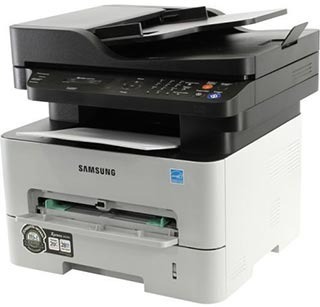
The Samsung SL-M2875 is the workgroup multifunction of its Xpress generation, built to print, scan and copy through a full shared workday without sitting idle for long. It feeds on two cartridge sizes: the standard MLT-D116S for lighter desks, or the high-yield MLT-D116L that most shared offices end up choosing. Toner is only half of the supply picture here, because imaging runs through a separate MLT-R116 drum unit rated for roughly 9,000 pages, so the two parts wear out on very different schedules.
A machine like this usually anchors a small team: contracts get scanned in the morning, invoices copied at midday, and long reports printed whenever the queue allows. That mixed diet is exactly why the high-yield cartridge earns its keep — every swap on a shared device interrupts somebody, so stretching the interval between swaps matters more than the small price gap. One spare cartridge on the shelf beside it is the standard setup for this class of printer.
Toner Cartridges for SL-M2875
| Cartridge | Color | Page Yield |
|---|---|---|
| MLT-D116L high-yield toner cartridge, single | Black | See product page |
| MLT-D116L high-yield toner, 3 pack | Black | See product page |
| MLT-D116L Premium high-yield toner, 5 pack | Black | See product page |
| SL-M2875 high-yield toner, model-named listing, single | Black | See product page |
| SL-M2875 high-yield toner, model-named listing, 5 pack | Black | See product page |
Drum unit for this printer:
- MLT-R116 imaging drum unit
Which cartridge should you buy?
Start with volume. A desk that prints a few pages a day will take months to empty the standard MLT-D116S, and paying for capacity that sits in the machine for a year buys nothing. A shared workgroup device is the opposite case: the MLT-D116L high-yield single spreads its cost over far more pages and needs changing less often, which is the real saving on a printer several people depend on. If your team goes through cartridges steadily, the multi-packs listed above cut the per-cartridge cost further and keep a spare within reach. Whichever size you pick, the drum keeps its own calendar — budget for an MLT-R116 roughly when page quality, not toner level, starts to slip.
Chip, toner and everyday use
Each cartridge carries a chip the SL-M2875 reads to track toner level, so seat a new cartridge until it clicks and let the machine finish its recognition cycle before sending a job. Pull the sealing tape fully out before installing, and give the cartridge a gentle side-to-side rock so the powder settles evenly. Store spares flat, in their bags, away from heat and direct light. Page-yield figures are estimates worked out at around five percent page coverage, so dense graphics and bold headers will empty any cartridge sooner than plain text does.
Frequently Asked Questions
What is the difference between the toner cartridge and the drum in the SL-M2875?
They are two independent consumables. The cartridge holds the toner powder and runs out first — most of your purchases will be MLT-D116L or MLT-D116S cartridges. The MLT-R116 drum forms the image on the page and survives several toner changes before its surface wears. When a fresh cartridge does not restore clean output, the drum is usually the part that has reached its limit.
My SL-M2875 will not print right after a toner change — what should I check?
Treat it as an installation issue first. Confirm the seal is fully removed, the chip faces its contacts cleanly, and the cartridge is pushed home until it clicks. Then double-check the code on the box: this printer accepts the MLT-D116S and MLT-D116L family only, and a near-miss code is the classic cause of an incompatible-cartridge message. A careful reinstall resolves most of these cases on the spot.
Why do pages from my SL-M2875 carry a light gray background everywhere?
A faint gray veil across the whole sheet points at the drum rather than the toner: its cleaning action is no longer wiping the surface fully between pages. If the haze persists with a fresh cartridge fitted, plan on replacing the drum unit instead of burning through more toner. Backgrounding never improves with time, so the sooner the drum is swapped, the sooner whites print white again.
More printers that use the same cartridges
The same MLT-D116 cartridges and MLT-R116 drum also serve this wider group of Samsung models: SL-M2625, SL-M2625D, SL-M2625DW, SL-M2626, SL-M2675, SL-M2675F, SL-M2675FN, SL-M2676, SL-M2825, SL-M2825DW, SL-M2825ND, SL-M2826, SL-M2835, SL-M2835DW, SL-M2875FD, SL-M2875FW, SL-M2876, SL-M2885, SL-M2885FW, Samsung-MLTD116L, Xpress M2626, Xpress M2676, Xpress M2826, Xpress M2835 DW, Xpress M2875, Xpress M2875 DW, Xpress SL-M2625D, Xpress SL-M2675F, Xpress SL-M2825DW, Xpress SL-M2875FD, Xpress SL-M2875FW.