




SL-M2876
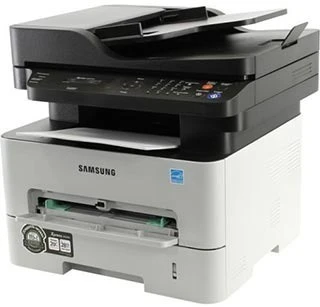
Samsung's SL-M2876 is a regional badge on the 2875-series workgroup multifunction, delivering print, scan, and copy with shared-office durability. Same workhorse engine, different model number.
It feeds on the MLT-D116S standard cartridge or MLT-D116L high-yield. Our compatible versions are the economical pick; genuine OEM versions are the factory pick. Fast shipping from Clever Supplies. A dedicated MLT-R116 drum unit forms each image on the SL-M2876 and holds up for around 9,000 pages between replacements.
Toner Cartridges for SL-M2876
This printer works with the following toner cartridges:
- Samsung MLT-D116S
- Samsung MLT-D116L
More Samsung Printers
- SL-M2625
- SL-M2625D
- SL-M2626
- SL-M2675
- SL-M2676
- SL-M2825
- SL-M2825DW
- SL-M2825ND
- SL-M2826
- SL-M2875
- SL-M2875FD
- SL-M2875FW
- SL-M2835
- SL-M2835DW
- SL-M2885FW
- SL-M2675F
- SL-M2885
- SL-M2625DW
- SL-M2675FN
- Xpress SL-M2625D
- Xpress SL-M2675F
- Xpress SL-M2825DW
- Xpress SL-M2875FD
- Xpress SL-M2875FW
- Xpress M2626
- Xpress M2676
- Xpress M2826
- Xpress M2835 DW
- Xpress M2875
- Xpress M2875 DW
Frequently Asked Questions
My SL-M2876 prints repeating marks down the length of the sheet, and how do I figure out which part is at fault?
When the same mark repeats at regular intervals down the page, the drum surface inside the SL-M2876 is usually damaged or worn. Open the multifunction printer and look at the drum for scratches, fingerprints, or a worn band that lines up with the streak on the page. Catching it early with a visual check beats guessing between a new MLT-D116S and a new drum.
Which replacement cartridge is compatible with the SL-M2876, and what do the S and L suffixes mean for everyday use?
Match the code on your old cartridge to the MLT-D116S / MLT-D116L family — MLT-D116S or MLT-D116L — and you cannot go wrong. If a listing does not show the exact MLT-D116S or MLT-D116L code, do not buy it for the SL-M2876 — close-looking codes are not interchangeable. A thirty-second code check beats a week-long exchange.
Why is the white paper coming out gray from my SL-M2876 — is it a drum issue or a toner issue that used to print clean white?
That all-over gray film is the classic signature of a tired drum or a failing cleaning blade inside the SL-M2876. Look at the drum surface under good light — a visibly worn or uneven coating confirms what the pages are telling you. Backgrounding only gets worse with time, so plan the drum replacement rather than living with it.