




SL-M2835DW
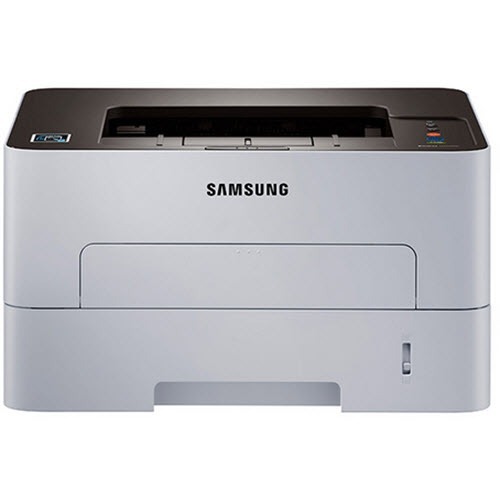
Wireless plus duplexing defines Samsung's SL-M2835DW: a fast workgroup mono laser shared over Wi-Fi, printing on both sides of the page without being asked twice. Its supplies run on a two-part architecture. The toner is the MLT-D116L high yield — Samsung also rates this machine for a standard MLT-D116S, but the L is the cartridge this shelf is built around — and behind it works the MLT-R116 imaging drum, a separate unit that carries the image to the page long after individual cartridges have come and gone.
On a shared network printer, supply planning is a small logistics exercise. Several people print, nobody owns the toner gauge, and the cartridge always seems to empty during someone else's deadline. The two-part design actually helps here: toner swaps are frequent and cheap, the drum change is rare and predictable, and keeping one of each in the cupboard covers both clocks at once.
Toner Cartridges for SL-M2835DW
| Cartridge | Color | Page Yield |
|---|---|---|
| Compatible Samsung MLT-D116L High Yield Laser Toner Cartridge Black | Black | See product page |
| Compatible Samsung MLT-D116L High Yield Laser Toner Cartridge Black 3 Pack | Black | See product page |
| Compatible Samsung MLT-D116L Premium Quality High Yield Laser Toner Cartridge Black 5 Pack | Black | See product page |
| Compatible Samsung SL-M2835DW High Yield Laser Toner Cartridge Black | Black | See product page |
| Compatible Samsung SL-M2835DW High Yield Laser Toner Cartridges Black 5 Pack | Black | See product page |
| Compatible Samsung SL-M2835DW Toner Cartridge Black (MLT-D116L) | Black | See product page |
Imaging drum for this model:
- Compatible Samsung MLT-R116 Drum Unit Cartridge Black
- Compatible Samsung SL-M2835DW DRUM Drum Cartridge Black (MLT-R116-DRUM)
Which cartridge should you buy?
Most owners should standardize on the MLT-D116L and stop thinking — it is the high-yield cartridge this printer was stocked around, sold as a single for light months, a three-pack for a working quarter, and a Premium five-pack when the machine serves a whole team. The listings carrying the printer's own name, including the SL-M2835DW cartridge, are the same MLT-D116L supply under a model label, so choose whichever naming line you find easier to reorder from. The drum is a different purchase on a different schedule: do not buy an MLT-R116 with every toner order. Wait until print defects — repeating marks, a dirty background — say the drum itself is tired, then replace it once and go back to toner-only ordering.
Chip, toner and everyday use
A cartridge that reports incompatible usually needs its chip read again: remove it, confirm the protective seal is gone, and reseat it until it clicks, then let the printer print a supplies status page to confirm it sees the cartridge. If finished pages smudge when touched, check that the paper type setting matches the stock loaded before blaming hardware, since a mismatched setting leaves toner sitting on the surface instead of fused into the fibers. Swap cartridges over a sheet of newspaper and keep the old one level while it travels to the bin; most toner spills come from tilting a spent cartridge. Yields are rated at five percent coverage, and the compatible supplies here carry a one-year warranty with one-year returns.
Frequently Asked Questions
Does the SL-M2835DW take the MLT-D116S or the MLT-D116L?
Both fit — Samsung rates the machine for the standard MLT-D116S and the high-yield MLT-D116L. This page stocks the L, the longer-running of the two, in single and multi-pack form, alongside the SL-M2835DW-named listing of the same cartridge.
What does the MLT-R116 do, and when do I replace it?
The MLT-R116 is the imaging drum: the surface that carries the toner image onto each page. It outlasts several toner cartridges and asks for replacement only when defects repeat at the same spot on page after page, or the background of prints turns dirty despite a fresh cartridge.
How do I change the toner without making a mess?
Work slowly and keep everything level. Open the machine, draw the old cartridge straight out without tipping it, and slide the new MLT-D116L in along its rails until it clicks. Forcing a cartridge means it is misaligned, not stuck — back it out and try the angle again.
Why does the printer call a new cartridge incompatible?
Start with the physical checks: chip aligned, seal removed, cartridge clicked fully home. After reinstalling, print a supplies status page; when the printer reports the cartridge there, the error is cleared. A wrong-code cartridge is the other usual suspect, so read the label before the second attempt.
More printers that use the same cartridges
These Samsung models share the D116 toner and R116 drum pairing:
SL-M2625, SL-M2625D, SL-M2625DW, SL-M2626, SL-M2675, SL-M2675F, SL-M2675FN, SL-M2676, SL-M2825, SL-M2825DW, SL-M2825ND, SL-M2826, SL-M2835, SL-M2875, SL-M2875FD, SL-M2875FW, SL-M2876, SL-M2885, SL-M2885FW, Samsung-MLTD116L, Xpress M2626, Xpress M2676, Xpress M2826, Xpress M2835 DW, Xpress M2875, Xpress M2875 DW, Xpress SL-M2625D, Xpress SL-M2675F, Xpress SL-M2825DW, Xpress SL-M2875FD, Xpress SL-M2875FW