





 See Compatible Printers
 Read more about our ink!
Samsung
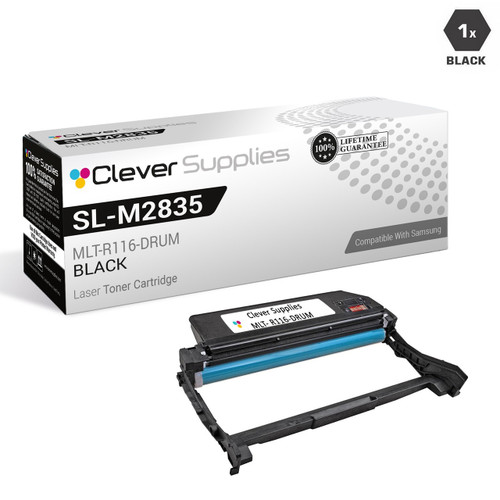
Compatible Samsung SL-M2835DW DRUM Drum Cartridge Black (MLT-R116-DRUM)

Amazon Price:

- Page Yield:
- Black:9000
- Availability:
- In Stock
- Shipping:
- Free Shipping
- Compatible Printers
- SL-M2835DW
- SL-M2885FW
- M2626
- M2676
- M2826
- M2835 DW
- M2875
- M2875 DW
- M3065FW
- SL-M2625D
- SL-M2675F
- SL-M2825DW
- SL-M2875DW
- SL-M2875FD
- SL-M2875FWi>
- Specifications
- SKU:
- CS-Samsung-SL-M2835DW-DR-BK
- Printer Brand:
- Samsung
- OEM Number:
- MLT-R116-DRUM
- Ink Color:
- Black
- Page Yield:
- Black:9000
- Printer Type:
- Laser Cartridge
- Description
- Reviews

/> 

Clever Supplies brand products are made in the USA! Why pay more for cheaper product with a high defective rate? You will end up having to send it back to the manufacturer. Get a quality product that you KNOW will work. Purchase the Clever Supplies Products Compatible for Samsung SL-M2835DW-DRUM (MLT-R116-DRUM) Drum Cartridge Black and experience the difference! All Clever Supplies brand products are backed by '100% Quality Satisfaction' 1 year warranty against defects in materials and workmanship for all toner products. Free tech support for a Clever Supplies problems for all Clever Supplies brand products. The use of Clever Supplies brand replacement laser toner cartridges and supplies does not void printer warranty. Premium Quality Replacement Toner Cartridge is made by ISO9001 Certified Factory to Meet or Exceed OEM Standards. These units are manufactured 100% brand new with all new parts including OPC drums, wiper blades, a smart chip and other internal parts, they are an economical alternative to expensive OEM MLT-R116-DRUM, Compatible Toner Cartridges. This is a Compatible for Samsung SL-M2625D-DRUMDrum Cartridge Black guaranteed to perform with Samsung Laser Printers. It replaces the original Samsung SL-M2625D-DRUM toner cartridge MLT-R116-DRUM Black. The compatible replacement for MLT-R116-DRUM. We offer a 100% Quality Satisfaction Guarantee on our Compatible for MLT-R116-DRUM Laser Toner Cartridges and supplies. For use in the following printers: SL-M2625D, SL-M2675F, SL-M2825DW, SL-M2835DW, SL-M2875FD, SL-M2875FW, SL-M2885FW, Xpress SL-M2625D, Xpress SL-M2675F, Xpress SL-M2825DW, Xpress SL-M2875FD, Xpress SL-M2875FW, Xpress M2626, Xpress M2676, Xpress M2826, Xpress M2835 DW, Xpress M2875, Xpress M2875 DW
Frequently Asked Questions
Spots keep appearing at the same intervals down every page — what causes that?
That pattern is the classic signature of a marked drum surface. A repeating defect — the same spot or nick showing up again and again at regular spacing — means something on a rotating surface is touching every page in the same place, and on this platform that surface is the MLT-R116 imaging unit. Toner faults do not repeat with that kind of rhythm; they fade or streak. When the marks march down the sheet in time, the drum is where the evidence points, and replacing it is the cure rather than another cartridge.
The unit I pulled out is stamped MLT-R116 — is this listing that drum?
Yes. The code on the spent unit is the reliable identifier: if it reads MLT-R116, this compatible replacement is the same imaging unit, rated for the same 9,000-page drum life. This listing is titled for the SL-M2835DW, but the part itself is defined by that stamp — the machine badge varies across the family while the drum does not.
What share of my printing cost does the drum account for?
At $82.75 spread over 9,000 pages, roughly 0.92 cents per page — the quiet slice of the running cost that sits alongside the toner. It is worth seeing it that way when a drum change feels like a big single outlay: you are not buying a repair, you are buying the next 9,000 imaged pages at under a cent each, and resetting print quality to what the machine delivered when the surface was new.
Will a new drum sharpen up gray, hazy text?
If the haze is coming from the surface, yes — that is precisely the complaint a fresh MLT-R116 answers. A tired drum lays down a faint background charge that toner clings to, so pages come out with a gray film and text loses its edge even with a good cartridge fitted. Swap the surface and the background whitens back up. The honest caveat: if the haze is actually a nearly-empty toner scattering its last pages, a cartridge is the cheaper first test — even fading points to toner, film and shading point to drum.
Which other models share this imaging unit?
Besides the SL-M2835DW, the same MLT-R116 serves the SL-M2885FW, SL-M2625D, SL-M2675F, SL-M2825DW and SL-M2875FD. Six machines, one drum — so a spare held for this printer also rescues any of its siblings, and the code on the old unit settles any question before you order.
What warranty and returns stand behind it?
The unit carries a year's warranty, and returns are free of charge across that first year — full detail on the shipping and returns page. It ships from whichever of our IL, PA, GA and CA warehouses is closest to you, with support staffed Monday to Friday, 9 AM to 5 PM CST.
How should a spare drum be stored so it is ready when the old one fails?
Keep the MLT-R116 sealed inside its packaging, flat, in a dark drawer or closed cupboard. The drum's surface is sensitive to light, which is exactly why it ships protected — opening the wrapping early to peek at it does the unit no favors. Stored that way, a spare bought ahead of need waits patiently and can be fitted the same day the old unit's marks become impossible to ignore.
What is the quickest way to tell whether fading means toner or drum?
Read the pattern. Toner trouble fades evenly across the page and usually recovers for a while when the cartridge is rocked side to side. Drum trouble looks different: the same mark repeating at fixed intervals, or a gray film that stays identical from page to page even with a fresh cartridge fitted. If swapping in a known-good toner changes nothing, the evidence has already pointed at the MLT-R116.
How do we avoid ordering the toner cartridge when the drum is what we need?
Check the code letter before ordering. The imaging unit is MLT-R116; the toner cartridge for the same machines is the MLT-D116L — one letter apart, entirely different parts. The stamp on the unit you have just removed settles the question in seconds, and ordering from that stamp rather than from the printer's badge avoids the most common mix-up on this platform.
What should happen to the old drum after the replacement goes in?
Hold it briefly, until the new MLT-R116 has produced a run of clean pages that proves the swap cured the fault. Then the old unit can be recycled or disposed of — there is no value in storing it longer, and its light-sensitive surface degrades on a shelf anyway. Keeping it just for that short proof period protects you if the new unit disappoints and the old one needs to be examined.
About This MLT-R116 Drum Unit for the SL-M2835DW
One compatible MLT-R116 imaging unit at $82.75, rated for 9,000 pages — the replacement surface for an SL-M2835DW whose prints have started repeating marks, streaking or greying in ways a toner change cannot fix. It carries no toner of its own; your MLT-D116L or MLT-D116S cartridge keeps working in front of it. The same drum fits the five other models above, and the platform's full supply list is in the Samsung toner range.
Related Items

Samsung
Compatible Samsung SL-M2875FD DRUM Drum Cartridge Black (MLT-R116-DRUM)
/>

Samsung
Compatible Samsung SL-M2825DW DRUM Drum Cartridge Black (MLT-R116-DRUM)
/>

Samsung
Compatible Samsung SL-M2875FW DRUM Drum Cartridge Black (MLT-R116-DRUM)
/>

Samsung
Compatible Samsung SL-M2675F DRUM Drum Cartridge Black (MLT-R116-DRUM)
/>