





 See Compatible Printers
 Read more about our ink!
Samsung
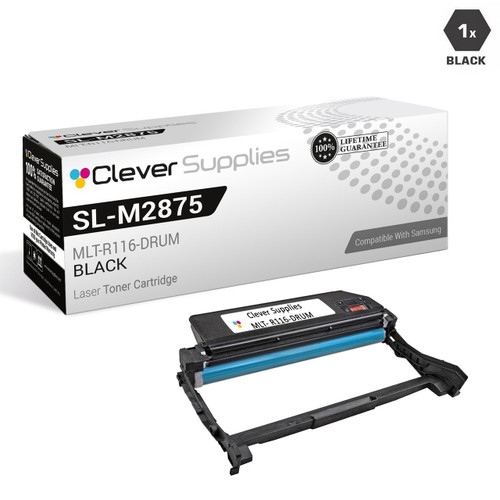
Compatible Samsung SL-M2875FW DRUM Drum Cartridge Black (MLT-R116-DRUM)

Amazon Price:

- Page Yield:
- Black:9000
- Availability:
- In Stock
- Shipping:
- Free Shipping
- Compatible Printers
- SL-M2835DW
- SL-M2885FW
- M2626
- M2676
- M2826
- M2835 DW
- M2875
- M2875 DW
- M3065FW
- SL-M2625D
- SL-M2675F
- SL-M2825DW
- SL-M2875DW
- SL-M2875FD
- SL-M2875FWi>
- SL-M2625
- SL-M2625DW
- SL-M2626
- SL-M2675
- SL-M2675FN
- SL-M2676
- SL-M2825
- SL-M2825ND
- SL-M2826
- SL-M2835
- SL-M2875
- SL-M2875FW
- SL-M2876
- SL-M2885
- Samsung-MLTD116L
- Xpress M2626
- Xpress M2676
- Xpress M2826
- Xpress M2835 DW
- Xpress M2875
- Xpress M2875 DW
- Xpress SL-M2625D
- Xpress SL-M2675F
- Xpress SL-M2825DW
- Xpress SL-M2875FD
- Xpress SL-M2875FW
- Specifications
- SKU:
- CS-Samsung-SL-M2875FW-DR-BK
- Printer Brand:
- Samsung
- OEM Number:
- MLT-R116-DRUM
- Ink Color:
- Black
- Page Yield:
- Black:9000
- Printer Type:
- Laser Cartridge
- Description
- Reviews

/> 

Clever Supplies brand products are made in the USA! Why pay more for cheaper product with a high defective rate? You will end up having to send it back to the manufacturer. Get a quality product that you KNOW will work. Purchase the Clever Supplies Products Compatible for Samsung SL-M2875FW-DRUM (MLT-R116-DRUM) Drum Cartridge Black and experience the difference! All Clever Supplies brand products are backed by '100% Quality Satisfaction' 1 year warranty against defects in materials and workmanship for all toner products. Free tech support for a Clever Supplies problems for all Clever Supplies brand products. The use of Clever Supplies brand replacement laser toner cartridges and supplies does not void printer warranty. Premium Quality Replacement Toner Cartridge is made by ISO9001 Certified Factory to Meet or Exceed OEM Standards. These units are manufactured 100% brand new with all new parts including OPC drums, wiper blades, a smart chip and other internal parts, they are an economical alternative to expensive OEM MLT-R116-DRUM, Compatible Toner Cartridges. This is a Compatible for Samsung SL-M2625D-DRUMDrum Cartridge Black guaranteed to perform with Samsung Laser Printers. It replaces the original Samsung SL-M2625D-DRUM toner cartridge MLT-R116-DRUM Black. The compatible replacement for MLT-R116-DRUM. We offer a 100% Quality Satisfaction Guarantee on our Compatible for MLT-R116-DRUM Laser Toner Cartridges and supplies. For use in the following printers: SL-M2625D, SL-M2675F, SL-M2825DW, SL-M2835DW, SL-M2875FD, SL-M2875FW, SL-M2885FW, Xpress SL-M2625D, Xpress SL-M2675F, Xpress SL-M2825DW, Xpress SL-M2875FD, Xpress SL-M2875FW, Xpress M2626, Xpress M2676, Xpress M2826, Xpress M2835 DW, Xpress M2875, Xpress M2875 DW
Frequently Asked Questions
Pages from our SL-M2875FW come out with a gray film over them — what is failing?
The imaging surface, most likely. A uniform gray background — the white parts of the page no longer printing white — is what a tired drum does: the MLT-R116's surface stops holding a clean charge, toner dusts where no image should be, and every page carries the haze. It is a different fault from an empty cartridge, which fades the image itself rather than dirtying the background. When the whites go gray, the drum is the part under suspicion, and this is its replacement.
Is the drum really a separate part from the toner on this model?
Really separate, and deliberately so. The toner cartridge — the MLT-D116L high-yield or the standard MLT-D116S — is just a reservoir of powder. The MLT-R116 drum is the imaging surface that powder is patterned on, page after page. Samsung split them because their lifespans differ by a factor of about three: cartridges come and go while one drum keeps imaging. It means a worn surface never forces you to throw away toner, and an empty toner never forces you to buy a drum.
How long is this drum expected to image for?
Its rated life is 9,000 pages — prints, copies and received faxes all drawing from the same budget, since each is imaged on the same surface. In toner terms, expect roughly three high-yield MLT-D116L cartridges to pass through the SL-M2875FW during one drum's service. Judge replacement by output rather than arithmetic, though: the counter and the rating are guides, while streaks, repeating marks and background shading are the surface reporting on itself.
Does this listing's drum serve the SL-M2875FW specifically?
Yes — this listing is the MLT-R116 as stocked for the SL-M2875FW, and the identical unit is the listed drum for the SL-M2835DW, SL-M2885FW, SL-M2625D, SL-M2675F, SL-M2825DW and SL-M2875FD. One imaging unit covers the whole group, which is why the stamp on your spent drum — MLT-R116 — matters more than the badge on the printer's front.
Anything to watch out for while handling the new unit?
Light and fingers. The drum surface is light-sensitive, so leave the MLT-R116 in its packaging until you are ready to fit it, and do the swap out of direct sunlight if you can. Once it is unwrapped, hold it by its body and keep skin off the smooth imaging surface — oil from a fingerprint marks every page afterward. Beyond that the change is a straightforward slide-out, slide-in, and your current toner cartridge returns to its place in front of the new drum.
What warranty and returns back this purchase?
A one-year warranty on the unit, with returns free of charge for the full year — the complete terms are on the shipping and returns page. Orders ship from the closest of our IL, PA, GA and CA warehouses, and the support team answers Monday to Friday, 9 AM to 5 PM CST.
How can we be sure the drum — not the toner — is causing the gray film?
Run a swap test. Fit a toner cartridge you know is good — ideally a fresh one — and print the same page again. An emptying cartridge fades the image; it does not dirty the background. If the white areas still come out gray with known-good toner in place, the imaging surface is the fault and the MLT-R116 is the part to replace.
After fitting the new drum, what page best proves it has fixed the problem?
A page that is mostly white. Print a document with wide margins and plenty of blank space — or a blank page followed by a short letter. On the old MLT-R116 those empty areas carried the gray haze; on a healthy drum they come out clean white. That single sheet judges the new surface more honestly than a dense page would.
Is it worth recording anything on the day the drum is changed?
Yes — the machine's page counter reading and the date. The MLT-R116 is rated at 9,000 pages, so a note of the counter at fitting turns the next change from a guess into arithmetic: when the counter approaches 9,000 pages beyond that reading and background shading starts to creep in, the drum's life is spent. Tape the note inside the supply cupboard.
What happens to the spent drum once the new one is in?
Keep it until the new MLT-R116 has printed cleanly for several days — it is the evidence of the old fault and carries the part code. Then it can go out with your cartridge recycling; imaging units are accepted by the same collection schemes as toner cartridges. Do not refit a worn drum as an experiment — a tired surface will only reintroduce the marks you just removed.
About This MLT-R116 Drum Unit for the SL-M2875FW
One compatible MLT-R116 imaging unit, $82.75 — 9,000 pages of rated drum life, about 0.92 cents per page, for the SL-M2875FW and the six sibling models sharing this drum. It contains no toner; it is the surface that takes gray film, streaks and repeating marks out of the machine's output when a cartridge swap no longer does, and your existing toner fits back in front of it untouched. Everything else for this platform is collected in the Samsung toner range.
Related Items

Samsung
Compatible Samsung SL-M2835DW DRUM Drum Cartridge Black (MLT-R116-DRUM)
/>


Samsung
Compatible Samsung SL-M2885FW DRUM Drum Cartridge Black (MLT-R116-DRUM)
/>

Samsung
Compatible Samsung SL-M2875FD DRUM Drum Cartridge Black (MLT-R116-DRUM)
/>
Samsung
Compatible Samsung SL-M2825DW DRUM Drum Cartridge Black (MLT-R116-DRUM)
/>