





 See Compatible Printers
 Read more about our ink!
Samsung
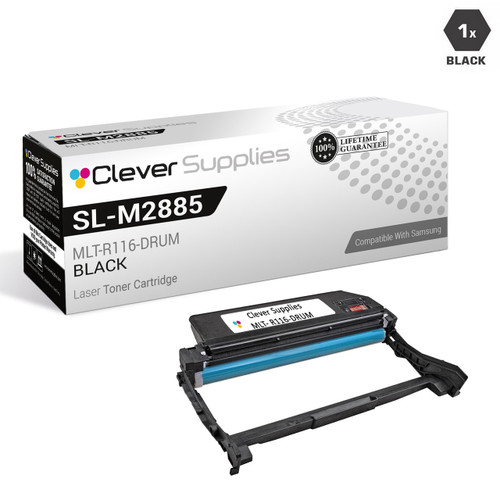
Compatible Samsung SL-M2885FW DRUM Drum Cartridge Black (MLT-R116-DRUM)

Amazon Price:

- Page Yield:
- Black:9000
- Availability:
- In Stock
- Shipping:
- Free Shipping
- Compatible Printers
- SL-M2835DW
- SL-M2885FW
- M2626
- M2676
- M2826
- M2835 DW
- M2875
- M2875 DW
- M3065FW
- SL-M2625D
- SL-M2675F
- SL-M2825DW
- SL-M2875DW
- SL-M2875FD
- SL-M2875FWi>
- SL-M2625
- SL-M2625DW
- SL-M2626
- SL-M2675
- SL-M2675FN
- SL-M2676
- SL-M2825
- SL-M2825ND
- SL-M2826
- SL-M2835
- SL-M2875
- SL-M2875FW
- SL-M2876
- SL-M2885
- Samsung-MLTD116L
- Xpress M2626
- Xpress M2676
- Xpress M2826
- Xpress M2835 DW
- Xpress M2875
- Xpress M2875 DW
- Xpress SL-M2625D
- Xpress SL-M2675F
- Xpress SL-M2825DW
- Xpress SL-M2875FD
- Xpress SL-M2875FW
- Specifications
- SKU:
- CS-Samsung-SL-M2885FW-DR-BK
- Printer Brand:
- Samsung
- OEM Number:
- MLT-R116-DRUM
- Ink Color:
- Black
- Page Yield:
- Black:9000
- Printer Type:
- Laser Cartridge
- Description
- Reviews

/> 

Clever Supplies brand products are made in the USA! Why pay more for cheaper product with a high defective rate? You will end up having to send it back to the manufacturer. Get a quality product that you KNOW will work. Purchase the Clever Supplies Products Compatible for Samsung SL-M2885FW-DRUM (MLT-R116-DRUM) Drum Cartridge Black and experience the difference! All Clever Supplies brand products are backed by '100% Quality Satisfaction' 1 year warranty against defects in materials and workmanship for all toner products. Free tech support for a Clever Supplies problems for all Clever Supplies brand products. The use of Clever Supplies brand replacement laser toner cartridges and supplies does not void printer warranty. Premium Quality Replacement Toner Cartridge is made by ISO9001 Certified Factory to Meet or Exceed OEM Standards. These units are manufactured 100% brand new with all new parts including OPC drums, wiper blades, a smart chip and other internal parts, they are an economical alternative to expensive OEM MLT-R116-DRUM, Compatible Toner Cartridges. This is a Compatible for Samsung SL-M2625D-DRUMDrum Cartridge Black guaranteed to perform with Samsung Laser Printers. It replaces the original Samsung SL-M2625D-DRUM toner cartridge MLT-R116-DRUM Black. The compatible replacement for MLT-R116-DRUM. We offer a 100% Quality Satisfaction Guarantee on our Compatible for MLT-R116-DRUM Laser Toner Cartridges and supplies. For use in the following printers: SL-M2625D, SL-M2675F, SL-M2825DW, SL-M2835DW, SL-M2875FD, SL-M2875FW, SL-M2885FW, Xpress SL-M2625D, Xpress SL-M2675F, Xpress SL-M2825DW, Xpress SL-M2875FD, Xpress SL-M2875FW, Xpress M2626, Xpress M2676, Xpress M2826, Xpress M2835 DW, Xpress M2875, Xpress M2875 DW
Frequently Asked Questions
How long will one of these drums actually last our SL-M2885FW?
Work it from your monthly volume. The MLT-R116 is rated for 9,000 imaged pages: a machine printing and copying 250 pages a month stretches one drum to about three years, at 750 a month it is a year, and a genuinely busy desk at 1,500 a month turns one around in six months. Copies and received faxes draw from the same 9,000 as prints do. The figure that fools people is the cartridge count — roughly three high-yield MLT-D116L toners per drum — because toner changes feel frequent while the drum quietly outlasts them all.
What actually wears a drum out?
Pages. Every sheet imaged is one pass of the surface under the machine's charging and exposure cycle, and the MLT-R116's coating is specified for about 9,000 of those passes. It is wear in the plain mechanical sense, not age — a drum in a rarely used printer does not expire on the shelf in the machine, and a hard-worked one can be spent while the printer is still young. That is also why there is no calendar-based change interval worth following; page count and print quality are the honest measures.
How do I tell a worn drum from a worn-out toner?
By the shape of the failure. A dying toner cartridge fades evenly — the whole page lighter, improving briefly if you rock the cartridge, then fading again. A dying drum leaves structure behind: lines or spots repeating down the page, a gray background film, streaks that stay in the same place sheet after sheet, and — the clincher — no improvement when a fresh MLT-D116L or MLT-D116S goes in. Even fading says buy toner; patterned defects say buy the MLT-R116.
Which machines does this drum fit?
This listing serves the SL-M2885FW, and the same MLT-R116 imaging unit is listed for the SL-M2835DW, SL-M2625D, SL-M2675F, SL-M2825DW and SL-M2875FD. The unit you remove from any of those printers carries the MLT-R116 stamp, and that code is the part's identity across the whole family.
What does the drum work out to per page?
About 0.92 cents — $82.75 divided across the 9,000-page rated life. It is the smaller, slower-moving slice of this platform's running cost next to toner, and it is spent on quality rather than coverage: the drum is what keeps blacks black and backgrounds white while the toner cartridges cycle through in front of it.
What cover comes with the purchase?
The MLT-R116 is backed by a year's warranty, and returns are free across that whole first year — see the shipping and returns page for the mechanics. Dispatch is from whichever of our warehouses in IL, PA, GA and CA is nearest, and support is staffed Monday to Friday, 9 AM to 5 PM CST.
If we keep a spare MLT-R116 on the shelf, how should it be stored?
Sealed in its packaging, in the dark. The drum's imaging surface is light-sensitive, so a spare should stay in its closed box inside a cupboard rather than sitting out on a shelf in daylight, and it should be kept flat, cool and dry like any other toner stock. Stored that way, a spare drum waits patiently — drums wear by pages imaged, not by time on the shelf.
What handling care does the drum swap itself call for?
Keep your fingers off the imaging surface, and fit the new MLT-R116 promptly once it is out of its packaging — the surface that carries the image is the part that must stay clean and unmarked. Work on a clean, flat surface, keep the old unit's box handy to receive it, and run a test page or two afterwards: the patterned defects that were there before should be gone with the new drum in place.
Before reordering, how do we make sure we buy the drum and not another toner cartridge?
Read the stamp on the unit you take out. The drum is the MLT-R116 — note the R — while the toner cartridges working in front of it are the MLT-D116L and MLT-D116S, with a D. The two parts do different jobs and are not interchangeable, and the most common ordering mistake on this platform is replacing the part that was not worn. The code on the removed unit settles it.
What happens to the old drum once the new one is in?
Keep it a short while, then recycle it. Holding the removed MLT-R116 until the new unit has printed cleanly for a few days gives you a fallback for comparison if anything looks odd after the change. After that it has no further use — it is a worn imaging surface, not a refillable part — so it goes out with your other spent consumables for recycling rather than into general waste.
About This MLT-R116 Drum Unit for the SL-M2885FW
A single compatible MLT-R116 imaging unit at $82.75, rated for 9,000 pages of prints, copies and faxes on the SL-M2885FW — the replaceable surface behind the machine's image quality, changed when patterned defects survive a toner swap, not when a cartridge empties. Your MLT-D116L or MLT-D116S toner works in front of it unchanged. The identical drum serves the five other models above, and the platform's supplies are gathered in the Samsung toner range.
Related Items

Samsung
Compatible Samsung SL-M2875FD DRUM Drum Cartridge Black (MLT-R116-DRUM)
/>

Samsung
Compatible Samsung SL-M2825DW DRUM Drum Cartridge Black (MLT-R116-DRUM)
/>

Samsung
Compatible Samsung SL-M2875FW DRUM Drum Cartridge Black (MLT-R116-DRUM)
/>

Samsung
Compatible Samsung SL-M2675F DRUM Drum Cartridge Black (MLT-R116-DRUM)
/>