




Xpress M2875 DW
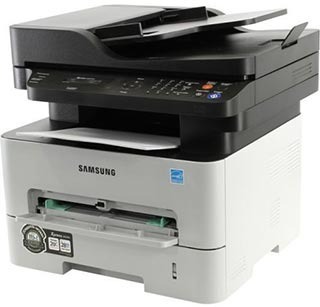
The Xpress M2875 DW is the wireless, duplexing Xpress multifunction of the 2875 workgroup line — print, scan and copy available to every device over Wi-Fi, with two-sided output standard. It feeds on the MLT-D116S cartridge or the longer-running MLT-D116L; this page lists the high-yield version. A second supply item serves it: the MLT-R116 drum unit, changed on its own schedule after approximately 9,000 pages.
A wireless multifunction becomes office furniture in the best sense — nobody thinks about where it is, every laptop and phone simply finds it. Its toner story is the mirror of that convenience: consumption is steady, shared and easy to forget until the warning appears. Owners who do well with this model treat the spare cartridge as part of the furniture too, and let the machine's own settings — a sleep timer matched to office hours, two-sided output as the default — do the quiet economizing.
Toner Cartridges for Xpress M2875 DW
- SL-M2675F badging — MLT-D116L, one cartridge — black; rated yield on the product page
- SL-M2825DW badging — MLT-D116L, one cartridge — black; rated yield on the product page
- SL-M2835DW badging — MLT-D116L, one cartridge — black; rated yield on the product page
- SL-M2875FD badging — MLT-D116L, one cartridge — black; rated yield on the product page
- SL-M2875FW badging — MLT-D116L, one cartridge — black; rated yield on the product page
- SL-M2885FW badging — MLT-D116L, one cartridge — black; rated yield on the product page
- M2826 badging — MLT-D116L, one cartridge — black; rated yield on the product page
- M2875 DW badging — MLT-D116L, one cartridge — black; rated yield on the product page
- SL-M2625D badging — MLT-D116L, one cartridge — black; rated yield on the product page
- SL-M2625D badging — MLT-D116L, 10 cartridges — black; rated yield on the product page
- SL-M2625D badging — MLT-D116L, 5 cartridges — black; rated yield on the product page
- SL-M2625D badging — MLT-D116L, 3 cartridges — black; rated yield on the product page
- SL-M2625D badging — MLT-D116L, 2 cartridges — black; rated yield on the product page
- SL-M2625D badging — MLT-D116L, one cartridge — black; rated yield on the product page
Under the toner sits the imaging drum, on a far longer cycle — its family listings are these:
- SL-M2625D-DRUM badging — MLT-R116 drum unit
- SL-M2625D-DRUM badging — MLT-R116, 2 drum units
- SL-M2625D-DRUM badging — MLT-R116, 3 drum units
- SL-M2625D-DRUM badging — MLT-R116, 5 drum units
- SL-M2625D-DRUM badging — MLT-R116, 10 drum units
- SL-M2675F badging — MLT-R116 drum unit
- SL-M2825DW badging — MLT-R116 drum unit
- SL-M2835DW badging — MLT-R116 drum unit
- SL-M2875FD badging — MLT-R116 drum unit
- SL-M2875FW badging — MLT-R116 drum unit
- SL-M2885FW badging — MLT-R116 drum unit
- SL-M2625D badging — MLT-R116 drum unit
- SL-M2675F badging — MLT-R116 drum unit
Which cartridge should you buy?
The listings here are the high-yield MLT-D116L, and for a Wi-Fi hub shared by a whole office that is the right default: the standard MLT-D116S holds less toner, so it asks for attention sooner and costs more per page. Singles suit a single spare on the shelf; the 2-pack and larger listings suit offices that would rather reorder quarterly than monthly. Whichever size you choose, the cartridge itself is the same — only the count in the box changes. Our compatibles are covered by a 1-year warranty and 1-year returns.
Chip, toner and everyday use
Cartridges do not expire the way food does; the "install by" guidance on a box is a conservative estimate under average storage, and a well-kept cartridge can print normally well past it. What actually preserves a spare is cool, dry, dark storage — and not stockpiling beyond about two years of your real usage. On the printer side, one trade-off is worth knowing: aggressive power-saving means a longer wait for the first page while the fuser reheats, so set the sleep timer to the office's rhythm, not to the minimum.
Frequently Asked Questions
Is there an expiration date on a cartridge for this printer?
There is guidance, not a hard cutoff. Genuine and quality compatible cartridges share similar shelf lives when stored properly; consistency of manufacturing, not longevity chemistry, is the real difference between them. If an old spare has been kept cool and sealed, install it and judge a test page rather than discarding it on the date alone.
How do I recycle an empty cartridge from the Xpress M2875 DW?
Slip the empty into a bag first to contain any residual toner dust — no thorough cleaning is needed, since recyclers handle that — and keep it dry and out of direct sun until drop-off. Office supply stores commonly take empties back, and the cartridge is either remanufactured or broken down for materials.
Does keeping the printer awake waste toner?
Not in any amount worth chasing. The real cost of an always-awake machine is the wait-versus-wear balance: deep sleep saves power but delays the first page while the fuser reheats, which annoys a busy office and is invisible to an occasional user. Match the timer to how often the machine actually prints.
Is the drum for this model the same as for the other 2875 versions?
Yes — every 2875 variant in this family, wired or wireless, fax or no fax, images on the same MLT-R116 drum rated near 9,000 pages, and all take the same MLT-D116L toner. One shelf of supplies covers the whole line.
More printers that use the same cartridges
One cartridge family covers all of these Samsung models: Xpress M2875, Xpress SL-M2625D, Xpress SL-M2675F, Xpress SL-M2825DW, Xpress SL-M2875FD, Xpress SL-M2875FW, SL-M2625, SL-M2625D, SL-M2625DW, SL-M2626, SL-M2675, SL-M2675F, SL-M2675FN, SL-M2676, SL-M2825, SL-M2825DW, SL-M2825ND, SL-M2826, SL-M2835, SL-M2835DW, SL-M2875, SL-M2875FD, SL-M2875FW, SL-M2876, SL-M2885, SL-M2885FW, Samsung-MLTD116L, Xpress M2626, Xpress M2676, Xpress M2826, Xpress M2835 DW.