





 See Compatible Printers
 Read more about our ink!
Samsung
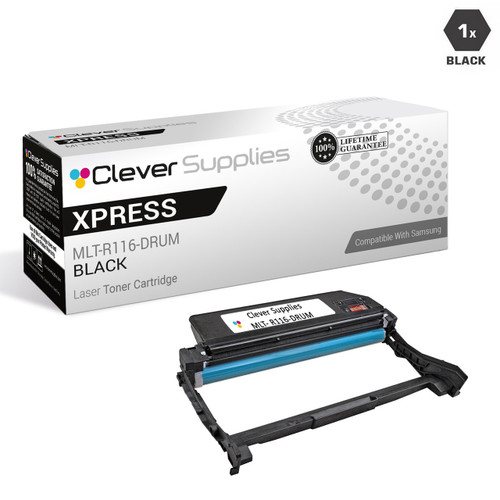
Compatible Samsung Xpress SL-M2675F DRUM Drum Cartridge Black (MLT-R116-DRUM)

Amazon Price:

- Page Yield:
- Black:9000
- Availability:
- In Stock
- Shipping:
- Free Shipping
- Compatible Printers
- SL-M2835DW
- SL-M2885FW
- M2626
- M2676
- M2826
- M2835 DW
- M2875
- M2875 DW
- M3065FW
- SL-M2625D
- SL-M2675F
- SL-M2825DW
- SL-M2875DW
- SL-M2875FD
- SL-M2875FWi>
- SL-M2625
- SL-M2625DW
- SL-M2626
- SL-M2675
- SL-M2675FN
- SL-M2676
- SL-M2825
- SL-M2825ND
- SL-M2826
- SL-M2835
- SL-M2875
- SL-M2875FW
- SL-M2876
- SL-M2885
- Samsung-MLTD116L
- Xpress M2626
- Xpress M2676
- Xpress M2826
- Xpress M2835 DW
- Xpress M2875
- Xpress M2875 DW
- Xpress SL-M2625D
- Xpress SL-M2675F
- Xpress SL-M2825DW
- Xpress SL-M2875FD
- Xpress SL-M2875FW
- Specifications
- SKU:
- CS-Samsung-XpressSL-M2675F-DR-BK
- Printer Brand:
- Samsung
- OEM Number:
- MLT-R116-DRUM
- Ink Color:
- Black
- Page Yield:
- Black:9000
- Printer Type:
- Laser Cartridge
- Description
- Reviews

/> 

Clever Supplies brand products are made in the USA! Why pay more for cheaper product with a high defective rate? You will end up having to send it back to the manufacturer. Get a quality product that you KNOW will work. Purchase the Clever Supplies Products Compatible for Samsung SL-M2675F-DRUM (MLT-R116-DRUM) Drum Cartridge Black and experience the difference! All Clever Supplies brand products are backed by '100% Quality Satisfaction' 1 year warranty against defects in materials and workmanship for all toner products. Free tech support for a Clever Supplies problems for all Clever Supplies brand products. The use of Clever Supplies brand replacement laser toner cartridges and supplies does not void printer warranty. Premium Quality Replacement Toner Cartridge is made by ISO9001 Certified Factory to Meet or Exceed OEM Standards. These units are manufactured 100% brand new with all new parts including OPC drums, wiper blades, a smart chip and other internal parts, they are an economical alternative to expensive OEM MLT-R116-DRUM, Compatible Toner Cartridges. This is a Compatible for Samsung SL-M2625D-DRUMDrum Cartridge Black guaranteed to perform with Samsung Laser Printers. It replaces the original Samsung SL-M2625D-DRUM toner cartridge MLT-R116-DRUM Black. The compatible replacement for MLT-R116-DRUM. We offer a 100% Quality Satisfaction Guarantee on our Compatible for MLT-R116-DRUM Laser Toner Cartridges and supplies. For use in the following printers: SL-M2625D, SL-M2675F, SL-M2825DW, SL-M2835DW, SL-M2875FD, SL-M2875FW, SL-M2885FW, Xpress SL-M2625D, Xpress SL-M2675F, Xpress SL-M2825DW, Xpress SL-M2875FD, Xpress SL-M2875FW, Xpress M2626, Xpress M2676, Xpress M2826, Xpress M2835 DW, Xpress M2875, Xpress M2875 DW
Frequently Asked Questions
What happens if I just keep changing toner and never replace the drum?
The printer keeps working, but its ceiling quietly lowers. The MLT-R116 is the surface every page is imaged on; as it wears past its 9,000-page rating, no cartridge — however fresh — can print better than that surface allows. The decline shows up as a gray background that never quite cleans, streaks in the same place on every sheet, marks repeating down the page. Owners often buy two or three toners chasing the fault before the drum is suspected. It is the cheaper diagnosis to make early: patterned defects that ignore new toner belong to the imaging unit.
Does copying count against this drum the same as printing?
Exactly the same. On the Xpress SL-M2675F, a copy, a computer print and a received fax are all formed on the MLT-R116 before they reach paper, so each spends the drum's rated life. Sending faxes and scanning to file image nothing, so they cost the drum nothing. On a multifunction machine the drum's true workload is the sum of all three paper streams — which is why a drum can be spent in a home office that swears it barely prints, while copying steadily every day.
How does fitting this drum interact with the toner already installed?
It doesn't disturb it. The toner cartridge — an MLT-D116L or the standard MLT-D116S — and the MLT-R116 drum are independent units in this machine: the cartridge lifts out for access and drops back in front of the new drum with whatever toner remains in it. You are replacing only the surface, and the toner spend already in the printer keeps working. Equally, the fresh drum does not reset when the next toner goes in; each part lives on its own clock.
Which printers share this imaging unit?
This listing is drawn for the Xpress SL-M2675F, and the same MLT-R116 drum is the listed unit for the SL-M2835DW, SL-M2885FW, SL-M2625D, SL-M2825DW and SL-M2875FD. The spent drum from any of them is stamped MLT-R116 — go by that stamp and the replacement is never in doubt.
How should the unit be kept before it is fitted?
Sealed, flat and out of strong light. The MLT-R116's imaging surface is light-sensitive, so the box stays closed until the swap, and the drum should not sit unwrapped on a sunny desk. There is no toner inside to settle or spoil — a drum is a precision surface, not a powder supply — so storage is about protecting that surface and nothing more exotic. When the old unit comes out and the new one goes in, keep fingers off the smooth drum itself.
What cover stands behind this drum?
A year's warranty, with returns free of charge throughout those twelve months — the full text is on the shipping and returns page. Orders are dispatched from our warehouses in IL, PA, GA and CA, and support is staffed Monday to Friday, 9 AM to 5 PM CST if you would like the symptoms checked against the drum before you commit.
Walk me through the swap itself — what are the handling points that matter?
The sequence is simple and the one caution is about touch. Open the machine, lift the toner cartridge out to clear the path, and remove the spent MLT-R116. Seat the new drum the same way, keeping your fingers off its smooth imaging surface — that surface is what every page is formed on, and it should go in clean. Drop the toner cartridge back in front of it, close up, and the Xpress SL-M2675F is ready; the toner you already owned never leaves its working life.
If the fault comes back after the drum change, how does the old unit help?
Kept aside for a few days, the old MLT-R116 becomes a control. A defect that stays identical through a drum change and a toner change is pointing at the machine itself rather than either supply, and being able to swap the old drum back briefly settles which side of the line the fault sits on. It costs nothing but a little shelf space for a short while, and it can save a long, inconclusive support conversation later.
Why note the page counter on the day the drum is fitted?
Because the MLT-R116 lives on a 9,000-page clock and the machine keeps the count. Writing the counter reading and the date on the drum's box turns every later quality question into arithmetic: pages since fitting, against 9,000 rated. Without that baseline, a worn drum and a tired toner cartridge feel identical from the outside; with it, you know which part's age explains the page in front of you before you order anything.
How should the drum's cost be figured into the machine's running costs?
As a steady per-page line rather than a surprise. At $82.75 across a 9,000-page rated life, the MLT-R116 contributes about 0.92 cents to every page the Xpress SL-M2675F images — prints, copies and received faxes alike. Setting that amount aside page by page means the drum change is already paid for when it arrives, and the machine's true cost per page stays visible instead of flattering itself by counting toner alone.
About This MLT-R116 Drum Unit for the Xpress SL-M2675F
A single compatible MLT-R116 imaging unit at $82.75, rated for 9,000 pages across prints, copies and received faxes on the Xpress SL-M2675F — about 0.92 cents of drum per imaged page. It carries no toner; it is the surface that decides whether the machine's output stays crisp, replaced when defects stop responding to cartridge changes, with your existing toner carried over. The identical unit fits the five sibling models above, and the platform's supplies are in the Samsung toner range.
Related Items

Samsung
Compatible Samsung SL-M2675F DRUM Drum Cartridge Black (MLT-R116-DRUM)
/>

Samsung
Compatible Samsung Xpress SL-M2625D Drum Cartridge Black (MLT-R116-DRUM)
/>
Samsung
Compatible Samsung SL-M2825DW DRUM Drum Cartridge Black (MLT-R116-DRUM)
/>

Samsung
Compatible Samsung SL-M2875FD DRUM Drum Cartridge Black (MLT-R116-DRUM)
/>