




SL-M2875FD
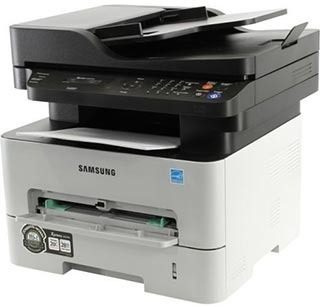
Fax and duplexing join the workgroup multifunction in Samsung's SL-M2875FD, which prints two-sided while handling fax alongside print, scan, and copy. A complete document station for demanding small offices.
It takes the MLT-D116S or the longer-lasting MLT-D116L. We offer compatible cartridges for value and genuine OEM cartridges for originality, both shipping fast from Clever Supplies.
Toner Cartridges for SL-M2875FD
This printer works with the following toner cartridges:
- Samsung MLT-D116S
- Samsung MLT-D116L
More Samsung Printers
- SL-M2625
- SL-M2625D
- SL-M2626
- SL-M2675
- SL-M2676
- SL-M2825
- SL-M2825DW
- SL-M2825ND
- SL-M2826
- SL-M2875
- SL-M2875FW
- SL-M2876
- SL-M2835
- SL-M2835DW
- SL-M2885FW
- SL-M2675F
- SL-M2885
- SL-M2625DW
- SL-M2675FN
- Xpress SL-M2625D
- Xpress SL-M2675F
- Xpress SL-M2825DW
- Xpress SL-M2875FD
- Xpress SL-M2875FW
- Xpress M2626
- Xpress M2676
- Xpress M2826
- Xpress M2835 DW
- Xpress M2875
- Xpress M2875 DW
Frequently Asked Questions
What causes a gray haze across prints from the SL-M2875FD, and will a new MLT-D116S fix it on text documents?
That all-over gray film is the classic signature of a tired drum or a failing cleaning blade inside the SL-M2875FD. Print the multifunction printer's cleaning page function if it has one, then reassess; persistent haze after cleaning means the drum needs replacing. Once the drum is fresh again, whites come back truly white.
How should I handle the old cartridge when replacing toner in the SL-M2875FD — what should I avoid touching inside the printer during the swap?
Work over a covered surface and pull the spent cartridge straight out without tipping it; the used MLT-D116S still holds loose toner. Slide the new cartridge into the SL-M2875FD along its rails until it clicks; forcing it means it is misaligned, not stuck. A calm two-minute swap beats a twenty-minute cleanup every time.
When should I replace the imaging unit in my SL-M2875FD instead of just the toner, and can I keep printing with a tired drum on this printer?
A drum is finished when its light-sensitive coating wears thin, which shows up as defects no cartridge swap can cure. The SL-M2875FD may display a drum-life or imaging-unit warning on its panel or status page, separate from toner alerts. Trust the new-cartridge test; it rarely leads you wrong.