





 See Compatible Printers
 Read more about our ink!
Samsung
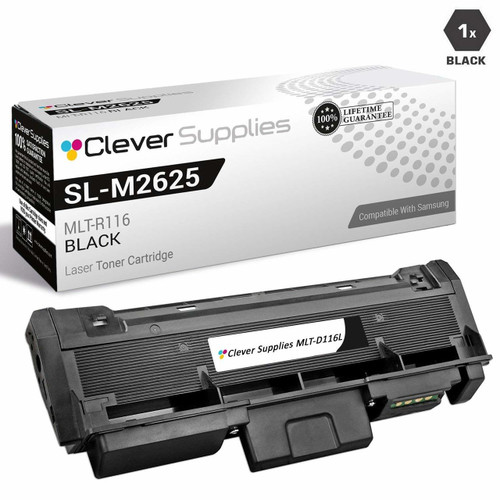
Compatible Samsung SL-M2875FD High Yield Laser Toner Cartridge Black

Amazon Price:

- Page Yield:
- 3,000 Pages
- Availability:
- In Stock
- Shipping:
- Calculated at Checkout
- Compatible Printers
- SL-M2835DW
- SL-M2885FW
- Xpress M2626
- Xpress M2676
- Xpress M2826
- Xpress M2835 DW
- Xpress M2875
- Xpress M2875 DW
- Xpress SL-M2625D
- Xpress SL-M2675F
- Xpress SL-M2825DW
- Xpress SL-M2875DW
- Xpress SL-M2875FD
- Xpress SL-M2875FWi>
- SL-M2625
- SL-M2625D
- SL-M2625DW
- SL-M2626
- SL-M2675
- SL-M2675F
- SL-M2675FN
- SL-M2676
- SL-M2825
- SL-M2825DW
- SL-M2825ND
- SL-M2826
- SL-M2835
- SL-M2875
- SL-M2875FD
- SL-M2875FW
- SL-M2876
- SL-M2885
- Samsung-MLTD116L
- Xpress SL-M2875FW
- Specifications
- SKU:
- SL-M2875FD
- Printer Brand:
- Samsung
- OEM Number:
- MLT-D116L
- Ink Color:
- High Yield Black
- Page Yield:
- 3,000 Pages
- Printer Type:
- Laser Cartridge
- Condition:
- New Compatible
- Description
- Yields up to 3000 pages.
- Ink/toner color: Black
- Maximize printing performance with compatible Samsung supplies
- Designed to reduce toner spillage as well as optimize installation
- Easy-to-install image transfer unit provides cost-effective reliable operation
- Packaging: Each
- Compatible with: Samsung SL M2625 SL M2626 SL M2876 SL M2835 SL M2885 Xpress series: M2625 M2825 M2835 M2885 etc. series laser printers
- Clean and sharp print with ReCP technology
- Print technology: Laser printer/copier/fax
- Replace your printer’s mono toner cartridge with ease
- Ensure print quality with crisp vibrant output from the first page to the last page
- Reviews

/> 

Compatible Samsung SL-M2875FD High Yield Laser Toner Cartridge Black maximises performance.
Samsung SL-M2875FD Black toner cartridge is ideally designed to deliver superior and professional quality prints for both texts/images. Cartridge is compatible with Samsung SL M2625 SL M2626 SL M2876 SL M2835 SL M2885 Xpress series: M2625 M2825 M2835 M2885 etc. series laser printers and yields up to 3000 pages.
Features:
Frequently Asked Questions
Does faxing and scanning on the SL-M2875FD draw on this cartridge too?
Printing faxes does — every incoming fax the SL-M2875FD puts on paper comes from this same MLT-D116L cartridge, exactly like a document sent from a computer. Scanning and copying a page onto the glass uses light, not toner, until you choose to print the copy. So a fax-heavy desk consumes cartridges at the speed of its incoming paper, not its outgoing scans.
What yield should I budget if the SL-M2875FD prints a lot of received faxes?
Fax pages are usually plain text and sit close to the 5% coverage behind the 3,000-page rating, so budget near the full figure. A machine receiving and printing 40 fax pages a day alongside normal office printing might see a cartridge last six to eight weeks; a quieter fax line stretches that a great deal. At $32.13 a cartridge, the running cost stays modest either way — about 1.07 cents a page.
How do I change the cartridge on the SL-M2875FD?
Open the front cover of the SL-M2875FD, grip the old cartridge's handle and slide it out. Unpack the new MLT-D116L, rock it gently from side to side several times so the toner is evenly distributed, pull out any sealing tape, and slide it in until it clicks into place. Close the cover and the machine is ready — received faxes will print on the new cartridge straight away.
Which other Samsung printers run on this cartridge?
The SL-M2875FD's cartridge, the MLT-D116L, is common across Samsung's mono range of that generation: the SL-M2835DW, SL-M2885FW, Xpress M2626, Xpress M2676, Xpress M2826, Xpress M2835 DW, Xpress M2875, Xpress M2875 DW, Xpress SL-M2625D, Xpress SL-M2675F, Xpress SL-M2825DW and Xpress SL-M2875FD. A single spare therefore covers the fax machine and quite possibly the other Samsung printers nearby. You will find the cartridge in the Samsung toner range.
Why choose the high-yield version for a machine like this?
Because fax machines cannot choose when to print — a cartridge that runs out overnight leaves incoming faxes queued or lost to memory. The high-yield MLT-D116L holds 3,000 pages' worth of toner against the standard version's smaller fill, so the unattended hours between changes are far longer. For an SL-M2875FD that must simply always be ready, that headroom is the point.
What if the replacement cartridge leaks or prints badly?
It goes back free — every cartridge is covered by a 1-year warranty and returns are free for one year, covering leaks, faults and poor print alike. The shipping and returns page explains how to start a return. Your order ships from whichever of our IL, PA, GA or CA warehouses is closest, and support is on hand Monday to Friday, 9 AM to 5 PM CST.
The first faxes after a cartridge change look a little soft - is that normal?
Within limits, yes. A fresh MLT-D116L settles over its first pages as the toner distributes, and the earliest faxes or documents can look slightly soft. Print several ordinary pages and judge the third or fourth sheet. If the softness persists, reseat the cartridge and rock it gently side to side; output that is still poor after that is a genuine fault, and it is covered.
How do I confirm the exact code when reordering for the SL-M2875FD?
Read it off the label of the cartridge you are taking out and quote it whole: MLT-D116L. The last letter carries meaning - L is the high-yield fill this fax machine wants, while the standard-yield sibling ends in S and holds less toner. In a machine that must always be ready to print, ordering the S by mistake shows up quickly as a much earlier change.
Could the paper be why incoming faxes are printing pale?
It could. Paper that has absorbed humidity prints pale and uneven under any cartridge, and fax paper often sits loaded in the tray for days. Load a few sheets from a freshly opened pack and let the machine print the next fax or a test page on them. If the darkness returns, the MLT-D116L was never at fault and the tray's old stack is what needs replacing.
Should the old cartridge go straight in the trash when I change it?
Keep it for a few days first. If the new MLT-D116L misbehaves, swapping the old cartridge back for a page or two separates a cartridge fault from a machine fault, and its label is the surest reference for the code. Once the replacement has a clean week of faxes and documents behind it, the empty can go for recycling with a clear conscience.
About This Cartridge for the Samsung SL-M2875FD
For a Samsung SL-M2875FD that prints around the clock, this Clever Supplies MLT-D116L cartridge offers a rated 3,000 pages at $32.13 and the longer change intervals a fax line needs. One year of warranty and one year of free returns come with it. Orders leave from IL, PA, GA or CA, and help is at hand Monday to Friday, 9 AM to 5 PM CST.
Related Items

Samsung
Compatible Samsung SL-M2875FD High Yield Laser Toner Cartridges Black 5 Pack
/>


Samsung
Compatible Samsung Xpress M2875FD High Yield Laser Toner Cartridge Black
/>
Samsung
Compatible Samsung Xpress M2875FD High Yield Laser Toner Cartridges Black 5 Pack
/>

Samsung
Compatible Samsung SL-M2670 High Yield Laser Toner Cartridge Black
/>