




LaserJet Enterprise 600 MFP Color M680F
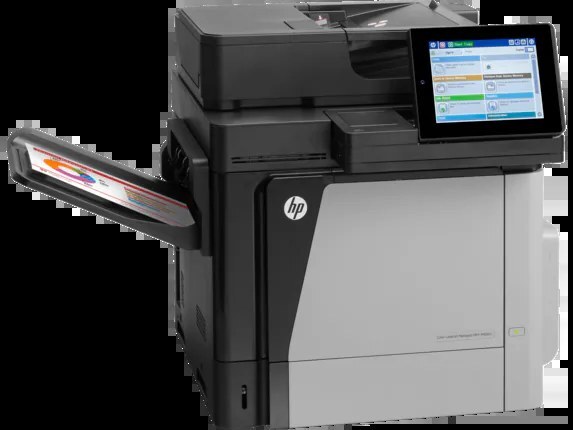
The 600-badge MFP with fax: the LaserJet Enterprise 600 MFP Color M680F delivers print, scan, copy and fax for enterprise departments under HP's Enterprise 600 line — one 2013-era machine for the full document cycle. It uses HP toner from that same Enterprise generation, with black CF320A (652A) or its high-yield partner CF320X (652X), and CF321A cyan (653A), CF322A yellow and CF323A magenta covering color. The cartridges listed here are compatibles produced for exactly those part numbers.
Fax changes the duty pattern of an MFP. Incoming faxes print whether or not anyone is standing there, signed pages get scanned and sent straight back out, and the machine quietly works nights and weekends. A unit with that profile should never be the one that runs dry — its toner family is a long-established one, so staying stocked is straightforward.
Toner Cartridges for LaserJet Enterprise 600 MFP Color M680F
| Cartridge | Color | Page Yield |
|---|---|---|
| CF321A | Cyan | See product page |
| CF322A | Yellow | See product page |
| CF323A | Magenta | See product page |
| CF320A | Black (standard yield) | See product page |
| CF320X | Black (high yield) | See product page |
Sets on this shelf: Enterprise 600 MFP Color M680F 4 Color Set is the four-color box carrying this model's name. The family alternatives are HP 653A & 653X 4 Color Set (CF320X/ CF321A/ CF322A/ CF323A) (high-yield black) and HP 652A & 653A 4 Color Set (CF320A/ CF321A/ CF322A/ CF323A) (standard black). Also listed is HP 652A & 654A 4 Color Set (CF320A/ CF331A/ CF333A/ CF332A); it combines the standard black with CF331A, CF332A and CF333A, the 654A colors of the M651 printers. Those are not the colors this machine uses — the set is stocked here, but it is not a set for this printer's color slots.
Which cartridge should you buy?
Because fax and copy traffic lands on the black cartridge without asking anyone's permission, most M680F units belong on the high-yield CF320X: fewer changes, lower cost per page, and less chance of an overnight fax run finding an empty slot. The standard CF320A remains a fair choice for a lightly used satellite machine. Colors follow the usual rule for this family — CF321A, CF322A and CF323A are single-yield and independently tracked, so replace whichever one the machine reports low. A four-color set makes sense as the standing spare for a fax-critical desk, since any one empty cartridge pauses the whole document cycle.
Chip, toner and everyday use
A fresh cartridge's chip tells the M680F which code is installed and how much toner it holds; the machine may run a short calibration after the door closes, and levels settle once it completes. Strip the sealing tape fully and keep the cartridge level while sliding it in — tilting a fresh cartridge can spill toner inside the cavity. Page yields are quoted at five percent coverage, and fax pages with dense letterheads use more than that estimate. Keep the spare set in a cool, dry cabinet rather than on top of the machine, where heat shortens cartridge life.
Frequently Asked Questions
What functions does the M680F combine?
Print, scan, copy and fax in one unit — the F configuration is the one that adds the fax line to the Enterprise 600 MFP platform. Scanning uses the glass or the document feeder; faxing sends from either.
Which black cartridge should a fax-heavy office choose?
The CF320X. Received faxes and copies consume black toner around the clock, and the high-yield cartridge stretches the interval between changes. The CF320A fits the same slot for quieter locations.
Can I keep printing if one color runs out?
The machine needs all four cartridges installed and ready. It will warn early, though — use that warning window to order the single color that is low instead of waiting for a hard stop mid-fax.
Are the cartridges on this page original HP?
No — they are Clever Supplies compatible cartridges built to the CF320A, CF320X, CF321A, CF322A and CF323A specifications, backed by a 1-year warranty and 1-year returns.
More printers that use the same cartridges
The wider Enterprise 600 color family runs on this same cartridge set:
Color LaserJet Enterprise Flow M680, Color LaserJet Enterprise Flow M680Z, Color LaserJet Enterprise M651, Color LaserJet Enterprise M651DN, Color LaserJet Enterprise M651N, Color LaserJet Enterprise M651XH, Color LASERJET ENTERPRISE M675 MFP, Color LASERJET ENTERPRISE M680 FLOW, Color LASERJET ENTERPRISE M680 MFP, Color LaserJet Enterprise M680DN, Color LASERJET ENTERPRISE M680DN MFP, Color LaserJet Enterprise M680F, Color LaserJet Enterprise M680Z, Color LASERJET ENTERPRISE M680Z FLOW, Color LASERJET ENTERPRISE M680Z MFP, Color LaserJet Enterprise MFP M675, Color LaserJet Enterprise MFP M680, Color LaserJet Enterprise MFP M680DN, Color LaserJet Enterprise MFP M680F, Color LaserJet Enterprise MFP M680z, Color LaserJet M651, Color LaserJet M651DN, Color LaserJet M651N, Color LaserJet M651XH, Color LaserJet M675, Color LaserJet M680, Color LaserJet M680DN, Color LaserJet M680F, Color LaserJet M680Z, HP 652A & 654A, LaserJet ENTERPRISE 600 COLOR M651, LaserJet Enterprise 600 Color M651, LaserJet ENTERPRISE 600 COLOR M651DN, LaserJet Enterprise 600 Color M651DN, LaserJet ENTERPRISE 600 COLOR M651N, LaserJet Enterprise 600 Color M651N, LaserJet ENTERPRISE 600 COLOR M651XH, LaserJet Enterprise 600 Color M651XH, LaserJet Enterprise 600 Flow M680, LaserJet Enterprise 600 Flow M680Z, LaserJet Enterprise 600 MFP Color M675, LaserJet Enterprise 600 MFP Color M680, LaserJet Enterprise 600 MFP Color M680DN, LaserJet Enterprise M651dn, LaserJet Enterprise M651n, LaserJet Enterprise M651xh