




Color LaserJet Enterprise MFP M680z
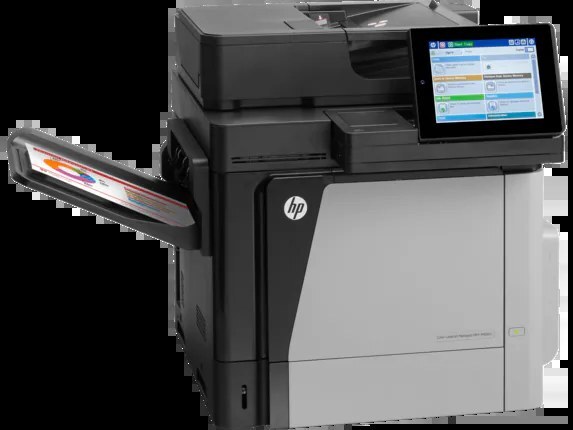
The Color LaserJet Enterprise MFP M680z is a 2013-era color print, scan and copy unit built around one idea: dependable printing for enterprise departments — clean text, even coverage, no fuss. Its black slot runs the high-yield CF320X, sold singly here as the 653X black cartridge, and the three color slots take 653A cyan CF321A, yellow CF322A and magenta CF323A. A single faded color never forces a full set change, because every slot is replaced independently.
Departmental MFPs live a double life: they are printers at 9 a.m. and scanners by 10. Toner only feeds half of that work, which makes the supplies math friendlier than a print-only box — but the copy function prints what it scans, so a busy copying culture still moves cartridges. The shelf below is all compatible cartridges for this platform, from singles to eight-cartridge sets for the supply room.
Toner Cartridges for Color LaserJet Enterprise MFP M680z
| Cartridge | Color | Page Yield |
|---|---|---|
| CF320X | Black (high yield) | See product page |
| CF321A | Cyan | See product page |
| CF322A | Yellow | See product page |
| CF323A | Magenta | See product page |
| CF320X — 2 Black Set | Black | See product page |
| CF320X — 3 Black Set | Black | See product page |
| CF320X — 5 Black Set | Black | See product page |
| 653X / 653A 4 Color Set | Black + CMY | See product page |
| 653X/653A 5 Color Set | Black + CMY | See product page |
| 653X/653A 8 Color Set | Black + CMY | See product page |
| 653A 3 Color Set (CMY) | CMY | See product page |
| 653A 6 Color Set (CMY) | CMY | See product page |
The identical cartridges are also listed under this model's own name — MFP M680z Black (CF320X), MFP M680z Cyan (CF321A), MFP M680z Magenta (CF323A), MFP M680z Yellow (CF322A) and the MFP M680z 4 Color Set — and under the sibling M675 name: MFP M675 Black (CF320X), MFP M675 Cyan (CF321A), MFP M675 Magenta (CF323A), MFP M675 Yellow (CF322A) and its MFP M675 4 Color Set. Same family, same codes — buy by the code and the listing label does not matter.
Which cartridge should you buy?
HP groups this family as the 652A/653A series: the black slot accepts the standard-yield CF320A or the high-yield black this page stocks, while colors come one to a slot. For a department MFP, the high-yield black is the working choice — text dominates, and every avoided swap is a queue that never forms. Colors should be bought as singles and changed as each one empties; the color sets are for a fresh install or a planned full refresh. These compatibles carry a 1-year warranty and 1-year returns.
Chip, toner and everyday use
A compatible cartridge for this platform carries the chip the printer expects, so levels report normally and the MFP does not nag after a swap. Fit one by pulling the old unit straight out, removing every piece of packing from the new one, and pushing it home until it clicks. A gentle rock of the cartridge before fitting spreads the toner evenly after shipping. Page-yield ratings assume roughly 5% coverage; a department that copies dense forms all day will see fewer pages, and that is arithmetic, not a defect. Keep one spare black sealed in the cabinet — it is always the first to go.
Frequently Asked Questions
Which toner cartridges are compatible with the M680z?
Look for the exact codes: the high-yield black and the three color cartridges listed above — one black and three colors, each in its own slot. Sticking to these codes guarantees a proper fit and correct recognition in the machine.
Can the M680z scan while a toner cartridge is empty?
Yes — scanning to a computer or email never uses toner, so it works with an empty cartridge. Copying prints the scan, so it needs toner; faded copies mean one of the four cartridges needs replacing.
Can I mix standard and high-yield cartridges in this printer?
Yes. The black slot takes either the standard or the high-yield black, and each color slot is replaced only when that color runs out. You never need to change all four cartridges at once.
Is a separate drum unit needed for the M680z?
No separate drum purchase is part of this page's lineup — the cartridges above are the consumables this model asks for. If print quality drops right after a swap, reseat the cartridge before suspecting anything larger.
More printers that use the same cartridges
One cartridge family covers a wide slice of the Enterprise 600 generation; these categories all feed on the same codes: Color LASERJET ENTERPRISE M675 MFP, Color LASERJET ENTERPRISE M680 FLOW, Color LASERJET ENTERPRISE M680 MFP, Color LASERJET ENTERPRISE M680DN MFP, Color LASERJET ENTERPRISE M680Z FLOW, Color LASERJET ENTERPRISE M680Z MFP, Color LaserJet Enterprise Flow M680, Color LaserJet Enterprise Flow M680Z, Color LaserJet Enterprise M651, Color LaserJet Enterprise M651DN, Color LaserJet Enterprise M651N, Color LaserJet Enterprise M651XH, Color LaserJet Enterprise M680DN, Color LaserJet Enterprise M680F, Color LaserJet Enterprise M680Z, Color LaserJet Enterprise MFP M675, Color LaserJet Enterprise MFP M680, Color LaserJet Enterprise MFP M680DN, Color LaserJet Enterprise MFP M680F, Color LaserJet M651, Color LaserJet M651DN, Color LaserJet M651N, Color LaserJet M651XH, Color LaserJet M675, Color LaserJet M680, Color LaserJet M680DN, Color LaserJet M680F, Color LaserJet M680Z, HP 652A & 654A, LaserJet ENTERPRISE 600 COLOR M651, LaserJet ENTERPRISE 600 COLOR M651DN, LaserJet ENTERPRISE 600 COLOR M651N, LaserJet ENTERPRISE 600 COLOR M651XH, LaserJet Enterprise 600 Color M651, LaserJet Enterprise 600 Color M651DN, LaserJet Enterprise 600 Color M651N, LaserJet Enterprise 600 Color M651XH, LaserJet Enterprise 600 Flow M680, LaserJet Enterprise 600 Flow M680Z, LaserJet Enterprise 600 MFP Color M675, LaserJet Enterprise 600 MFP Color M680, LaserJet Enterprise 600 MFP Color M680DN, LaserJet Enterprise 600 MFP Color M680F, LaserJet Enterprise M651dn, LaserJet Enterprise M651n, LaserJet Enterprise M651xh.