




Color LaserJet M680F
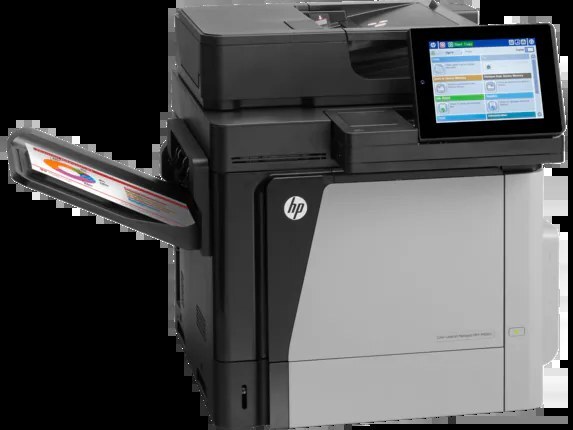
The M680F is the fax-equipped configuration of the M680 line, pairing 2013-era color printing with a built-in fax for departments that still send documents over the line. It feeds on the same toner as the rest of the platform: the CF320A (652A) black or the high-yield CF320X (652X), plus the CF321A (653A) cyan, the CF322A yellow and the CF323A magenta. This page stocks all of them as compatibles, as singles and in sets.
A fax changes the rhythm of a printer’s life. Alongside the department’s ordinary printing, the M680F wakes on its own schedule to receive documents, and those incoming pages land on paper at hours when nobody is watching the supply levels. Departments that rely on it — the ones exchanging signed forms with clients, carriers or agencies — learn to treat its toner the way they treat the fax line itself: it has to be live when a document arrives, not the morning after.
Toner Cartridges for Color LaserJet M680F
Sets first on this page, since a machine that prints unattended is usually stocked by the set, then the singles in reverse order:
| Cartridge | Color | Page Yield |
|---|---|---|
| M680F 4 Color Set | Black + 3 colors | See product page |
| 652A & 653A 4 Color Set (CF320A CF321A CF322A CF323A) | Black + 3 colors | See product page |
| 653A & 653X 4 Color Set (CF320X CF321A CF322A CF323A) | Black + 3 colors | See product page |
| 652A & 654A 4 Color Set (CF320A CF331A CF333A CF332A) | Black + 3 colors | See product page |
| CF323A Magenta | Magenta | See product page |
| CF322A Yellow | Yellow | See product page |
| CF321A Cyan | Cyan | See product page |
| CF320X High Yield Black | Black | See product page |
| CF320A Black | Black | See product page |
Which cartridge should you buy?
Think in two budgets. The department’s planned printing — reports, letters, handouts — can be bought slot by slot: the high-yield CF320X for black, singles of the CF321A, CF322A and CF323A when a color fades. The unplanned part, the overnight fax traffic, argues for keeping one full set in reserve at all times; a received contract that cannot print because a slot ran dry at 2 a.m. is a worse surprise than a spare set on the shelf. One caution when choosing a set: the 652A & 654A set in the table pairs its black with CF331A-family colors that carry different codes from this machine’s — the sets built on the 653A colors are the ones keyed to the M680F. Every compatible here carries a 1-year warranty and 1-year returns.
Chip, toner and everyday use
Because a fax machine prints when nobody is present, the low-toner warning deserves more respect than it gets on a supervised printer: act on the first warning, not the first failed page. The panel reports each cartridge’s level, and a received fax will consume black steadily even in a week when the office prints little. When you swap a cartridge, work the old one out gently and the new one in until it seats with a click, then send yourself a one-page test fax or print — confirmation now beats discovering a bad seat from a client’s phone call.
Frequently Asked Questions
What toner does the Color LaserJet M680F use?
The CF320A or high-yield CF320X in the black slot, and the CF321A, CF322A and CF323A across the three color slots — the platform’s standard 652A/653A set of codes.
Does faxing use the same cartridges as printing?
Yes. A received fax is printed by the same engine and the same cartridges as any other page, so incoming documents draw down the black cartridge even when nobody in the office is printing. That is the main reason this model rewards keeping a reserve set on hand.
What is the difference between CF320A and CF320X?
Capacity. The CF320X is the high-yield build of the black cartridge and the CF320A the standard one; both fit the same slot. On a machine that also prints incoming faxes around the clock, the longer interval of the X is worth having.
Can I replace just one color cartridge in the middle of a cycle?
Yes — the four slots are independent. Pull the empty color, fit its replacement from the singles above, and the remaining cartridges carry on with their own levels untouched.
More printers that use the same cartridges
Every other member of this enterprise family takes the same cartridge set:
Color LASERJET ENTERPRISE M675 MFP, Color LASERJET ENTERPRISE M680 FLOW, Color LASERJET ENTERPRISE M680 MFP, Color LASERJET ENTERPRISE M680DN MFP, Color LASERJET ENTERPRISE M680Z FLOW, Color LASERJET ENTERPRISE M680Z MFP, Color LaserJet Enterprise Flow M680, Color LaserJet Enterprise Flow M680Z, Color LaserJet Enterprise M651, Color LaserJet Enterprise M651DN, Color LaserJet Enterprise M651N, Color LaserJet Enterprise M651XH, Color LaserJet Enterprise M680DN, Color LaserJet Enterprise M680F, Color LaserJet Enterprise M680Z, Color LaserJet Enterprise MFP M675, Color LaserJet Enterprise MFP M680, Color LaserJet Enterprise MFP M680DN, Color LaserJet Enterprise MFP M680F, Color LaserJet Enterprise MFP M680z, Color LaserJet M651, Color LaserJet M651DN, Color LaserJet M651N.
Color LaserJet M651XH, Color LaserJet M675, Color LaserJet M680, Color LaserJet M680DN, Color LaserJet M680Z, HP 652A & 654A, LaserJet ENTERPRISE 600 COLOR M651, LaserJet ENTERPRISE 600 COLOR M651DN, LaserJet ENTERPRISE 600 COLOR M651N, LaserJet ENTERPRISE 600 COLOR M651XH, LaserJet Enterprise 600 Color M651, LaserJet Enterprise 600 Color M651DN, LaserJet Enterprise 600 Color M651N, LaserJet Enterprise 600 Color M651XH, LaserJet Enterprise 600 Flow M680, LaserJet Enterprise 600 Flow M680Z, LaserJet Enterprise 600 MFP Color M675, LaserJet Enterprise 600 MFP Color M680, LaserJet Enterprise 600 MFP Color M680DN, LaserJet Enterprise 600 MFP Color M680F, LaserJet Enterprise M651dn, LaserJet Enterprise M651n, LaserJet Enterprise M651xh.