




LaserJet Enterprise 600 MFP Color M675
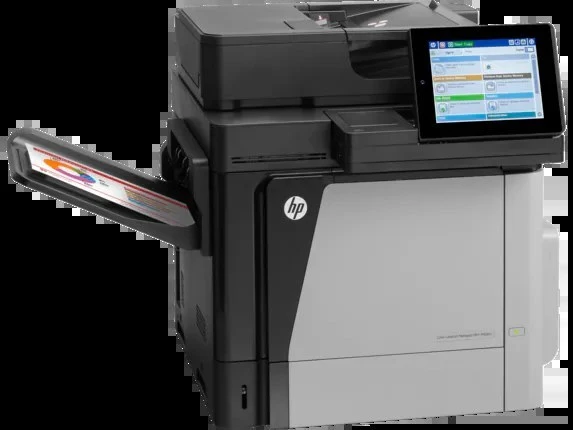
The LaserJet Enterprise 600 MFP Color M675 is a 2013-era color all-in-one built for enterprise departments — one shared machine that prints, scans and copies for a whole team. Its toner is a long-running HP family: black comes as the standard CF320A (652A) or the high-yield CF320X (652X), and color work runs on CF321A cyan (653A), CF322A yellow and CF323A magenta. Every cartridge on this page is a Clever Supplies compatible built for those exact codes.
A departmental MFP like this one rarely sits idle: it is the box a floor of people send contracts, reports and scanned paperwork through all day. That duty cycle is exactly why the supply chain around it matters — the cartridge family is mature, the codes are stable, and keeping one spare black on the shelf next to it is cheap insurance against a stalled workday.
Toner Cartridges for LaserJet Enterprise 600 MFP Color M675
| Cartridge | Color | Page Yield |
|---|---|---|
| CF320A | Black (standard yield) | See product page |
| CF320X | Black (high yield) | See product page |
| CF321A | Cyan | See product page |
| CF322A | Yellow | See product page |
| CF323A | Magenta | See product page |
Full sets and the shelf alternative: HP 653A & 653X 4 Color Set (CF320X/ CF321A/ CF322A/ CF323A) pairs the high-yield black with the three colors; HP 652A & 653A 4 Color Set (CF320A/ CF321A/ CF322A/ CF323A) builds the same four slots around the standard black; Enterprise 600 MFP Color M675 4 Color Set is the model-named four-color set. One more listing, HP 652A & 654A 4 Color Set (CF320A/ CF331A/ CF333A/ CF332A), mixes the standard black with the CF331A, CF332A and CF333A colors of the 654A line used by the M651 printers — it is stocked on this shelf, but those three color codes are not this machine's colors, so match the code on your own cartridge before choosing it.
Which cartridge should you buy?
Start with the black slot, because it does most of the work on a shared MFP. The standard CF320A suits departments whose color MFP mostly handles short runs and scanned-document copies; the CF320X carries more toner in the same slot, so a busy floor changes it less often and pays less per page. Colors are simpler: there is one yield tier, so replace CF321A, CF322A or CF323A individually as each one empties — the machine tracks them separately and never forces a full set. Choose a four-color set when several cartridges run low together or when you want a complete spare kit in the supply cabinet; otherwise singles keep cash in the jobs that actually print.
Chip, toner and everyday use
Each cartridge carries a chip the M675 reads for fit and remaining level, so seat a new cartridge firmly until it clicks and let the machine finish its calibration before judging output. Pull the seal tape completely before installing; a half-removed tab is the most common cause of a cartridge that is not recognized. Yield figures in this family are estimates at five percent page coverage, and dense color pages use color toner faster than the estimate suggests. Store spares flat, sealed and away from direct sunlight, and give a cartridge that has sat for months a gentle rock side to side before fitting it, so the toner inside settles evenly.
Frequently Asked Questions
What toner does the LaserJet Enterprise 600 MFP Color M675 use?
Four separate cartridges: CF320A or CF320X in the black slot, plus CF321A cyan, CF322A yellow and CF323A magenta. Match the code printed on the cartridge you remove — the two blacks are interchangeable in the slot, the colors are not interchangeable with each other.
Can this MFP scan and copy, or is it print-only?
It is a true multifunction unit: print, scan and copy from one machine, using either the scanner glass for single sheets or the automatic document feeder for stacks. Toner choice does not change scanning, but copies are prints, so copy-heavy teams go through black toner faster than they expect.
My department prints mostly black documents. Which colors do I still need?
All four cartridges must be installed for the machine to run, even on black-only jobs. Selecting grayscale or black-only in the print dialog keeps the color cartridges from being consumed on everyday documents, so a set of colors can last a long time in a text-heavy office.
Are these cartridges covered by a warranty?
Yes — the compatible cartridges on this page carry a 1-year warranty and 1-year returns from Clever Supplies.
More printers that use the same cartridges
The same black cartridges and color trio also run the rest of the Enterprise 600 color line:
Color LASERJET ENTERPRISE M675 MFP, Color LASERJET ENTERPRISE M680 FLOW, Color LASERJET ENTERPRISE M680 MFP, Color LASERJET ENTERPRISE M680DN MFP, Color LASERJET ENTERPRISE M680Z FLOW, Color LASERJET ENTERPRISE M680Z MFP, Color LaserJet Enterprise Flow M680, Color LaserJet Enterprise Flow M680Z, Color LaserJet Enterprise M651, Color LaserJet Enterprise M651DN, Color LaserJet Enterprise M651N, Color LaserJet Enterprise M651XH, Color LaserJet Enterprise M680DN, Color LaserJet Enterprise M680F, Color LaserJet Enterprise M680Z, Color LaserJet Enterprise MFP M675, Color LaserJet Enterprise MFP M680, Color LaserJet Enterprise MFP M680DN, Color LaserJet Enterprise MFP M680F, Color LaserJet Enterprise MFP M680z, Color LaserJet M651, Color LaserJet M651DN, Color LaserJet M651N, Color LaserJet M651XH, Color LaserJet M675, Color LaserJet M680, Color LaserJet M680DN, Color LaserJet M680F, Color LaserJet M680Z, HP 652A & 654A, LaserJet ENTERPRISE 600 COLOR M651, LaserJet ENTERPRISE 600 COLOR M651DN, LaserJet ENTERPRISE 600 COLOR M651N, LaserJet ENTERPRISE 600 COLOR M651XH, LaserJet Enterprise 600 Color M651, LaserJet Enterprise 600 Color M651DN, LaserJet Enterprise 600 Color M651N, LaserJet Enterprise 600 Color M651XH, LaserJet Enterprise 600 Flow M680, LaserJet Enterprise 600 Flow M680Z, LaserJet Enterprise 600 MFP Color M680, LaserJet Enterprise 600 MFP Color M680DN, LaserJet Enterprise 600 MFP Color M680F, LaserJet Enterprise M651dn, LaserJet Enterprise M651n, LaserJet Enterprise M651xh