




Color LaserJet M680DN
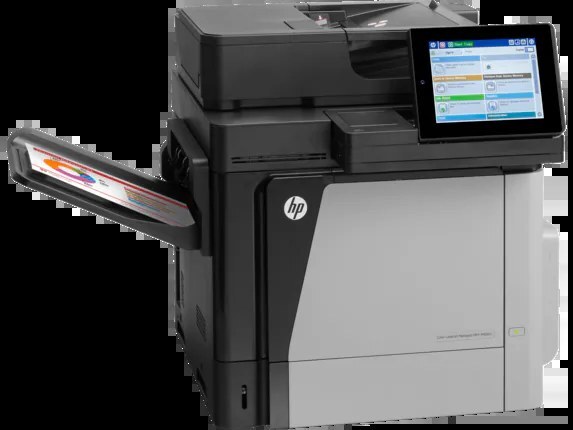
Duplex and network define the M680DN: it is the two-sided, shared color printer on the M680 platform for enterprise departments that skip the MFP layer. The toner is the platform’s standard set — the CF320A (652A) black or its high-yield twin the CF320X (652X), with the CF321A (653A) cyan, the CF322A yellow and the CF323A magenta covering color. Every cartridge and set for those codes is listed below as a compatible.
Built in 2013-era enterprise fashion — practical, unglamorous and meant to be shared — the M680DN sits on the department network and takes work from every desk around it. Two-sided printing is its everyday trick, halving paper on long reports, and because a whole floor depends on it, the toner routine matters: somebody should always know which slot is next to run out, and a spare should already be in the building.
Toner Cartridges for Color LaserJet M680DN
The shelf, colors first this time, then the black pair and the sets:
- CF321A Cyan — Cyan — See product page
- CF322A Yellow — Yellow — See product page
- CF323A Magenta — Magenta — See product page
- CF320A Black — Black — See product page
- CF320X High Yield Black — Black — See product page
- M680DN 4 Color Set — Black + 3 colors — See product page
- 652A & 653A 4 Color Set (CF320A CF321A CF322A CF323A) — Black + 3 colors — See product page
- 653A & 653X 4 Color Set (CF320X CF321A CF322A CF323A) — Black + 3 colors — See product page
- 652A & 654A 4 Color Set (CF320A CF331A CF333A CF332A) — Black + 3 colors — See product page
One caution on the last set in that list: the 652A & 654A set pairs its black with CF331A, CF333A and CF332A color cartridges — different codes from this machine’s 653A colors. Codes are what the slots are keyed to, so for the M680DN order the sets whose colors read CF321A, CF322A and CF323A.
Which cartridge should you buy?
For a printer the whole department shares, default to the high-yield black. The CF320X holds substantially more toner than the standard CF320A, and on a networked machine the cost of a toner-out interruption is measured in other people’s stalled work, not just the price of the cartridge. Keep the standard cartridge as the fallback for a light-use period. Colors should be bought as singles — a shared machine’s cyan, yellow and magenta never empty in step — and a full set makes sense mainly as the standing spare, so a depleted slot can be swapped the same morning it reports empty. Compatible cartridges on this page carry a 1-year warranty and 1-year returns.
Chip, toner and everyday use
Two-sided printing saves paper, not toner — every page still lays down the same coverage, so do not expect the duplex habit to stretch a cartridge. What does stretch one is the driver setting: draft mode for internal copies and full quality reserved for what leaves the building. When a cartridge is changed on a shared machine, note the date on the box end and leave it in the tray; the next person then knows at a glance how long the current set has been running, and the supplies order stops being guesswork.
Frequently Asked Questions
Which toner cartridges are compatible with the Color LaserJet M680DN?
Look for the exact codes CF320A or CF320X for black, and CF321A, CF322A and CF323A for the three color slots — one black and three color cartridges in total.
Standard CF320A or high-yield CF320X for a shared department printer?
High-yield, in almost every shared setting. The CF320X goes longer between changes, which is the metric a whole floor feels. The standard CF320A suits a quiet period or a machine about to be retired.
Do all four cartridges have to be replaced together?
No. Each cartridge is independent and reports its own level, so replace the empty slot and leave the others running. A set is a convenience for a full refresh or a standing spare, not a requirement of the machine.
Does duplex printing change which cartridge I need?
Not at all — the two-sided unit works with paper handling, and the M680DN takes the same five codes either way. Duplex changes how much paper you buy, not which toner.
More printers that use the same cartridges
The rest of the enterprise line built around these cartridges, in reverse order:
LaserJet Enterprise M651xh, LaserJet Enterprise M651n, LaserJet Enterprise M651dn, LaserJet Enterprise 600 MFP Color M680F, LaserJet Enterprise 600 MFP Color M680DN, LaserJet Enterprise 600 MFP Color M680, LaserJet Enterprise 600 MFP Color M675, LaserJet Enterprise 600 Flow M680Z, LaserJet Enterprise 600 Flow M680, LaserJet Enterprise 600 Color M651XH, LaserJet Enterprise 600 Color M651N, LaserJet Enterprise 600 Color M651DN, LaserJet Enterprise 600 Color M651, LaserJet ENTERPRISE 600 COLOR M651XH, LaserJet ENTERPRISE 600 COLOR M651N, LaserJet ENTERPRISE 600 COLOR M651DN, LaserJet ENTERPRISE 600 COLOR M651, HP 652A & 654A, Color LaserJet M680Z, Color LaserJet M680F, Color LaserJet M680, Color LaserJet M675, Color LaserJet M651XH, Color LaserJet M651N, Color LaserJet M651DN, Color LaserJet M651, Color LaserJet Enterprise MFP M680z, Color LaserJet Enterprise MFP M680F, Color LaserJet Enterprise MFP M680DN, Color LaserJet Enterprise MFP M680, Color LaserJet Enterprise MFP M675, Color LaserJet Enterprise M680Z, Color LaserJet Enterprise M680F, Color LaserJet Enterprise M680DN, Color LaserJet Enterprise M651XH, Color LaserJet Enterprise M651N, Color LaserJet Enterprise M651DN, Color LaserJet Enterprise M651, Color LaserJet Enterprise Flow M680Z, Color LaserJet Enterprise Flow M680, Color LASERJET ENTERPRISE M680Z MFP, Color LASERJET ENTERPRISE M680Z FLOW, Color LASERJET ENTERPRISE M680DN MFP, Color LASERJET ENTERPRISE M680 MFP, Color LASERJET ENTERPRISE M680 FLOW, Color LASERJET ENTERPRISE M675 MFP.