




Color LASERJET ENTERPRISE M680 MFP
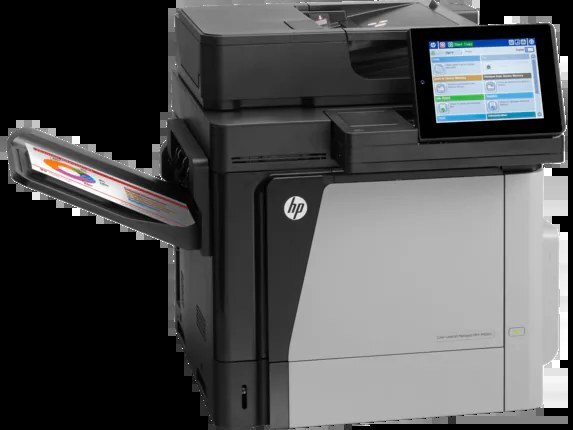
The HP Color LaserJet Enterprise M680 MFP was the standard-bearer of its Enterprise color MFP generation, deployed by managed offices for secure, consistent document output. It runs four cartridges: black CF320A, a high-yield CF320X option, and three color cartridges beside them. Of that family, this page stocks two compatible singles — the HP 653A cyan (CF321A) and the HP 653A magenta (CF323A). The black cartridges and the yellow CF322A are documented for this printer but are not stocked here.
Being the standard-bearer meant being unremarkable in the best sense: the M680 MFP was the machine an organization bought when it wanted the same printer on every floor, with the same supplies cabinet stocked the same way. Standardization is a supplies strategy as much as an IT one — one cartridge family to learn, one set of codes to reorder, spares that fit whichever unit on the floor runs dry first. Owners of this model who also run its sibling machines on this page's family list get exactly that benefit from the 652A/653A line.
Toner Cartridges for Color LASERJET ENTERPRISE M680 MFP
| Cartridge | Color | Page Yield |
|---|---|---|
| HP 653A Cyan (CF321A) | Cyan | See product page |
| HP 653A Magenta (CF323A) | Magenta | See product page |
The black side of the family — CF320A standard and CF320X high-yield — and the yellow CF322A complete this printer's set. They are genuine members of the family but are not stocked on this page; cyan and magenta are what is sold here.
Which cartridge should you buy?
All four cartridges must be installed for the machine to print, but they are replaced one at a time, each on its own schedule. That makes the buying rule simple: replace the cartridge the printer reports as empty, and resist replacing the rest out of symmetry. Between the two colors stocked here, cyan tends to lead in offices whose color work is charts, forms and corporate documents, while magenta leads where photographs and marketing pieces dominate — your own history with the machine says which spare to keep closest. For black, the family's choice is the standard CF320A against the longer-running CF320X; heavy queues argue for the X, though neither black is stocked on this page.
Chip, toner and everyday use
Consistency is the theme with this machine, and its supplies are no different: a compatible cartridge's chip identifies it to the printer on installation, levels are tracked per color, and a properly seated unit simply gets on with the work. Keep the routine consistent too — seal off before the cartridge goes in, slot matched to color, a gentle rock from side to side when a color first starts to fade, since toner settles as it is consumed. Remember that rated yields assume roughly 5% coverage per page; the fuller your color pages, the sooner each cartridge's turn comes. Sealed spares stored at room temperature will wait patiently for theirs.
Frequently Asked Questions
What toner does the Color LASERJET ENTERPRISE M680 MFP take?
It needs all four positions filled from the HP 652A/653A family: CF320A or CF320X black, CF321A cyan, CF322A yellow and CF323A magenta. This page stocks the cyan and magenta singles; any cartridge marketed as a replacement for these exact codes will work.
Can the Color LASERJET ENTERPRISE M680 MFP scan and copy documents?
Yes — it is a multifunction unit, printing, copying and scanning from the control panel, with the scanner glass and automatic document feeder both available for copies and scans.
What is the difference between CF320A and CF320X for the M680 MFP?
Both fit, but the CF320X is the high-yield build of the CF320A black and prints longer before it runs out. Choose the CF320X for heavy printing and the CF320A if the machine prints only occasionally.
My office runs several machines from this family. Can spares be shared?
Yes — the models in the family list below all draw from the same 652A/653A cartridges, so a sealed spare kept for one machine can serve another on the list when it runs dry.
More printers that use the same cartridges
One cartridge family covers all of these machines as well: LaserJet Enterprise M651xh, LaserJet Enterprise M651n, LaserJet Enterprise M651dn, LaserJet Enterprise 600 MFP Color M680F, LaserJet Enterprise 600 MFP Color M680DN, LaserJet Enterprise 600 MFP Color M680, LaserJet Enterprise 600 MFP Color M675, LaserJet Enterprise 600 Flow M680Z, LaserJet Enterprise 600 Flow M680, LaserJet Enterprise 600 Color M651XH, LaserJet ENTERPRISE 600 COLOR M651XH, LaserJet Enterprise 600 Color M651N, LaserJet ENTERPRISE 600 COLOR M651N, LaserJet Enterprise 600 Color M651DN, LaserJet ENTERPRISE 600 COLOR M651DN, LaserJet Enterprise 600 Color M651, LaserJet ENTERPRISE 600 COLOR M651, HP 652A & 654A, Color LaserJet M680Z, Color LaserJet M680F, Color LaserJet M680DN, Color LaserJet M680, Color LaserJet M675, Color LaserJet M651XH, Color LaserJet M651N, Color LaserJet M651DN, Color LaserJet M651, Color LaserJet Enterprise MFP M680z, Color LaserJet Enterprise MFP M680F, Color LaserJet Enterprise MFP M680DN, Color LaserJet Enterprise MFP M680, Color LaserJet Enterprise MFP M675, Color LASERJET ENTERPRISE M680Z MFP, Color LASERJET ENTERPRISE M680Z FLOW, Color LaserJet Enterprise M680Z, Color LaserJet Enterprise M680F, Color LASERJET ENTERPRISE M680DN MFP, Color LaserJet Enterprise M680DN, Color LASERJET ENTERPRISE M680 FLOW, Color LASERJET ENTERPRISE M675 MFP, Color LaserJet Enterprise M651XH, Color LaserJet Enterprise M651N, Color LaserJet Enterprise M651DN, Color LaserJet Enterprise M651, Color LaserJet Enterprise Flow M680Z, Color LaserJet Enterprise Flow M680