




Color LASERJET ENTERPRISE M680 FLOW
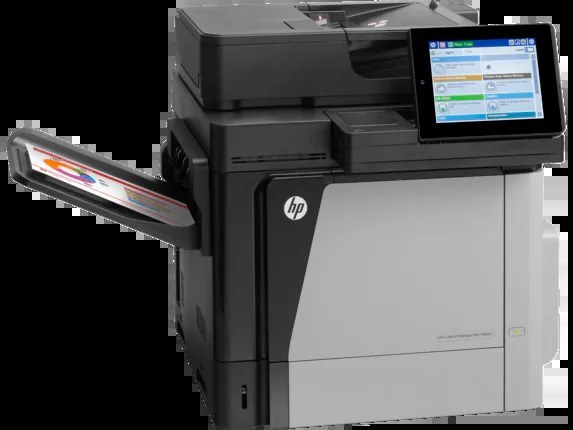
Advanced capture workflows defined the HP Color LaserJet Enterprise M680 Flow, the document-digitizing specialist of its multifunction family — the machine offices leaned on when they went paperless. It takes the HP 652A black cartridges — CF320A, with a high-yield CF320X option — and separate cyan, yellow and magenta cartridges. The two color singles stocked on this page are the HP 653A cyan (CF321A) and the HP 653A magenta (CF323A), both compatibles with a 1-year warranty and 1-year returns. The family's black cartridges and its yellow CF322A are not stocked here.
Going paperless never meant printing nothing. The offices that adopted the M680 Flow scanned the archive, then printed the working copies, the sign-off packets and the color reports the digital workflow produced. That is the honest way to think about this machine's toner: scanning sets the pace of the office, and printing still empties cartridges. Because the Flow model was bought for capture, its printed output skews toward finished documents — the pages people keep — which makes faded color a more visible failure here than on a draft printer.
Toner Cartridges for Color LASERJET ENTERPRISE M680 FLOW
| Cartridge | Color | Page Yield |
|---|---|---|
| HP 653A Cyan (CF321A) | Cyan | See product page |
| HP 653A Magenta (CF323A) | Magenta | See product page |
For reference, the rest of this printer's family is the CF320A standard black, the CF320X high-yield black and the CF322A yellow. They fit the M680 Flow but are not stocked on this page; the two singles above are what is sold here.
Which cartridge should you buy?
Buy the color that is actually empty. The M680 Flow watches each cartridge on its own, and its printed work — finished documents rather than drafts — shows a weak color immediately. Cyan carries the blues in charts, letterheads and scanned forms; magenta carries the reds and skin tones in anything photographic. A practical rule for a capture department: when one of the two stocked colors is replaced, check the other's reported level at the panel, because color jobs on this machine tend to arrive in batches and the second color often follows the first within weeks. Black, when you need it, is the CF320A — or the CF320X if your volume justifies the high-yield build — but neither is stocked on this page.
Chip, toner and everyday use
A compatible cartridge's chip is how the printer knows what was installed, so expect the panel to confirm the new unit and reset that color's level as soon as it is seated. Remove the full length of sealing tape beforehand; a strip left behind is a common cause of blank or streaked first pages. If a color prints light before its level reads empty, take the cartridge out and rock it gently side to side — toner settles toward one end in storage and in use, and evening it out restores even coverage for a while. Spares keep best sealed in their bags, stored flat in a normally heated room rather than a cold warehouse corner.
Frequently Asked Questions
Which toner cartridges are compatible with the Color LASERJET ENTERPRISE M680 FLOW?
Look for the exact codes CF320A, CF320X, CF321A, CF322A and CF323A. Sticking to these codes guarantees a proper fit and correct recognition. Of the five, this page stocks the cyan CF321A and the magenta CF323A.
What is the difference between CF320A and CF320X for the M680 Flow?
Both cartridges fit, but the CF320X is the high-yield version of the standard CF320A black, so it prints longer before running out. Choose the CF320X for heavy printing and the CF320A for occasional use — and note that neither black is stocked on this page.
Can the M680 Flow scan and copy, or is it only a printer?
It is a multifunction machine: it prints, scans and copies, and its Flow feature set is built around document capture for offices moving paper into digital workflows. The scanner glass and document feeder work straight from the control panel.
How should I store spare cartridges for the M680 Flow?
Keep them sealed in their packaging, stored flat at normal room temperature and away from direct sunlight. Toner keeps well, but use the oldest spare first and install stored cartridges within a couple of years.
More printers that use the same cartridges
These sibling machines run on the same cartridge family: LaserJet Enterprise M651xh, LaserJet Enterprise M651n, LaserJet Enterprise M651dn, LaserJet Enterprise 600 MFP Color M680F, LaserJet Enterprise 600 MFP Color M680DN, LaserJet Enterprise 600 MFP Color M680, LaserJet Enterprise 600 MFP Color M675, LaserJet Enterprise 600 Flow M680Z, LaserJet Enterprise 600 Flow M680, LaserJet Enterprise 600 Color M651XH, LaserJet Enterprise 600 Color M651N, LaserJet Enterprise 600 Color M651DN, LaserJet Enterprise 600 Color M651, LaserJet ENTERPRISE 600 COLOR M651XH, LaserJet ENTERPRISE 600 COLOR M651N, LaserJet ENTERPRISE 600 COLOR M651DN, LaserJet ENTERPRISE 600 COLOR M651, HP 652A & 654A, Color LaserJet M680Z, Color LaserJet M680F, Color LaserJet M680DN, Color LaserJet M680, Color LaserJet M675, Color LaserJet M651XH, Color LaserJet M651N, Color LaserJet M651DN, Color LaserJet M651, Color LaserJet Enterprise MFP M680z, Color LaserJet Enterprise MFP M680F, Color LaserJet Enterprise MFP M680DN, Color LaserJet Enterprise MFP M680, Color LaserJet Enterprise MFP M675, Color LaserJet Enterprise M680Z, Color LaserJet Enterprise M680F, Color LaserJet Enterprise M680DN, Color LaserJet Enterprise M651XH, Color LaserJet Enterprise M651N, Color LaserJet Enterprise M651DN, Color LaserJet Enterprise M651, Color LaserJet Enterprise Flow M680Z, Color LaserJet Enterprise Flow M680, Color LASERJET ENTERPRISE M680Z MFP, Color LASERJET ENTERPRISE M680Z FLOW, Color LASERJET ENTERPRISE M680DN MFP, Color LASERJET ENTERPRISE M680 MFP, Color LASERJET ENTERPRISE M675 MFP