




Color LaserJet M680Z
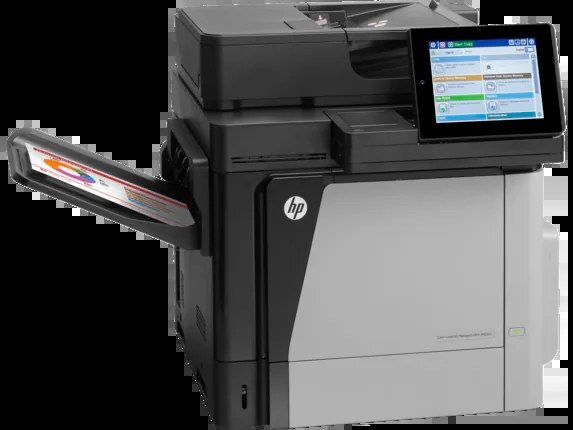
The Color LaserJet M680Z sits at the top of the M680 range — the fully loaded configuration of HP's 2013-era enterprise color line, built for departments that want the family's full capability in a single machine. Black comes as the CF320A (652A) or the high-yield CF320X (652X), and the three colors are the CF321A (653A) cyan, CF322A yellow and CF323A magenta cartridges. Every cartridge on this page is a Clever Supplies compatible built for these exact codes.
A department that standardizes on the M680Z usually does so to stop juggling printer models: one flagship machine absorbs the shared color workload, and the supply shelf shrinks to a single four-cartridge family. That makes stock control simple — one black in two capacities, three colors, nothing else to keep track of — and it means a spare set on the shelf covers the department's most important printer at all times.
Toner Cartridges for Color LaserJet M680Z
| Cartridge | Color | Page Yield |
|---|---|---|
| HP 653A & 653X s 4 Color Set, (CF320X, CF321A, CF322A, CF323A) | Full color set | See product page |
| HP CF320A Black, HP 652A Toner | Black | See product page |
| HP CF320X High Yield Black, HP 652X Toner | Black | See product page |
| HP CF321A Cyan, HP 653A Toner | Cyan | See product page |
| HP CF322A Yellow, HP 653A Toner | Yellow | See product page |
| HP CF323A Magenta, HP 653A Toner | Magenta | See product page |
| HP 652A & 653A 4 Color Set (CF320A, CF321A, CF322A, CF323A) | Full color set | See product page |
| HP 652A & 654A 4 Color Set (CF320A, CF331A, CF333A, CF332A) | Full color set | See product page |
| HP M680z Color Laserjet 4 Color Set | Full color set | See product page |
One caution on the 652A & 654A set listed above: it pairs this machine's CF320A black with the CF331A, CF332A and CF333A colors, which belong to the M651 line, not to the M680Z. The black cartridge fits; the three colors do not belong in this printer, whose color codes are CF321A, CF322A and CF323A. Order it only if the M651-side colors are useful elsewhere in your fleet.
Which cartridge should you buy?
Start with the black decision, because it is the only real fork in this family. The standard CF320A suits a department whose color volume is steady but modest; the CF320X carries the same fit with a larger toner load, so a busy M680Z goes longer between swaps and the cost per page drops. Colors offer no such fork — CF321A, CF322A and CF323A each come in one capacity, so replace whichever color the control panel reports as low and leave the others in place. Buying the four-color set makes sense when several cartridges run down together or when you want a complete spare set staged beside the machine; buying singles is cheaper when only one slot is calling for toner.
Chip, toner and everyday use
The M680Z reads the chip on each cartridge to confirm the code and track the remaining toner, so a cartridge wound for a different family can be rejected even if it physically slides in — the code on the label is what the machine trusts. When a new cartridge goes in, seat it firmly until it clicks and give the printer a moment to calibrate before judging the first pages. If a nearly empty cartridge has to finish a job, take it out and rock it gently side to side to redistribute the toner, then refit it. Spares keep best sealed, upright and out of direct sunlight, and every compatible cartridge here is covered by a 1-year warranty with 1-year returns.
Frequently Asked Questions
Which black cartridge should the M680Z get — CF320A or CF320X?
Both fit the same slot. The CF320A is the standard-capacity black; the CF320X is the high-yield version of the same cartridge and simply lasts longer between changes. High-volume departments generally come out ahead on the CF320X, while lighter users pay less up front with the CF320A.
Can the M680Z keep printing when one color cartridge is empty?
Treat an empty color as a stop point: this class of machine needs all four cartridges present and reporting toner to run its normal print cycle, and forcing black-only work around an empty color is not a reliable long-term habit. Keeping one spare of each color on the shelf avoids the stall entirely.
Does the M680Z use a separate drum unit?
No separate drum appears in this model's cartridge list — the imaging components ride with the toner cartridges themselves, so a cartridge change refreshes the wear parts of the print path in one step. Order by code: CF320A or CF320X for black, CF321A, CF322A and CF323A for the colors.
Will a compatible cartridge be recognized by the M680Z?
Yes — the compatible cartridges on this page carry the chip the printer expects for these codes, so the machine reports toner levels normally. If a cartridge is ever not recognized, reseat it firmly and restart the printer before assuming the cartridge is at fault.
More printers that use the same cartridges
The same 652A/653A family also serves the wider M651/M675/M680 group: Color LASERJET ENTERPRISE M675 MFP, Color LASERJET ENTERPRISE M680 FLOW, Color LASERJET ENTERPRISE M680 MFP, Color LASERJET ENTERPRISE M680DN MFP, Color LASERJET ENTERPRISE M680Z FLOW, Color LASERJET ENTERPRISE M680Z MFP, Color LaserJet Enterprise Flow M680, Color LaserJet Enterprise Flow M680Z, Color LaserJet Enterprise M651, Color LaserJet Enterprise M651DN, Color LaserJet Enterprise M651N, Color LaserJet Enterprise M651XH, Color LaserJet Enterprise M680DN, Color LaserJet Enterprise M680F, Color LaserJet Enterprise M680Z, Color LaserJet Enterprise MFP M675, Color LaserJet Enterprise MFP M680, Color LaserJet Enterprise MFP M680DN, Color LaserJet Enterprise MFP M680F, Color LaserJet Enterprise MFP M680z, Color LaserJet M651, Color LaserJet M651DN, Color LaserJet M651N. Rounding out the family: Color LaserJet M651XH, Color LaserJet M675, Color LaserJet M680, Color LaserJet M680DN, Color LaserJet M680F, HP 652A & 654A, LaserJet ENTERPRISE 600 COLOR M651, LaserJet ENTERPRISE 600 COLOR M651DN, LaserJet ENTERPRISE 600 COLOR M651N, LaserJet ENTERPRISE 600 COLOR M651XH, LaserJet Enterprise 600 Color M651, LaserJet Enterprise 600 Color M651DN, LaserJet Enterprise 600 Color M651N, LaserJet Enterprise 600 Color M651XH, LaserJet Enterprise 600 Flow M680, LaserJet Enterprise 600 Flow M680Z, LaserJet Enterprise 600 MFP Color M675, LaserJet Enterprise 600 MFP Color M680, LaserJet Enterprise 600 MFP Color M680DN, LaserJet Enterprise 600 MFP Color M680F, LaserJet Enterprise M651dn, LaserJet Enterprise M651n, LaserJet Enterprise M651xh.