




LaserJet ENTERPRISE 600 COLOR M651
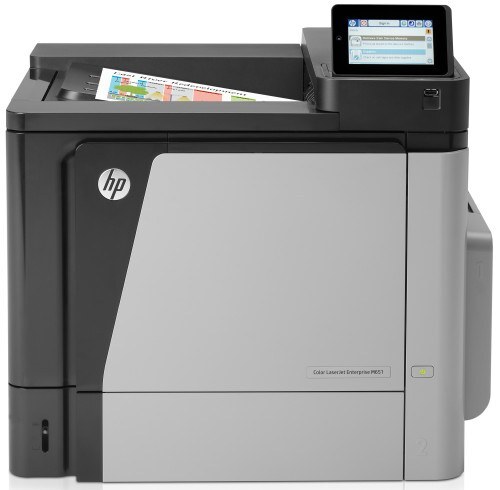
An early-2010s color single-function printer, the LaserJet Enterprise 600 Color M651 earned its reputation the slow way — page after page of clean, reliable output at everyday office document printing. Its supplies are straightforward: black CF320A, a high-yield black CF330X step-up, and cyan, yellow and magenta in separate cartridges. The cartridge stocked on this page is the cyan single, HP 654A (CF331A). The black cartridges, the yellow CF332A and the magenta CF333A are documented for this model but are not stocked here.
A single-function machine makes a simple promise: printing is all it does, and it does it without ceremony. The M651 tracks each of its four cartridges independently, so its supplies life is four separate schedules rather than one — the color a document-heavy office leans on runs down first, and the others wait their turn. Cyan is the classic early casualty in offices whose output is charts, forms and letterheads, which is precisely the cartridge this page exists to keep within reach.
Toner Cartridges for LaserJet ENTERPRISE 600 COLOR M651
| Cartridge | Color | Page Yield |
|---|---|---|
| HP 654A Cyan (CF331A) | Cyan | See product page |
The rest of this printer's family — CF320A black, CF330X high-yield black, CF332A yellow and CF333A magenta — fits the M651 as well, but those cartridges are not stocked on this page. The cyan single above is what is sold here.
Which cartridge should you buy?
Replace only the color that runs out. Each cartridge in the M651 is independent and monitored separately, so a faded cyan never obliges you to touch the black, yellow or magenta. The cyan stocked here is the direct replacement for the machine's CF331A slot — the right purchase when blues start to wash out of charts and letterheads. For the colors and black not sold on this page, buy by exact code: CF320A for standard black, CF330X when your volume earns the high-yield build, CF332A for yellow and CF333A for magenta. After any cartridge change, run the color calibration routine from the printer's settings if colors look off; it aligns the toners so prints come out accurate.
Chip, toner and everyday use
The compatible cyan's chip identifies it to the M651 on installation, and the printer resumes tracking that color from full. Seat the cartridge in the cyan slot with the seal fully removed, and give the machine a page or two to settle before judging the output. Rated yields in this family assume roughly 5% page coverage, so a run of dense, chart-heavy documents will spend cyan faster than the estimate — which is normal, not a defect. If a color looks uneven before it reads empty, rock its cartridge gently side to side to redistribute the toner. Keep the spare sealed until the day it is needed.
Frequently Asked Questions
Which toner cartridges does the LaserJet ENTERPRISE 600 COLOR M651 use?
It uses separate cartridges from the HP 652A/654A family: CF320A black, CF330X high-yield black, CF331A cyan, CF332A yellow and CF333A magenta. Replace only the color that runs out — the printer tracks each one independently. This page stocks the cyan.
Can I replace just the black cartridge when the colors are still full?
Yes — each cartridge is independent, so you can swap only the black CF320A or CF330X and leave the color cartridges in place. Note, though, that black is not one of the cartridges stocked on this page; the cyan single is what is sold here.
How do I calibrate colors on the LaserJet ENTERPRISE 600 COLOR M651?
The printer includes a color calibration routine in its settings — run it when colors look off after installing a new cartridge. Calibration aligns the toners so the M651's prints look accurate again.
Why does this page list only the cyan cartridge?
Because the cyan CF331A single is the cartridge stocked here. The rest of the family fits this printer, and the codes are listed above so you can match them exactly wherever you buy them.
More printers that use the same cartridges
The wider 652A/654A cartridge family also covers these models: Color LASERJET ENTERPRISE M680Z MFP, Color LaserJet Enterprise Flow M680, Color LaserJet Enterprise Flow M680Z, Color LaserJet Enterprise M651, Color LaserJet Enterprise M651DN, Color LaserJet Enterprise M651N, Color LaserJet Enterprise M651XH, Color LaserJet Enterprise M680DN, Color LaserJet Enterprise M680F, Color LaserJet Enterprise M680Z, Color LaserJet Enterprise MFP M675, Color LaserJet Enterprise MFP M680, Color LaserJet Enterprise MFP M680DN, Color LaserJet Enterprise MFP M680F, Color LaserJet Enterprise MFP M680z, Color LaserJet M651, Color LaserJet M651DN, Color LaserJet M651N, Color LaserJet M651XH, Color LaserJet M675, Color LaserJet M680, Color LaserJet M680DN, Color LaserJet M680F, Color LaserJet M680Z, HP 652A & 654A, LaserJet ENTERPRISE 600 COLOR M651DN, LaserJet ENTERPRISE 600 COLOR M651N, LaserJet ENTERPRISE 600 COLOR M651XH, LaserJet Enterprise 600 Color M651, LaserJet Enterprise 600 Color M651DN, LaserJet Enterprise 600 Color M651N, LaserJet Enterprise 600 Color M651XH, LaserJet Enterprise 600 Flow M680, LaserJet Enterprise 600 Flow M680Z, LaserJet Enterprise 600 MFP Color M675, LaserJet Enterprise 600 MFP Color M680, LaserJet Enterprise 600 MFP Color M680DN, LaserJet Enterprise 600 MFP Color M680F, LaserJet Enterprise M651dn, LaserJet Enterprise M651n, LaserJet Enterprise M651xh, Color LASERJET ENTERPRISE M675 MFP, Color LASERJET ENTERPRISE M680 FLOW, Color LASERJET ENTERPRISE M680 MFP, Color LASERJET ENTERPRISE M680DN MFP, Color LASERJET ENTERPRISE M680Z FLOW