




Color LASERJET ENTERPRISE M680Z FLOW
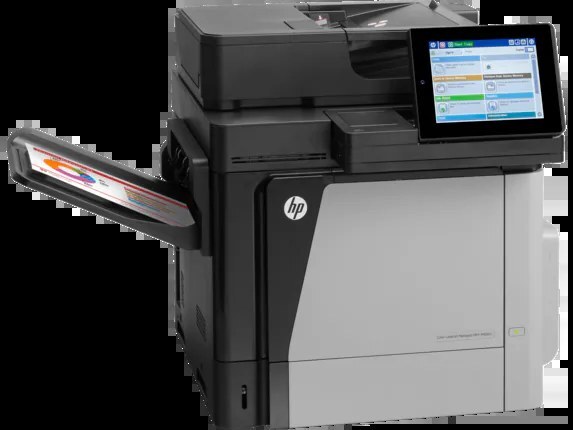
Built for scan-heavy departments, the Color LaserJet Enterprise M680z Flow is the workflow-tuned color multifunction of the M680 line — print, scan and copy, with the Flow feature set made for document capture. Its toner family is HP 652A on the black side — CF320A standard and CF320X high-yield — with three separate color cartridges beside it. This page stocks two of those colors as compatible singles, the HP 653A cyan (CF321A) and the HP 653A magenta (CF323A). The black cartridges and the yellow CF322A belong to this printer's family but are not stocked on this page, so check the code on the cartridge you are replacing before you order.
A Flow machine lives a double life. Half of its work never touches toner at all — paper goes in, scans come out — and the other half is reprinting, marking up and filing the documents it captured. That rhythm means the color cartridges in an M680z Flow tend to age by the calendar as much as by the page count: a department can scan for weeks, then drain real toner in one afternoon of color packets. Keeping the two stocked colors on the shelf, sealed and ready, is what keeps a capture workflow from stalling on a supply run.
Toner Cartridges for Color LASERJET ENTERPRISE M680Z FLOW
| Cartridge | Color | Page Yield |
|---|---|---|
| HP 653A Cyan (CF321A) | Cyan | See product page |
| HP 653A Magenta (CF323A) | Magenta | See product page |
The full family for this printer also includes the CF320A standard black, the CF320X high-yield black and the CF322A yellow. Those three are documented for the M680z Flow but are not stocked on this page; only the cyan and magenta singles above are sold here.
Which cartridge should you buy?
On this page the decision is simply which of the two stocked colors has run down. The cartridges are independent — the machine tracks cyan and magenta separately and only asks for the one that is empty — so there is no reason to replace a color that still has life in it. Cyan does the quiet work in charts, scanned forms and anything with a blue cast; magenta carries the reds in presentations and marked-up drafts. If your department prints color in bursts, keep one spare of each on hand. And when it is black you need, remember that this page does not stock it: the family's standard black is the CF320A and its high-yield sibling is the CF320X.
Chip, toner and everyday use
Enterprise machines read each cartridge's chip at installation and report levels per color, so a fresh compatible should register the moment it seats in its slot. Match the cartridge to the color of the slot — the units are keyed, but a forced fit helps no one. Yield figures in this family are measured at about 5% page coverage, and dense color pages will draw a cartridge down far faster than that estimate suggests. When a color starts to fade, remove its cartridge and rock it gently from side to side to redistribute the toner before you conclude it is empty. Store spares sealed, upright and out of direct sunlight, and rotate the oldest spare into the machine first.
Frequently Asked Questions
Which toner cartridges are compatible with the Color LASERJET ENTERPRISE M680Z FLOW?
Look for the exact codes CF320A, CF320X, CF321A, CF322A and CF323A — one standard black, one high-yield black and three color cartridges. This page stocks the CF321A cyan and the CF323A magenta as compatibles; the black cartridges and the yellow are part of the family but are not sold here.
Is there a high-yield black cartridge for the M680z Flow?
Yes, the CF320X is the high-yield version of the standard CF320A black, and it prints longer before running out. It belongs to this printer's family, though it is not one of the cartridges stocked on this page.
Only one color has run out — do I replace the others too?
No. Each color sits in its own cartridge and is tracked independently, so swap only the one that faded. The two colors stocked on this page, cyan and magenta, are each sold as singles for exactly that reason.
How do I connect the Color LASERJET ENTERPRISE M680Z FLOW to my wireless network?
Run the wireless setup wizard on the control panel to pick your network and enter the password. Once the printer joins the network, install the HP driver on your computer and select the printer by name.
More printers that use the same cartridges
The same 652A/653A family also feeds these Enterprise models: Color LaserJet Enterprise M651XH, Color LaserJet Enterprise M680DN, Color LaserJet Enterprise M680F, Color LaserJet Enterprise M680Z, Color LaserJet Enterprise MFP M675, Color LaserJet Enterprise MFP M680, Color LaserJet Enterprise MFP M680DN, Color LaserJet Enterprise MFP M680F, Color LaserJet Enterprise MFP M680z, Color LaserJet M651, Color LaserJet M651DN, Color LaserJet M651N, Color LaserJet M651XH, Color LaserJet M675, Color LaserJet M680, Color LaserJet M680DN, Color LaserJet M680F, Color LaserJet M680Z, HP 652A & 654A, LaserJet ENTERPRISE 600 COLOR M651, LaserJet ENTERPRISE 600 COLOR M651DN, LaserJet ENTERPRISE 600 COLOR M651N, LaserJet ENTERPRISE 600 COLOR M651XH, LaserJet Enterprise 600 Color M651, LaserJet Enterprise 600 Color M651DN, LaserJet Enterprise 600 Color M651N, LaserJet Enterprise 600 Color M651XH, LaserJet Enterprise 600 Flow M680, LaserJet Enterprise 600 Flow M680Z, LaserJet Enterprise 600 MFP Color M675, LaserJet Enterprise 600 MFP Color M680, LaserJet Enterprise 600 MFP Color M680DN, LaserJet Enterprise 600 MFP Color M680F, LaserJet Enterprise M651dn, LaserJet Enterprise M651n, LaserJet Enterprise M651xh, Color LASERJET ENTERPRISE M675 MFP, Color LASERJET ENTERPRISE M680 FLOW, Color LASERJET ENTERPRISE M680 MFP, Color LASERJET ENTERPRISE M680DN MFP, Color LASERJET ENTERPRISE M680Z MFP, Color LaserJet Enterprise Flow M680, Color LaserJet Enterprise Flow M680Z, Color LaserJet Enterprise M651, Color LaserJet Enterprise M651DN, Color LaserJet Enterprise M651N