




Color LASERJET ENTERPRISE M680Z MFP
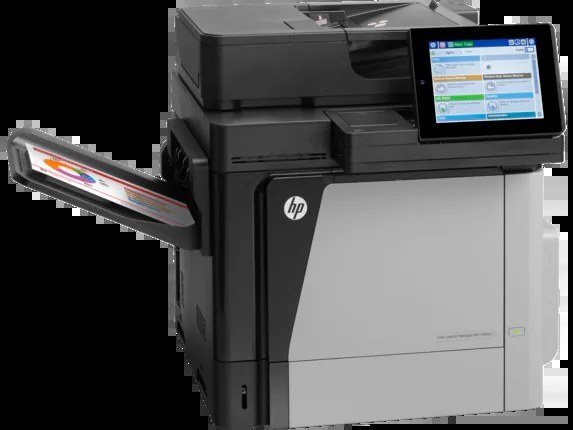
HP's Color LaserJet Enterprise M680Z MFP slots into the 2013-era lineup as a color all-in-one for enterprise departments — a machine that delivered pages without ceremony. Its toner comes in four slots: black CF320A and its high-yield CF320X counterpart, with cyan, yellow and magenta in cartridges of their own. The colors stocked on this page are the HP 653A cyan (CF321A) and the HP 653A magenta (CF323A) compatibles. The two blacks and the yellow CF322A fit this printer but are not stocked here.
There is a particular kind of office that kept machines like this one: the department that measures a printer by whether anyone had to think about it this month. The M680Z MFP prints, copies and scans from one unit at the end of the hall, and its supplies routine matches that temperament — four cartridges, each on its own schedule, replaced one at a time when the panel asks. Nothing about its toner is exotic; the only real discipline is reordering before the low warning becomes a blank page in the middle of someone else's job.
Toner Cartridges for Color LASERJET ENTERPRISE M680Z MFP
| Cartridge | Color | Page Yield |
|---|---|---|
| HP 653A Cyan (CF321A) | Cyan | See product page |
| HP 653A Magenta (CF323A) | Magenta | See product page |
The remaining members of the family — CF320A black, CF320X high-yield black and CF322A yellow — are this printer's cartridges too, but they are not stocked on this page. Only the cyan and magenta singles are sold here.
Which cartridge should you buy?
Let the panel make the decision. The M680Z MFP reports each color's level on its own, so the right purchase is almost always the single cartridge it names. Of the two stocked here, cyan is the one charts and corporate blues lean on, while magenta is what makes reds and photographs look right; either can be swapped in minutes without disturbing the rest. For black, the family's fork is between the standard CF320A for lighter queues and the CF320X for departments that print in volume — both belong to this machine, though neither is stocked on this page. Buying a spare of the color your team uses hardest is cheaper than any expedited order placed after a job has already failed.
Chip, toner and everyday use
When you install a compatible cartridge, its chip reports the new unit to the printer, which is what resets the level gauge for that color. Seat the cartridge in the slot of the matching color and push it home until it stops — most recognition problems trace back to a unit left slightly short. Page yields for this family are quoted at roughly 5% coverage, a memo's worth of ink on the page; a run of full-color presentations will spend a cartridge much faster than that yardstick implies. Keep one sealed spare per heavily used color in the supply cabinet, and when output fades, rock the cartridge gently side to side before deciding it is truly empty.
Frequently Asked Questions
What toner does the Color LASERJET ENTERPRISE M680Z MFP take?
Its family is the HP 652A/653A line: CF320A and CF320X black cartridges with CF321A cyan, CF322A yellow and CF323A magenta. Any cartridge set marketed as a replacement for these exact codes will work; this page stocks the cyan and magenta singles.
Can the Color LASERJET ENTERPRISE M680Z MFP scan and copy documents?
Yes — it is a multifunction unit, so it prints, copies and scans in one machine. Use the scanner glass or the automatic document feeder to copy or scan straight from the control panel.
What is the difference between CF320A and CF320X for this printer?
Both fit, but the CF320X is the high-yield version of the standard CF320A black and prints longer before running out. Heavy printing argues for the CF320X; occasional printing is served fine by the CF320A.
A color is fading but the level gauge is not at zero. What should I do?
Remove that color's cartridge and rock it gently side to side to redistribute the toner, then reinstall it. Fading often starts before the cartridge is truly empty, and this usually restores even output for a while.
More printers that use the same cartridges
Other Enterprise models share this printer's cartridge family: Color LaserJet Enterprise Flow M680, Color LaserJet Enterprise Flow M680Z, Color LaserJet Enterprise M651, Color LaserJet Enterprise M651DN, Color LaserJet Enterprise M651N, Color LaserJet Enterprise M651XH, Color LASERJET ENTERPRISE M675 MFP, Color LASERJET ENTERPRISE M680 FLOW, Color LASERJET ENTERPRISE M680 MFP, Color LaserJet Enterprise M680DN, Color LASERJET ENTERPRISE M680DN MFP, Color LaserJet Enterprise M680F, Color LaserJet Enterprise M680Z, Color LASERJET ENTERPRISE M680Z FLOW, Color LaserJet Enterprise MFP M675, Color LaserJet Enterprise MFP M680, Color LaserJet Enterprise MFP M680DN, Color LaserJet Enterprise MFP M680F, Color LaserJet Enterprise MFP M680z, Color LaserJet M651, Color LaserJet M651DN, Color LaserJet M651N, Color LaserJet M651XH, Color LaserJet M675, Color LaserJet M680, Color LaserJet M680DN, Color LaserJet M680F, Color LaserJet M680Z, HP 652A & 654A, LaserJet ENTERPRISE 600 COLOR M651, LaserJet Enterprise 600 Color M651, LaserJet ENTERPRISE 600 COLOR M651DN, LaserJet Enterprise 600 Color M651DN, LaserJet ENTERPRISE 600 COLOR M651N, LaserJet Enterprise 600 Color M651N, LaserJet ENTERPRISE 600 COLOR M651XH, LaserJet Enterprise 600 Color M651XH, LaserJet Enterprise 600 Flow M680, LaserJet Enterprise 600 Flow M680Z, LaserJet Enterprise 600 MFP Color M675, LaserJet Enterprise 600 MFP Color M680, LaserJet Enterprise 600 MFP Color M680DN, LaserJet Enterprise 600 MFP Color M680F, LaserJet Enterprise M651dn, LaserJet Enterprise M651n, LaserJet Enterprise M651xh