




Color LaserJet Enterprise MFP M680F
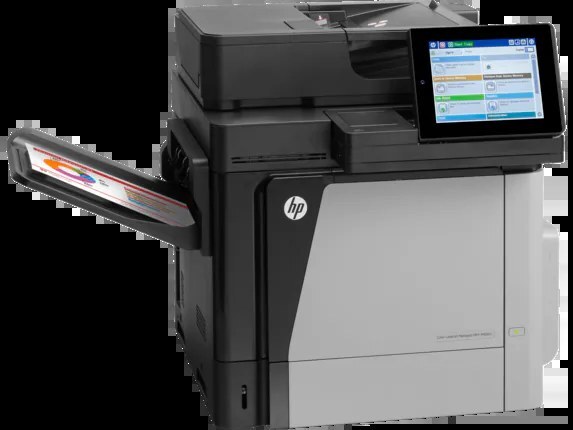
Print, scan, copy and fax — the MFP M680F is the full-suite enterprise color MFP of the 2013-era line, built for departments that document everything end to end. One machine takes the whole job, and its toner shelf is organized around two lines. The standard-yield 652/653 line uses CF320A black, its high-yield twin CF320X (652X), and the colors CF321A cyan, CF322A yellow and CF323A magenta. The heavier 654 line runs on CF330X high-yield black with CF331A cyan, CF332A yellow and CF333A magenta.
What makes the F variant different is the fax line, and the toner habit follows it. A machine that receives faxes, copies meeting notes and prints reports in the same hour burns through black first, so the shelf here leans on black multi-packs — two, three and five at a time — while the colors are kept as singles and small sets. Every cartridge on this page is a compatible replacement, with a one-year warranty and one-year returns.
Toner Cartridges for Color LaserJet Enterprise MFP M680F
More black multi-packs, larger color sets and M680F-named listings: 4 Color Set, 654X CF330X Black 2 Black Set, 654X CF330X Black 3 Black Set, 654X CF330X Black 5 Black Set, 654A 654X CF330X CF331A CF332A CF333A 5 Color Set, 654A 654X CF330X CF331A CF332A CF333A 8 Color Set, 654A CF331A CF332A CF333A 6 Color Set, 654A CF331A CF332A CF333A 3 Color Set, CF330X CF331A CF332A CF333A 4 Color Set, CF330X Black, CF331A Cyan, CF333A Magenta, CF332A Yellow, 653A 653X CF320X CF321A CF322A CF323A 4 Color Set, 653X CF320X Black 2 Black Set, 653X CF320X Black 3 Black Set, 653X CF320X Black 5 Black Set, 653A 653X CF320X CF321A CF322A CF323A 5 Color Set, 653A 653X CF320X CF321A CF322A CF323A 8 Color Set, 653A CF321A CF322A CF323A 6 Color Set, 653A CF321A CF322A CF323A 3 Color Set.
Which cartridge should you buy?
For a machine that does everything, buy toner by the job. Received faxes and copies eat black, so a two or three black pack of the high-yield CF320X or CF330X belongs on the shelf before the colors do. Color printing is lighter here — one color at a time, as a single — and the four, five and eight color sets are for the day everything runs low at once. The two lines are not interchangeable: pick the line whose color codes are already in the machine, and read the code on the old cartridge when in doubt.
Chip, toner and everyday use
A fresh cartridge should slide home and click. If the M680F does not recognize it, check the seal strip first — a torn remnant across the contacts is the usual cause — then reseat the cartridge firmly. Keep spares in their sealed bags and upright; a cartridge left on its side can settle unevenly and print light on one side until it is rocked gently back to even. One spare black near the machine covers the fax line's appetite.
Frequently Asked Questions
Which toner cartridges does the Color LaserJet Enterprise MFP M680F use?
The MFP M680F is a color laser printer that takes four separate toner cartridges. The standard-yield line is CF320A or CF320X black with CF321A, CF322A and CF323A colors, and the heavier 654 line is CF330X black with CF331A, CF332A and CF333A colors. Match these exact codes when buying replacements.
Does the M680F also take the 654 series for heavier workloads?
Yes — for heavier workloads the MFP M680F also takes the 654 series: CF330X high-yield black alongside CF331A cyan, CF332A yellow and CF333A magenta. Choose that line when the machine prints heavily every day.
Do received faxes use toner?
Yes. A received fax prints through the same cartridges as any other job, and most fax pages are black text, so the black cartridge carries the fax line. Keep a spare black on hand if the machine receives faxes daily.
Should I buy the four color set or single cartridges?
Singles win when only one slot is empty. The four color set wins when black and all three colors are low together — a full refresh in one box, with the high-yield black versions available as the 653A & 653X set or the 654X & 654A set.
More printers that use the same cartridges
The same cartridges serve this whole family — first the M651 and M675 machines, then the M680 machines: Color LASERJET ENTERPRISE M675 MFP, Color LASERJET ENTERPRISE M680 FLOW, Color LASERJET ENTERPRISE M680 MFP, Color LASERJET ENTERPRISE M680DN MFP, Color LASERJET ENTERPRISE M680Z FLOW, Color LASERJET ENTERPRISE M680Z MFP, Color LaserJet Enterprise Flow M680, Color LaserJet Enterprise Flow M680Z, Color LaserJet Enterprise M651, Color LaserJet Enterprise M651DN, Color LaserJet Enterprise M651N, Color LaserJet Enterprise M651XH, Color LaserJet Enterprise M680DN, Color LaserJet Enterprise M680F, Color LaserJet Enterprise M680Z, Color LaserJet Enterprise MFP M675, Color LaserJet Enterprise MFP M680, Color LaserJet Enterprise MFP M680DN, Color LaserJet Enterprise MFP M680z, Color LaserJet M651, Color LaserJet M651DN, Color LaserJet M651N, Color LaserJet M651XH.
Color LaserJet M675, Color LaserJet M680, Color LaserJet M680DN, Color LaserJet M680F, Color LaserJet M680Z, HP 652A & 654A, LaserJet ENTERPRISE 600 COLOR M651, LaserJet ENTERPRISE 600 COLOR M651DN, LaserJet ENTERPRISE 600 COLOR M651N, LaserJet ENTERPRISE 600 COLOR M651XH, LaserJet Enterprise 600 Color M651, LaserJet Enterprise 600 Color M651DN, LaserJet Enterprise 600 Color M651N, LaserJet Enterprise 600 Color M651XH, LaserJet Enterprise 600 Flow M680, LaserJet Enterprise 600 Flow M680Z, LaserJet Enterprise 600 MFP Color M675, LaserJet Enterprise 600 MFP Color M680, LaserJet Enterprise 600 MFP Color M680DN, LaserJet Enterprise 600 MFP Color M680F, LaserJet Enterprise M651dn, LaserJet Enterprise M651n, LaserJet Enterprise M651xh.