




LaserJet ENTERPRISE 600 COLOR M651DN
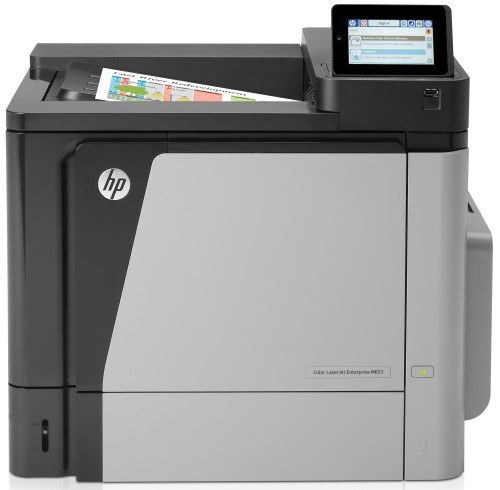
The LaserJet Enterprise 600 Color M651DN is an enterprise color laser from HP's early-2010s 600 series, a single-function machine built to turn out office documents in full color, day after day. Four separate cartridges feed it, and the cyan stocked on this page is the 654A (CF331A); the rest of its HP 652A/654A family is CF320A black, a high-yield black sold as CF330X, CF332A yellow and CF333A magenta. Each position is tracked and replaced independently, so the buying routine for this printer is one cartridge at a time. The DN in the name is the working configuration: automatic two-sided printing and a wired network connection are both built in, which is why this variant ended up as the shared machine in so many departments.
A departmental color printer lives or dies on two habits: it has to be reachable by everyone, and it must not waste paper. Built-in Ethernet covers the first — one cable puts the M651DN on the office network for every workstation. Automatic duplexing covers the second, halving paper on long reports without anyone flipping a stack by hand. It is a single-function machine, so there is no scanner or copier lid competing for the top of the unit; it prints, and it keeps printing.
Toner Cartridges for LaserJet Enterprise 600 Color M651DN
| Cartridge | Color | Page Yield |
|---|---|---|
| 654A (CF331A) | Cyan | See product page |
The black and remaining color positions of this family — CF320A, CF330X, CF332A and CF333A — belong to the same cartridge set but are not on this page's shelf; the full family is grouped under the HP 652A & 654A category in the list below.
Which cartridge should you buy?
Only one cartridge from this family sits on this page's shelf: the cyan. That is less limiting than it sounds, because the M651DN tracks all four positions independently and each cartridge swaps on its own schedule. When the panel flags cyan low, you replace cyan and the black, yellow and magenta cartridges carry on untouched. Keep the sealed spare in the supply cabinet rather than on the printer — heat and light are unkind to toner — and order the replacement when the warning first appears instead of when the cartridge is empty, so a long color report never stalls mid-run.
Chip, toner and everyday use
The M651DN reads a chip on each cartridge to report supply levels per color, so a compatible cartridge has to carry a chip the printer accepts — the listing on this page is built for this family and seats the same way as the original. Pull the sealing tape fully before installing, seat the cartridge until it clicks, and let the printer calibrate. Page yields are estimates figured at 5% coverage; dense color pages with big graphics will empty a cartridge sooner than letter-style documents. A gentle side-to-side shake can redistribute toner and buy a few more clean pages from a cartridge that starts printing faint.
Frequently Asked Questions
Can the M651DN print on both sides automatically?
Yes. Automatic duplexing is built into this model, so double-sided output is a driver setting rather than a manual flip. Turning it on for routine internal documents cuts paper use roughly in half.
Does the whole office print to one M651DN?
That is what the Ethernet port is for. Connect the printer to the network once, install the driver on each computer, and every workstation sends jobs straight to it — no host PC needs to stay switched on.
When cyan runs out, do I change all four cartridges?
No. Each color is a separate cartridge with its own supply reading. Replace only the position the panel reports as low; changing the others early just throws away the toner still in them.
Will a compatible cyan cartridge register correctly?
A family-matched compatible cartridge carries the chip the printer reads, so levels report normally. The cyan stocked here is the 654A (CF331A) build for this family, backed by a 1-year warranty and 1-year returns.
More printers that use the same cartridges
The M651DN's cartridge family is shared across the enterprise 600 color line and its MFP relatives — every category below stocks cartridges from the same 652A/654A shelf: Color LASERJET ENTERPRISE M675 MFP, Color LASERJET ENTERPRISE M680 FLOW, Color LASERJET ENTERPRISE M680 MFP, Color LASERJET ENTERPRISE M680DN MFP, Color LASERJET ENTERPRISE M680Z FLOW, Color LASERJET ENTERPRISE M680Z MFP, Color LaserJet Enterprise Flow M680, Color LaserJet Enterprise Flow M680Z, Color LaserJet Enterprise M651, Color LaserJet Enterprise M651DN, Color LaserJet Enterprise M651N, Color LaserJet Enterprise M651XH, Color LaserJet Enterprise M680DN, Color LaserJet Enterprise M680F, Color LaserJet Enterprise M680Z, Color LaserJet Enterprise MFP M675, Color LaserJet Enterprise MFP M680, Color LaserJet Enterprise MFP M680DN, Color LaserJet Enterprise MFP M680F, Color LaserJet Enterprise MFP M680z, Color LaserJet M651, Color LaserJet M651DN, Color LaserJet M651N, Color LaserJet M651XH, Color LaserJet M675, Color LaserJet M680, Color LaserJet M680DN, Color LaserJet M680F, Color LaserJet M680Z, HP 652A & 654A, LaserJet ENTERPRISE 600 COLOR M651, LaserJet ENTERPRISE 600 COLOR M651N, LaserJet ENTERPRISE 600 COLOR M651XH, LaserJet Enterprise 600 Color M651, LaserJet Enterprise 600 Color M651DN, LaserJet Enterprise 600 Color M651N, LaserJet Enterprise 600 Color M651XH, LaserJet Enterprise 600 Flow M680, LaserJet Enterprise 600 Flow M680Z, LaserJet Enterprise 600 MFP Color M675, LaserJet Enterprise 600 MFP Color M680, LaserJet Enterprise 600 MFP Color M680DN, LaserJet Enterprise 600 MFP Color M680F, LaserJet Enterprise M651dn, LaserJet Enterprise M651n, LaserJet Enterprise M651xh.