




Color LASERJET ENTERPRISE M675 MFP
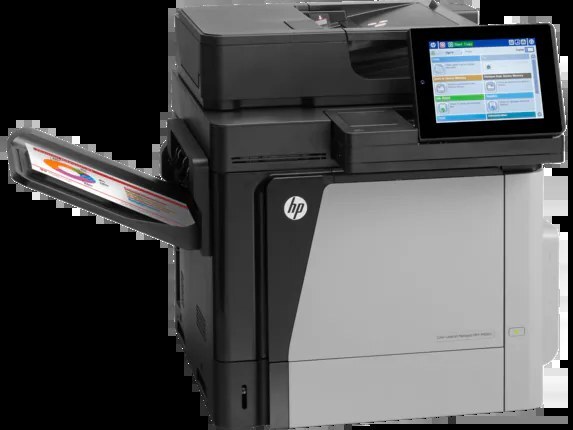
The HP Color LaserJet Enterprise M675 MFP brought mid-2010s Enterprise color multifunction to managed offices: print, copy, scan and fax, wrapped in the security IT departments required. It uses four cartridges, each in its own slot: black CF320A with a high-yield CF320X alternative, and the color line beside it. This page stocks the HP 653A cyan (CF321A) and the HP 653A magenta (CF323A) as compatible singles. The black cartridges and the yellow are part of the family but are not stocked here.
Managed offices run printers differently from small ones. The M675 MFP typically lived under an IT department's eye, on a network, serving a floor of people whose names the machine never knew. Its toner routine inside that world is about predictability: levels that report honestly, cartridges that change one at a time, and no surprises in the middle of a print run that fifty people are waiting on. A fax-capable, security-minded hub like this one also skews toward documents — contracts, forms, records — where black does most of the work and the colors are spent in deliberate bursts.
Toner Cartridges for Color LASERJET ENTERPRISE M675 MFP
| Cartridge | Color | Page Yield |
|---|---|---|
| HP 653A Cyan (CF321A) | Cyan | See product page |
| HP 653A Magenta (CF323A) | Magenta | See product page |
Also in this printer's family, though not stocked on this page: the CF320A standard black, the CF320X high-yield black and the CF322A yellow. The cyan and magenta singles above are the cartridges sold here.
Which cartridge should you buy?
In a managed fleet, the answer usually follows the meter. This machine reports each cartridge independently, and the correct purchase is the one it flags. Cyan and magenta — the two colors sold on this page — rarely run down together unless the office prints color in sustained runs; when one is replaced, a glance at the other's level tells you whether a second order is a week away or a quarter away. For black, fleets with real volume standardize on the high-yield CF320X rather than the standard CF320A, but black is not stocked on this page. The habit that saves money in either case is boring and effective: order when the warning appears, not when the pages come out blank.
Chip, toner and everyday use
Compatible cartridges for this machine carry chips the printer reads at installation, and the reported levels are what fleet managers watch — so a cartridge that seats properly and registers cleanly matters more than any other quality. Pull the seal fully, slide the unit into the slot of its own color, and confirm the panel shows the new level before walking away. Yields are rated at about 5% page coverage, so a floor that prints dense color documents will cycle cartridges faster than the rating suggests. Keep spares sealed in a cool, dry cabinet; toner powder is stable, but the oldest spare should always be the next one installed.
Frequently Asked Questions
What toner cartridges does the Color LASERJET ENTERPRISE M675 MFP use?
It is a color laser MFP that takes four separate cartridges from the HP 652A/653A family: black, cyan, yellow and magenta — CF320A or CF320X for black, with CF321A, CF322A and CF323A for the colors. This page stocks the cyan and magenta; match the exact codes when buying the rest.
Can the Color LASERJET ENTERPRISE M675 MFP scan and copy documents?
Yes — it prints, copies, scans and faxes from one unit. Use the scanner glass or the automatic document feeder from the control panel for copies and scans.
What is the difference between CF320A and CF320X for the M675 MFP?
The CF320X is the high-yield version of the standard CF320A black cartridge and prints longer before running out. Managed fleets printing in volume usually choose the CF320X; lighter use is fine with the CF320A.
One color ran out in the middle of a run. Do I stop everything?
Only that color needs replacing — the cartridges are independent. Swap the empty one and the machine can carry on with the remaining colors and black.
More printers that use the same cartridges
The same family serves the rest of this Enterprise line: Color LaserJet M675, Color LaserJet M680, Color LaserJet M680DN, Color LaserJet M680F, Color LaserJet M680Z, HP 652A & 654A, LaserJet ENTERPRISE 600 COLOR M651, LaserJet ENTERPRISE 600 COLOR M651DN, LaserJet ENTERPRISE 600 COLOR M651N, LaserJet ENTERPRISE 600 COLOR M651XH, LaserJet Enterprise 600 Color M651, LaserJet Enterprise 600 Color M651DN, LaserJet Enterprise 600 Color M651N, LaserJet Enterprise 600 Color M651XH, LaserJet Enterprise 600 Flow M680, LaserJet Enterprise 600 Flow M680Z, LaserJet Enterprise 600 MFP Color M675, LaserJet Enterprise 600 MFP Color M680, LaserJet Enterprise 600 MFP Color M680DN, LaserJet Enterprise 600 MFP Color M680F, LaserJet Enterprise M651dn, LaserJet Enterprise M651n, LaserJet Enterprise M651xh, Color LASERJET ENTERPRISE M680 FLOW, Color LASERJET ENTERPRISE M680 MFP, Color LASERJET ENTERPRISE M680DN MFP, Color LASERJET ENTERPRISE M680Z FLOW, Color LASERJET ENTERPRISE M680Z MFP, Color LaserJet Enterprise Flow M680, Color LaserJet Enterprise Flow M680Z, Color LaserJet Enterprise M651, Color LaserJet Enterprise M651DN, Color LaserJet Enterprise M651N, Color LaserJet Enterprise M651XH, Color LaserJet Enterprise M680DN, Color LaserJet Enterprise M680F, Color LaserJet Enterprise M680Z, Color LaserJet Enterprise MFP M675, Color LaserJet Enterprise MFP M680, Color LaserJet Enterprise MFP M680DN, Color LaserJet Enterprise MFP M680F, Color LaserJet Enterprise MFP M680z, Color LaserJet M651, Color LaserJet M651DN, Color LaserJet M651N, Color LaserJet M651XH