




LaserJet ENTERPRISE 600 COLOR M651N
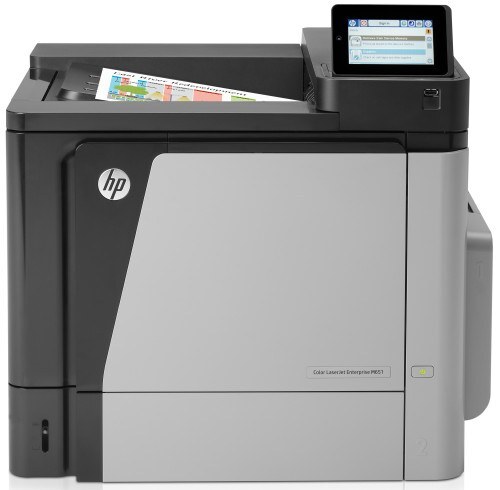
The LaserJet Enterprise 600 Color M651N brought enterprise color laser printing to small offices in the early 2010s, and plenty of them never left — the job they do has not changed. It is a single-function color printer whose cyan position takes the 654A (CF331A), the cartridge stocked on this page; the rest of its HP 652A/654A family is standard black CF320A, high-yield black CF330X, yellow CF332A and magenta CF333A. The four cartridges are separate units with separate supply readings, so each is swapped only when its own level runs out. The N marks this as the networked base model: an Ethernet connection is built in, so the printer hangs on the office network as a shared resource instead of tethering to one person's PC.
Small offices buy the M651N for a simple reason — color output that everybody can reach without a print server or a shared-computer workaround. One network cable and a driver install per workstation, and the machine serves the whole room. It stayed in service for years in many offices because nothing about that job changed: proposals, invoices and charts still need to come out in color, on demand, from whichever desk sent them.
Toner Cartridges for LaserJet Enterprise 600 Color M651N
| Cartridge | Color | Page Yield |
|---|---|---|
| 654A (CF331A) | Cyan | See product page |
The black and remaining color positions of this family — CF320A, CF330X, CF332A and CF333A — belong to the same cartridge set but are not on this page's shelf; the full family is grouped under the HP 652A & 654A category in the list below.
Which cartridge should you buy?
This page's shelf holds one member of the family — the cyan cartridge — and the M651N is designed so that is all you need to think about at a time. The four positions deplete independently, and the printer reports each one separately, so a low-cyan warning is a one-cartridge errand. Order when the warning appears rather than after the cartridge runs dry; a shared printer always seems to empty itself the morning of a deadline. If your office burns through one color far faster than the rest — a house style built on one accent color is the usual cause — keeping a sealed spare of that color is the cheapest insurance on this page.
Chip, toner and everyday use
Supply levels on the M651N come from a chip on each cartridge, and a compatible replacement has to present a chip the machine accepts; the cyan listed here is the family-matched build and installs exactly like an original. Remove all the sealing tape, push the cartridge home until it seats, and let the printer run its calibration page. Yields are rated at 5% page coverage, so graphics-heavy color work drains a cartridge faster than text documents. Storing spares upright, sealed and out of direct sunlight keeps the toner free-flowing until the day they are needed.
Frequently Asked Questions
What does the N in M651N stand for?
Built-in networking. The Ethernet port lets the printer sit on the office network as a shared device, so every computer prints to it directly after a one-time driver install.
Which colors does the M651N use?
Four separate cartridges: black, cyan, magenta and yellow from the 652A/654A family. The cyan position is the CF331A, and it is replaced on its own whenever the printer reports it low — the other three stay in place.
Is there a high-yield black for this printer?
Yes — alongside the standard black, the family includes a high-yield black, the CF330X, for offices that print more black than color. The standard black is the CF320A; both are documented for this model, while this page's shelf carries the cyan.
Do compatible cartridges carry the same warranty here?
Compatible cartridges from Clever Supplies carry a 1-year warranty and 1-year returns. The cyan for this family is the CF331A listing below.
More printers that use the same cartridges
Six sibling models were sold on this same cartridge family, and the wider enterprise color line shares it too — the categories below all draw on the same 652A/654A shelf: LaserJet Enterprise M651xh, LaserJet Enterprise M651n, LaserJet Enterprise M651dn, LaserJet Enterprise 600 MFP Color M680F, LaserJet Enterprise 600 MFP Color M680DN, LaserJet Enterprise 600 MFP Color M680, LaserJet Enterprise 600 MFP Color M675, LaserJet Enterprise 600 Flow M680Z, LaserJet Enterprise 600 Flow M680, LaserJet Enterprise 600 Color M651XH, LaserJet Enterprise 600 Color M651N, LaserJet Enterprise 600 Color M651DN, LaserJet Enterprise 600 Color M651, LaserJet ENTERPRISE 600 COLOR M651XH, LaserJet ENTERPRISE 600 COLOR M651DN, LaserJet ENTERPRISE 600 COLOR M651, HP 652A & 654A, Color LaserJet M680Z, Color LaserJet M680F, Color LaserJet M680DN, Color LaserJet M680, Color LaserJet M675, Color LaserJet M651XH, Color LaserJet M651N, Color LaserJet M651DN, Color LaserJet M651, Color LaserJet Enterprise MFP M680z, Color LaserJet Enterprise MFP M680F, Color LaserJet Enterprise MFP M680DN, Color LaserJet Enterprise MFP M680, Color LaserJet Enterprise MFP M675, Color LaserJet Enterprise M680Z, Color LaserJet Enterprise M680F, Color LaserJet Enterprise M680DN, Color LaserJet Enterprise M651XH, Color LaserJet Enterprise M651N, Color LaserJet Enterprise M651DN, Color LaserJet Enterprise M651, Color LaserJet Enterprise Flow M680Z, Color LaserJet Enterprise Flow M680, Color LASERJET ENTERPRISE M680Z MFP, Color LASERJET ENTERPRISE M680Z FLOW, Color LASERJET ENTERPRISE M680DN MFP, Color LASERJET ENTERPRISE M680 MFP, Color LASERJET ENTERPRISE M680 FLOW, Color LASERJET ENTERPRISE M675 MFP.