




LaserJet Enterprise 600 MFP Color M680
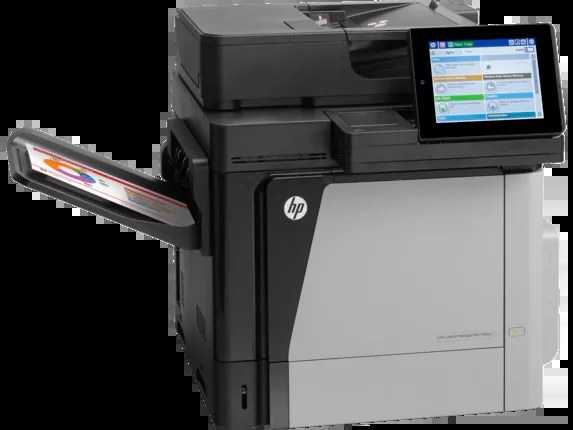
Designed for enterprise departments, the LaserJet Enterprise 600 MFP Color M680 is a 2013-era color all-in-one with a reputation for simply working — reliability, not flash, is what keeps this machine on desks years later. Its black slot takes two tiers of the HP 652A (CF320A) family: the standard cartridge, or the high-yield 652X (CF320X) for longer runs between swaps. Color comes from the companion 653A (CF321A) line — cyan by that code, yellow CF322A and magenta CF323A.
Machines earn this kind of longevity by being boring in the right ways, and toner is part of the boredom: a two-tier black system lets a department match the cartridge to its real volume instead of overbuying for a quiet desk or starving a busy one. The M680's typical home is a shared departmental landing where print, copy and scan work arrives all day, and where the person who changes the cartridge is whoever happens to be standing nearest — another argument for cartridges that go longer between changes.
Toner Cartridges for LaserJet Enterprise 600 MFP Color M680
| Cartridge | Color | Page Yield |
|---|---|---|
| CF320A | Black | See product page |
| CF320X | Black, high yield | See product page |
| CF321A | Cyan | See product page |
| CF322A | Yellow | See product page |
| CF323A | Magenta | See product page |
Sets on this shelf:
- 653A & 653X four-color set (high-yield black with the three 653A colors)
- 652A & 653A four-color set (standard black with the three 653A colors)
- Enterprise 600 MFP Color M680 four-color set
One set stocked here needs a clear caveat: the 652A & 654A four-color set pairs this machine's black cartridge with the 654A colors CF331A, CF332A and CF333A — and those colors belong to the M651 line, not to this MFP. The colors that fit the M680 are the 653A three in the table; check any set's component codes against that table before ordering.
Which cartridge should you buy?
The black decision is the only real fork: both black cartridges fit the same slot, and the high-yield version simply prints longer before running out. Occasional printing favors the standard black; a department that prints every day should default to the high-yield and enjoy the longer interval — cost per page and swap frequency both move the right way. Colors admit no such choice: one code per slot, bought as singles when a slot runs low, or as part of a set when the whole machine is being restocked. If a full change is due, the sets above bundle the black tier of your choice with all three colors in one box.
Chip, toner and everyday use
This MFP reads each cartridge's chip at installation, so slide replacements in until they click and let the machine finish recognizing them before sending work. Because it is an all-in-one, remember that copying and scanning from the glass consume no toner at all — only printed output does — which is why a cartridge can seem to last forever in a scan-heavy office and vanish in a print-heavy one. Keep one spare black sealed near the machine; compatible cartridges here carry a one-year warranty and one-year returns. When output finally fades, swap promptly rather than nursing a cartridge through a week of pale pages.
Frequently Asked Questions
Which toner cartridges are compatible with the M680?
Five codes cover the machine: CF320A and CF320X in black, then CF321A cyan, CF322A yellow and CF323A magenta. Match those codes exactly — cartridges from other HP families will not fit or be recognized.
What is the difference between CF320A and CF320X?
Both fit the same black slot. The X cartridge is the high-yield version of the standard one, so it prints longer before running out; choose it for heavy printing and the standard cartridge where volume is light and occasional.
Can the M680 scan and copy documents?
Yes — it is a multifunction unit that prints, copies and scans in one machine, working from the scanner glass or the automatic document feeder at the control panel. Scanning, unlike printing, uses no toner.
Does the 654A set on this page fit the M680?
Its black cartridge does, but its colors do not — they are coded for the M651 line. For this MFP, order colors by the 653A codes in the table above, as singles or in the sets built on them.
More printers that use the same cartridges
The 652A/653A family is a large one. First, the MFP and Flow models:
Color LASERJET ENTERPRISE M675 MFP, Color LASERJET ENTERPRISE M680 FLOW, Color LASERJET ENTERPRISE M680 MFP, Color LASERJET ENTERPRISE M680DN MFP, Color LASERJET ENTERPRISE M680Z FLOW, Color LASERJET ENTERPRISE M680Z MFP, Color LaserJet Enterprise Flow M680, Color LaserJet Enterprise Flow M680Z, Color LaserJet Enterprise M651, Color LaserJet Enterprise M651DN, Color LaserJet Enterprise M651N, Color LaserJet Enterprise M651XH, Color LaserJet Enterprise M680DN, Color LaserJet Enterprise M680F, Color LaserJet Enterprise M680Z
Then the wider Enterprise bench:
Color LaserJet Enterprise MFP M675, Color LaserJet Enterprise MFP M680, Color LaserJet Enterprise MFP M680DN, Color LaserJet Enterprise MFP M680F, Color LaserJet Enterprise MFP M680z, Color LaserJet M651, Color LaserJet M651DN, Color LaserJet M651N, Color LaserJet M651XH, Color LaserJet M675, Color LaserJet M680, Color LaserJet M680DN, Color LaserJet M680F, Color LaserJet M680Z, HP 652A & 654A, LaserJet ENTERPRISE 600 COLOR M651
And the remaining 600-series listings:
LaserJet ENTERPRISE 600 COLOR M651DN, LaserJet ENTERPRISE 600 COLOR M651N, LaserJet ENTERPRISE 600 COLOR M651XH, LaserJet Enterprise 600 Color M651, LaserJet Enterprise 600 Color M651DN, LaserJet Enterprise 600 Color M651N, LaserJet Enterprise 600 Color M651XH, LaserJet Enterprise 600 Flow M680, LaserJet Enterprise 600 Flow M680Z, LaserJet Enterprise 600 MFP Color M675, LaserJet Enterprise 600 MFP Color M680DN, LaserJet Enterprise 600 MFP Color M680F, LaserJet Enterprise M651dn, LaserJet Enterprise M651n, LaserJet Enterprise M651xh