




Color LASERJET ENTERPRISE M680DN MFP
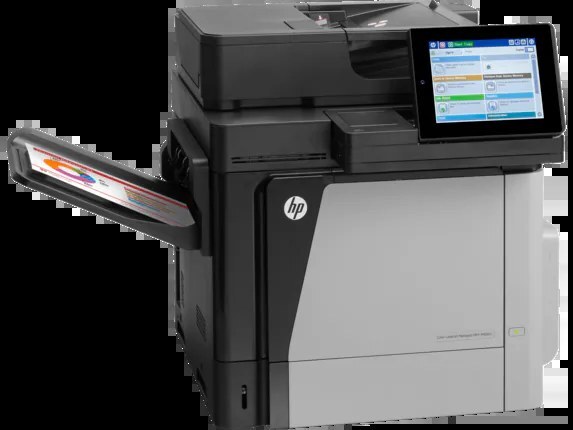
This MFP configuration of the HP Color LaserJet Enterprise M680DN delivered the complete managed document hub — print, copy, scan and fax, with duplexing and networking built in. It uses four cartridges in slots of their own: black CF320A, the high-yield CF320X, and three color cartridges. The colors sold on this page are the HP 653A cyan (CF321A) and the HP 653A magenta (CF323A) compatible singles; the black cartridges and the yellow belong to the family but are not stocked here.
The DN letters tell you how this machine was meant to live: duplexing as a default and a network cable as its lifeline. On a shared network hub, toner stops being one person's errand and becomes part of the floor's infrastructure — the cartridge that runs out on Tuesday blocks everyone's Wednesday. Duplexing quietly helps the supplies budget too, since two-sided output spreads the same toner across half the sheets. What the configuration really asks of its owners is foresight: watch the levels the hub reports and reorder while there is still toner in the machine.
Toner Cartridges for Color LASERJET ENTERPRISE M680DN MFP
| Cartridge | Color | Page Yield |
|---|---|---|
| HP 653A Cyan (CF321A) | Cyan | See product page |
| HP 653A Magenta (CF323A) | Magenta | See product page |
The family's other members — CF320A black, CF320X high-yield black and CF322A yellow — fit this printer as well, but they are not stocked on this page. Cyan and magenta are the cartridges sold here.
Which cartridge should you buy?
On a networked hub, buy by the gauge, not by the calendar. The M680DN reports each color separately, and the stocked pair on this page covers the two colors a document hub spends in presentations, reports and marked-up scans. Order the one that is low; duplex-heavy offices often find their colors last longer than expected, because so much of the hub's output is two-sided text. Black is the family's real fork — standard CF320A for moderate queues, high-yield CF320X for a hub that never cools down — but black is not stocked on this page. The standing rule for shared machines applies with full force here: the time to order is when the warning appears, while the printer is still printing.
Chip, toner and everyday use
A shared machine makes cartridge changes a public event, so make them boring: power through the swap with the panel's guidance, seat the compatible cartridge in its matching color slot until it stops, and let its chip register the new level before the next job arrives. If a color fades ahead of its reported level, rock that cartridge gently from side to side to even out the toner inside — settling is normal in a machine that sits between bursts of heavy use. Rated yields assume about 5% page coverage, and a hub printing full-color reports will outrun that estimate. Keep the spare shelf where the whole floor can find it, stocked with the colors this hub actually burns.
Frequently Asked Questions
Which toner cartridges are compatible with the Color LASERJET ENTERPRISE M680DN MFP?
Look for the exact codes CF320A, CF320X, CF321A, CF322A and CF323A — one standard black, one high-yield black and three colors. Sticking to these codes guarantees a proper fit and correct recognition; this page stocks the cyan and magenta.
Can the Color LASERJET ENTERPRISE M680DN MFP scan and copy documents?
Yes — it is a multifunction unit that prints, copies, scans and faxes. The scanner glass and automatic document feeder handle copies and scans straight from the control panel.
What is the difference between CF320A and CF320X for this printer?
The CF320X is the high-yield version of the standard CF320A black, so it prints longer before running out. A busy networked hub is exactly the case the high-yield cartridge is built for.
Does duplex printing change how fast toner runs out?
Duplexing prints on both sides of the sheet, so the same documents use half the paper; toner use per document is broadly similar, since the same pages are imaged either way. It mainly extends the interval between paper refills, not cartridge changes.
More printers that use the same cartridges
These family members take the same cartridges: LaserJet Enterprise 600 Color M651N, LaserJet Enterprise 600 Color M651XH, LaserJet Enterprise 600 Flow M680, LaserJet Enterprise 600 Flow M680Z, LaserJet Enterprise 600 MFP Color M675, LaserJet Enterprise 600 MFP Color M680, LaserJet Enterprise 600 MFP Color M680DN, LaserJet Enterprise 600 MFP Color M680F, LaserJet Enterprise M651dn, LaserJet Enterprise M651n, LaserJet Enterprise M651xh, Color LASERJET ENTERPRISE M675 MFP, Color LASERJET ENTERPRISE M680 FLOW, Color LASERJET ENTERPRISE M680 MFP, Color LASERJET ENTERPRISE M680Z FLOW, Color LASERJET ENTERPRISE M680Z MFP, Color LaserJet Enterprise Flow M680, Color LaserJet Enterprise Flow M680Z, Color LaserJet Enterprise M651, Color LaserJet Enterprise M651DN, Color LaserJet Enterprise M651N, Color LaserJet Enterprise M651XH, Color LaserJet Enterprise M680DN, Color LaserJet Enterprise M680F, Color LaserJet Enterprise M680Z, Color LaserJet Enterprise MFP M675, Color LaserJet Enterprise MFP M680, Color LaserJet Enterprise MFP M680DN, Color LaserJet Enterprise MFP M680F, Color LaserJet Enterprise MFP M680z, Color LaserJet M651, Color LaserJet M651DN, Color LaserJet M651N, Color LaserJet M651XH, Color LaserJet M675, Color LaserJet M680, Color LaserJet M680DN, Color LaserJet M680F, Color LaserJet M680Z, HP 652A & 654A, LaserJet ENTERPRISE 600 COLOR M651, LaserJet ENTERPRISE 600 COLOR M651DN, LaserJet ENTERPRISE 600 COLOR M651N, LaserJet ENTERPRISE 600 COLOR M651XH, LaserJet Enterprise 600 Color M651, LaserJet Enterprise 600 Color M651DN