




Color LaserJet Enterprise MFP M675
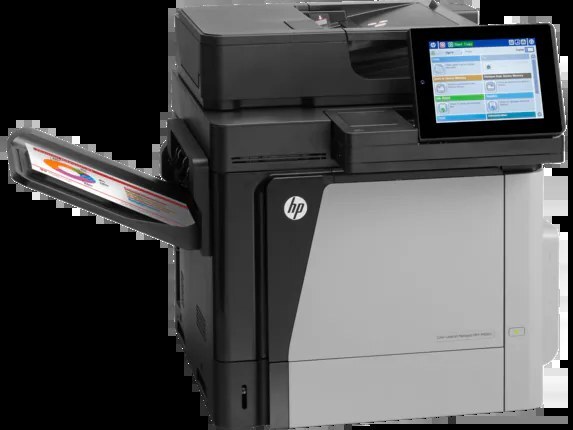
One machine does the work of three in the Color LaserJet Enterprise MFP M675. It prints, scans and copies in color, and its automatic document feeder takes a stack of originals so a department does not feed pages one by one. Its black cartridge is CF320A — the high-yield version is CF320X (652X) — and its three colors are CF321A cyan, CF322A yellow and CF323A magenta. Sold together, the standard-yield mix is the 652A & 653A 4 Color Set, and the high-yield black mix is the 653A & 653X 4 Color Set.
The M675 earns its place by consolidation. A department that used to run a separate printer, scanner and copier folds all three into one box, and the toner shelf follows the same logic: four cartridge slots, four codes to remember, and a spare black kept close because black empties first. Everything on this page is a compatible replacement for those codes, covered by a one-year warranty and one-year returns.
Toner Cartridges for Color LaserJet Enterprise MFP M675
| Cartridge | Color | Page Yield |
|---|---|---|
| CF320A Black (652A) | Black | See product page |
| CF320X High Yield Black (652X) | Black | See product page |
| CF321A Cyan (653A) | Cyan | See product page |
| CF322A Yellow (653A) | Yellow | See product page |
| CF323A Magenta (653A) | Magenta | See product page |
| 652A & 653A 4 Color Set | Black / Cyan / Magenta / Yellow | See product page |
| 653A & 653X 4 Color Set | Black / Cyan / Magenta / Yellow | See product page |
| 652A & 654A 4 Color Set (CF320A + CF331A, CF332A, CF333A) | Black / Cyan / Magenta / Yellow | See product page |
| Enterprise MFP M675 4 Color Set | Black / Cyan / Magenta / Yellow | See product page |
Which cartridge should you buy?
Black volume decides the black cartridge. The standard CF320A suits light use; the high-yield CF320X is the better buy when black pages pile up every week, since it is the same slot with a longer run. Colors are separate slots, so replace only the color that runs out — cyan, yellow and magenta empty at different rates depending on what the department prints. For a full refresh, take a four color set instead of four separate boxes. One listing on this page is a 652A & 654A set whose color codes are CF331A, CF332A and CF333A rather than the 653A colors — before buying any set, match the code on the cartridge you are replacing.
Chip, toner and everyday use
Every compatible cartridge here carries a chip that the M675 reads on install. If the printer reports a cartridge it cannot see, remove it, confirm the seal strip came off completely, and push it back until it seats. A cartridge that has sat unused should be rocked gently side to side before install so the toner inside is even. Store spares upright in their sealed packaging, away from heat, and keep a spare black within reach of the machine.
Frequently Asked Questions
What cartridge codes fit the black and color slots of the Color LaserJet Enterprise MFP M675?
The black slot takes CF320A or its high-yield version CF320X. The color slots take CF321A cyan, CF322A yellow and CF323A magenta. Those five codes cover every cartridge this printer needs.
What is the difference between CF320A and CF320X?
Both fit the same black slot. CF320X is the high-yield version of the standard CF320A black cartridge, so it prints longer before it runs out. Choose the high-yield cartridge for heavy printing and the standard one when the printer sees only occasional use.
Can the M675 copy a stack of pages at once?
Yes. Load the stack into the automatic document feeder and start the copy from the control panel. For a single delicate page, use the scanner glass instead.
What is the 652A & 654A set listed on this page?
It is a four color set whose black is CF320A and whose colors are CF331A, CF332A and CF333A — the 654A color codes. The M675's own color codes are CF321A, CF322A and CF323A, so check the code printed on the cartridge you are replacing before choosing between the two sets.
More printers that use the same cartridges
The same cartridges serve a long line of HP machines. These models all use this family: Color LASERJET ENTERPRISE M675 MFP, Color LASERJET ENTERPRISE M680 FLOW, Color LASERJET ENTERPRISE M680 MFP, Color LASERJET ENTERPRISE M680DN MFP, Color LASERJET ENTERPRISE M680Z FLOW, Color LASERJET ENTERPRISE M680Z MFP, Color LaserJet Enterprise Flow M680, Color LaserJet Enterprise Flow M680Z, Color LaserJet Enterprise M651, Color LaserJet Enterprise M651DN, Color LaserJet Enterprise M651N, Color LaserJet Enterprise M651XH, Color LaserJet Enterprise M680DN, Color LaserJet Enterprise M680F, Color LaserJet Enterprise M680Z, Color LaserJet Enterprise MFP M680, Color LaserJet Enterprise MFP M680DN, Color LaserJet Enterprise MFP M680F, Color LaserJet Enterprise MFP M680z, Color LaserJet M651, Color LaserJet M651DN, Color LaserJet M651N, Color LaserJet M651XH, Color LaserJet M675, Color LaserJet M680, Color LaserJet M680DN, Color LaserJet M680F, Color LaserJet M680Z, HP 652A & 654A, LaserJet ENTERPRISE 600 COLOR M651, LaserJet ENTERPRISE 600 COLOR M651DN, LaserJet ENTERPRISE 600 COLOR M651N, LaserJet ENTERPRISE 600 COLOR M651XH, LaserJet Enterprise 600 Color M651, LaserJet Enterprise 600 Color M651DN, LaserJet Enterprise 600 Color M651N, LaserJet Enterprise 600 Color M651XH, LaserJet Enterprise 600 Flow M680, LaserJet Enterprise 600 Flow M680Z, LaserJet Enterprise 600 MFP Color M675, LaserJet Enterprise 600 MFP Color M680, LaserJet Enterprise 600 MFP Color M680DN, LaserJet Enterprise 600 MFP Color M680F, LaserJet Enterprise M651dn, LaserJet Enterprise M651n, LaserJet Enterprise M651xh.