




LaserJet Enterprise M651n
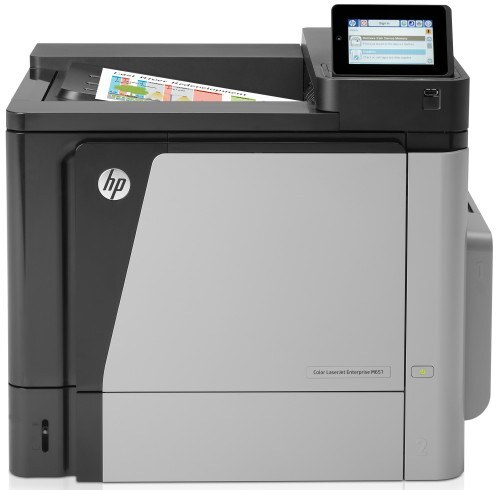
The N in LaserJet Enterprise M651n stands for built-in networking — this is the shared color printer a small office plugs in once and then simply uses. Its cartridge family is CF320A black or the high-yield CF330X, with CF331A cyan and CF332A yellow alongside — and the member stocked on this page is the magenta, CF333A (654A). The black, cyan and yellow members of the family are not stocked here.
What keeps this model in service is unglamorous reliability at everyday office document printing — letters, invoices, the occasional color report — shared across a handful of desks through its Ethernet connection. Its cartridges are shared with the other models in the family list below, which keeps supplies easy to find and lets an office standardize its toner shelf instead of stocking something different for every machine.
Toner Cartridges for LaserJet Enterprise M651n
| Cartridge | Color | Page Yield |
|---|---|---|
| CF333A | Magenta | See product page |
The rest of the family — CF320A standard black, CF330X high-yield black, CF331A cyan and CF332A yellow — fits this printer as well, but those cartridges are not stocked on this page; only the magenta is sold here.
Which cartridge should you buy?
If the M651n is telling you magenta is low, the CF333A above is the whole answer — each color on this printer is a separate cartridge, tracked on its own, and only the empty one needs to change. That one-at-a-time design is the economical way to run a color laser: you never throw away remaining toner in the colors that still have life. A small office that prints color regularly will save itself a stall by keeping one magenta spare in the drawer, since a shared printer with one empty color can hold up everyone's black-and-white work too.
Chip, toner and everyday use
Levels for all four cartridges can be checked without walking to the machine — the printer software on any connected workstation shows them, which suits a shared device. When a new cartridge goes in, remove all of its packaging and sealing tape and seat it firmly; the chip on the cartridge is what the printer reads to report its level, and a clean, fully seated fit keeps those readings honest. Store the spare upright, sealed and out of direct sunlight.
Frequently Asked Questions
Which toner cartridges does the LaserJet Enterprise M651n use?
The family is CF320A (black), CF330X (black high-yield), CF331A (cyan), CF332A (yellow) and CF333A (magenta), each a separate cartridge that the printer tracks independently. This page stocks the CF333A magenta; replace only the color that runs out.
Can the M651n be shared on an office network?
Yes. Its Ethernet connection lets you plug it into the office network and install the driver on each workstation, after which every computer sends jobs directly to it. That is the normal way this model is deployed — one machine, several desks.
Can the M651n still print in black if a color cartridge is empty?
Often not: many color lasers pause when any cartridge is empty, and this one may block printing until the depleted color is replaced. Keeping a spare from the CF320A/CF330X/CF331A/CF332A/CF333A set on hand means one empty color never stalls a black-and-white job for the whole office.
More printers that use the same cartridges
The same cartridge family serves all of these enterprise models:
- Color LASERJET ENTERPRISE M675 MFP
- Color LASERJET ENTERPRISE M680 FLOW
- Color LASERJET ENTERPRISE M680 MFP
- Color LASERJET ENTERPRISE M680DN MFP
- Color LASERJET ENTERPRISE M680Z FLOW
- Color LASERJET ENTERPRISE M680Z MFP
- Color LaserJet Enterprise Flow M680
- Color LaserJet Enterprise Flow M680Z
- Color LaserJet Enterprise M651
- Color LaserJet Enterprise M651DN
- Color LaserJet Enterprise M651N
- Color LaserJet Enterprise M651XH
- Color LaserJet Enterprise M680DN
- Color LaserJet Enterprise M680F
- Color LaserJet Enterprise M680Z
- Color LaserJet Enterprise MFP M675
- Color LaserJet Enterprise MFP M680
- Color LaserJet Enterprise MFP M680DN
- Color LaserJet Enterprise MFP M680F
- Color LaserJet Enterprise MFP M680z
- Color LaserJet M651
- Color LaserJet M651DN
- Color LaserJet M651N
- Color LaserJet M651XH
- Color LaserJet M675
- Color LaserJet M680
- Color LaserJet M680DN
- Color LaserJet M680F
- Color LaserJet M680Z
- HP 652A & 654A
- LaserJet ENTERPRISE 600 COLOR M651
- LaserJet ENTERPRISE 600 COLOR M651DN
- LaserJet ENTERPRISE 600 COLOR M651N
- LaserJet ENTERPRISE 600 COLOR M651XH
- LaserJet Enterprise 600 Color M651
- LaserJet Enterprise 600 Color M651DN
- LaserJet Enterprise 600 Color M651N
- LaserJet Enterprise 600 Color M651XH
- LaserJet Enterprise 600 Flow M680
- LaserJet Enterprise 600 Flow M680Z
- LaserJet Enterprise 600 MFP Color M675
- LaserJet Enterprise 600 MFP Color M680
- LaserJet Enterprise 600 MFP Color M680DN
- LaserJet Enterprise 600 MFP Color M680F
- LaserJet Enterprise M651dn
- LaserJet Enterprise M651xh