




Color LaserJet Enterprise M680Z
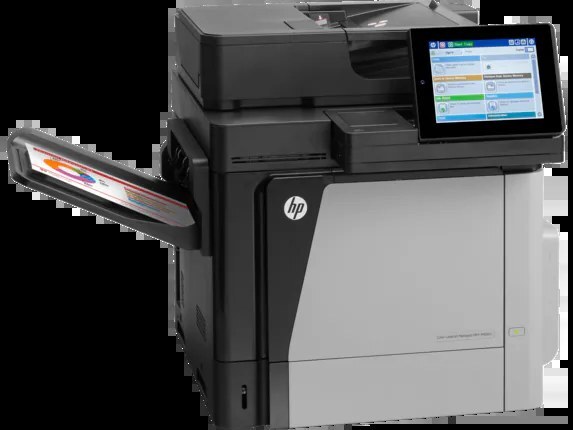
At the top of the M680 range sits the Color LaserJet Enterprise M680Z, the fully loaded configuration for departments that want every capability the platform offers in a single 2013-era color machine. Its toner shelf is the HP family built around CF320A (652A) standard black or CF320X (652X) high-yield black, with CF321A (653A) cyan, CF322A yellow and CF323A magenta beside it. All of the listings here are Clever Supplies compatibles matched to those codes.
A flagship configuration earns its keep when many different jobs land on one device — board packs in the morning, scanned contracts after lunch, color handouts before the client meeting. The M680Z was specified for exactly that mixed load, which also shapes how it eats toner: black drains steadily on documents, while the colors move in bursts around presentation work. Stocking for this machine means planning for both rhythms at once.
Toner Cartridges for Color LaserJet Enterprise M680Z
- CF320X / CF321A / CF322A / CF323A / 653A / 653X — Color set, yield: see product page
- CF320A / 652A — Black, yield: see product page
- CF320X / 652X — Black, yield: see product page
- CF321A / 653A — Cyan, yield: see product page
- CF322A / 653A — Yellow, yield: see product page
- CF323A / 653A — Magenta, yield: see product page
- CF320A / CF321A / CF322A / CF323A / 652A / 653A — Color set, yield: see product page
- CF320A / CF331A / CF333A / CF332A / 652A / 654A — Color set, yield: see product page
- Enterprise M680z Toner Cartridge Color Laserjet 4 Color Set — Color set, yield: see product page
Which cartridge should you buy?
For a machine at the center of a department, the high-yield CF320X is the natural black: fewer interruptions, and the per-page cost of a bigger cartridge works in your favor when volume is steady. Lighter-use teams can stay with the standard CF320A and pay less up front. Colors are single cartridges — CF321A, CF322A and CF323A each drop in independently — and a four-color set is the tidy way to refresh the whole row when several levels are sagging at once. One spare black on site is cheap insurance for deadline days.
Chip, toner and everyday use
Keep spares in their sealed bags, flat and out of sunlight, until the day they are needed; toner keeps well, heat and humidity are what age it. When a cartridge goes in, remove the full length of the sealing strip in one steady pull and avoid touching the green drum surface. If a fresh cartridge prints light for the first few pages, that is usually toner still distributing — rock it gently end to end and run a calibration page. Levels shown on the panel are chip estimates, so a cartridge flagged low often has useful pages left in it.
Frequently Asked Questions
What toner does the Color LaserJet Enterprise M680Z take?
Four cartridges: CF320A or CF320X black, and CF321A cyan, CF322A yellow, CF323A magenta. Match the code on the cartridge you pull out with the listings in the table above and the fit is settled.
Is the high-yield black worth it on the M680Z?
On a flagship machine serving a whole department, almost always. CF320X holds more toner than CF320A, so swaps come less often and the cost per page drops. The standard cartridge remains the right pick only where the machine sees genuinely light use.
One color looks wrong after a cartridge change — what should I check?
First confirm the new cartridge sits in the slot its label names; a cyan in the magenta position will print, and the output will look wrong in a way that mimics a defect. Then run the printer's color calibration from the panel before suspecting the cartridge itself.
Do the color cartridges wear out together?
No. Each color is consumed by the pages that actually use it, so a team printing blue-heavy charts will drain CF321A long before CF322A. The panel tracks every position separately, which makes staggered replacement easy to plan.
More printers that use the same cartridges
These cartridges also run the rest of the M651, M675 and M680 enterprise family — the full list of sibling machines follows.
LaserJet Enterprise M651xh, LaserJet Enterprise M651n, LaserJet Enterprise M651dn, LaserJet Enterprise 600 MFP Color M680F, LaserJet Enterprise 600 MFP Color M680DN, LaserJet Enterprise 600 MFP Color M680, LaserJet Enterprise 600 MFP Color M675, LaserJet Enterprise 600 Flow M680Z, LaserJet Enterprise 600 Flow M680, LaserJet Enterprise 600 Color M651XH, LaserJet Enterprise 600 Color M651N, LaserJet Enterprise 600 Color M651DN, LaserJet Enterprise 600 Color M651, LaserJet ENTERPRISE 600 COLOR M651XH, LaserJet ENTERPRISE 600 COLOR M651N, LaserJet ENTERPRISE 600 COLOR M651DN, LaserJet ENTERPRISE 600 COLOR M651, HP 652A & 654A, Color LaserJet M680Z, Color LaserJet M680F, Color LaserJet M680DN, Color LaserJet M680, Color LaserJet M675, Color LaserJet M651XH, Color LaserJet M651N, Color LaserJet M651DN, Color LaserJet M651, Color LaserJet Enterprise MFP M680z, Color LaserJet Enterprise MFP M680F, Color LaserJet Enterprise MFP M680DN, Color LaserJet Enterprise MFP M680, Color LaserJet Enterprise MFP M675, Color LaserJet Enterprise M680F, Color LaserJet Enterprise M680DN, Color LaserJet Enterprise M651XH, Color LaserJet Enterprise M651N, Color LaserJet Enterprise M651DN, Color LaserJet Enterprise M651, Color LaserJet Enterprise Flow M680Z, Color LaserJet Enterprise Flow M680, Color LASERJET ENTERPRISE M680Z MFP, Color LASERJET ENTERPRISE M680Z FLOW, Color LASERJET ENTERPRISE M680DN MFP, Color LASERJET ENTERPRISE M680 MFP, Color LASERJET ENTERPRISE M680 FLOW, Color LASERJET ENTERPRISE M675 MFP.