




LaserJet Enterprise 600 MFP Color M680DN
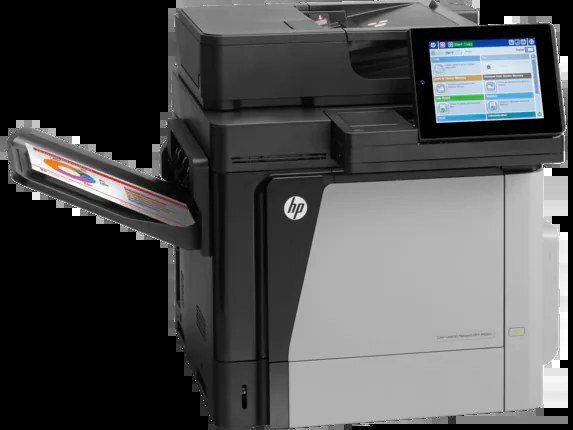
As a 2013-era color print, scan and copy unit, the LaserJet Enterprise 600 MFP Color M680DN gave enterprise departments a no-drama way to keep pages flowing — networked, with a built-in duplex unit for automatic two-sided work. The engine was built around HP's established Enterprise cartridge generation: CF320A (652A) as the standard black, CF320X (652X) when the black slot needs to run longer, and the color trio of CF321A cyan (653A), CF322A yellow and CF323A magenta. The listings here are compatible cartridges made for those codes.
The DN configuration is the one departments standardized on: it hangs on the office network where everyone can reach it, and it flips sheets itself instead of asking users to re-feed paper. Years after launch, replacement toner for this printer remains easy to find, which is a large part of why so many of these units are still in service.
Toner Cartridges for LaserJet Enterprise 600 MFP Color M680DN
- CF320A — Black (standard yield)
- CF320X — Black (high yield)
- CF321A — Cyan
- CF322A — Yellow
- CF323A — Magenta
Buying all four slots at once? The model-named option is Enterprise 600 MFP Color M680DN 4 Color Set. Two family sets sit beside it: HP 652A & 653A 4 Color Set (CF320A/ CF321A/ CF322A/ CF323A) around the standard black, and HP 653A & 653X 4 Color Set (CF320X/ CF321A/ CF322A/ CF323A) around the high-yield one. The shelf also carries HP 652A & 654A 4 Color Set (CF320A/ CF331A/ CF333A/ CF332A), a mixed set that pairs this black with the CF331A, CF332A and CF333A colors of the 654A family from the M651 series — a genuine listing, but those colors belong to a different machine, so read the code on the cartridge you are replacing before ordering it.
Which cartridge should you buy?
Two-sided printing quietly doubles the value of the high-yield black: a department that duplexes its reports burns through black toner at a pace the standard CF320A was not sized for, so the CF320X is the sensible default here, with the CF320A kept for lighter satellite use. For color, buy the single that is empty — CF321A, CF322A and CF323A are tracked independently, and there is no discount logic that justifies replacing a half-full color early. The four-color sets earn their place when you are stocking a supply room rather than answering one low-toner warning: one box covers every slot at the next change.
Chip, toner and everyday use
The M680DN reads each cartridge's chip to confirm the code and report levels on the control panel, so a new cartridge should click home positively; if the panel still shows the old level, reseat it and let the machine recalibrate. Remove the full seal strip before installation and avoid touching the drum surface on the cartridge underside. Automatic duplex works with plain paper in the main tray — labels and card stock belong in the manual feed, printed single-sided. When a cartridge nears the end, a gentle side-to-side rock redistributes the remaining toner and often buys a few more clean pages while the replacement ships.
Frequently Asked Questions
Does the M680DN print double-sided automatically?
Yes. The duplex unit is built in, so choosing the two-sided option in the print dialog flips each sheet for you. It is designed for plain paper from the main tray; heavier stocks should be fed manually, one side at a time.
What is the difference between the CF320A and CF320X blacks?
Both install in the same black slot. The CF320X is the high-yield build of the pair and prints longer before running out, which suits a shared networked machine; the CF320A is the standard-yield version for lighter use.
Do I have to replace all four cartridges at once?
No. Each color is its own cartridge with its own level tracking. Replace the one the panel flags — but note that all four must be present and non-empty for the machine to keep printing, color included.
Will a compatible cartridge be recognized by this printer?
Cartridges built for the CF320A/CF320X and 653A codes carry the chip this machine expects. Seat the cartridge fully, close the door and allow the calibration cycle to finish before printing a test page.
More printers that use the same cartridges
These Enterprise models share this page's cartridge family:
LaserJet Enterprise M651xh, LaserJet Enterprise M651n, LaserJet Enterprise M651dn, LaserJet Enterprise 600 MFP Color M680F, LaserJet Enterprise 600 MFP Color M680, LaserJet Enterprise 600 MFP Color M675, LaserJet Enterprise 600 Flow M680Z, LaserJet Enterprise 600 Flow M680, LaserJet Enterprise 600 Color M651XH, LaserJet Enterprise 600 Color M651N, LaserJet Enterprise 600 Color M651DN, LaserJet Enterprise 600 Color M651, LaserJet ENTERPRISE 600 COLOR M651XH, LaserJet ENTERPRISE 600 COLOR M651N, LaserJet ENTERPRISE 600 COLOR M651DN, LaserJet ENTERPRISE 600 COLOR M651, HP 652A & 654A, Color LaserJet M680Z, Color LaserJet M680F, Color LaserJet M680DN, Color LaserJet M680, Color LaserJet M675, Color LaserJet M651XH, Color LaserJet M651N, Color LaserJet M651DN, Color LaserJet M651, Color LaserJet Enterprise MFP M680z, Color LaserJet Enterprise MFP M680F, Color LaserJet Enterprise MFP M680DN, Color LaserJet Enterprise MFP M680, Color LaserJet Enterprise MFP M675, Color LaserJet Enterprise M680Z, Color LaserJet Enterprise M680F, Color LaserJet Enterprise M680DN, Color LaserJet Enterprise M651XH, Color LaserJet Enterprise M651N, Color LaserJet Enterprise M651DN, Color LaserJet Enterprise M651, Color LaserJet Enterprise Flow M680Z, Color LaserJet Enterprise Flow M680, Color LASERJET ENTERPRISE M680Z MFP, Color LASERJET ENTERPRISE M680Z FLOW, Color LASERJET ENTERPRISE M680DN MFP, Color LASERJET ENTERPRISE M680 MFP, Color LASERJET ENTERPRISE M680 FLOW, Color LASERJET ENTERPRISE M675 MFP